


The Facebook connector lets your AI agent act in each user's Facebook account. Each user signs in to Facebook once, and Scalekit stores and refreshes their tokens, so your agent never handles credentials. It comes with 166 tools.
- Tools
- 166
- What they doRead · write · destructive
- 90 · 49 · 2790 read49 write27 destructive
- Users sign in with
- OAuth
- OAuth app
- Your own Facebook app
Setup
Install the SDK
Terminal window npm install @scalekit-sdk/node dotenvTerminal window pip install scalekit-sdk-python python-dotenvSet your credentials
Add your Scalekit credentials to your
.envfile. Find values in app.scalekit.com > Developers > API Credentials..env SCALEKIT_ENVIRONMENT_URL=<your-environment-url>SCALEKIT_CLIENT_ID=<your-client-id>SCALEKIT_CLIENT_SECRET=<your-client-secret>Create the Facebook connection
In AgentKit > Connections, create a Facebook connection and copy its redirect URI. The name you give it is the
connection_nameyour code passes. See Configure connections.Register an OAuth app
Facebook connections use your own OAuth app. Register one with Facebook and add the redirect URI you copied.
Then enter the app's Client ID and Client Secret on the Facebook connection.
Console steps with screenshots
Create a Meta app with Facebook Login enabled so Scalekit can authorize access to your users’ Facebook Pages on their behalf. You’ll register the Scalekit redirect URI in the app, then add the app’s ID and secret to your Scalekit connection.
-
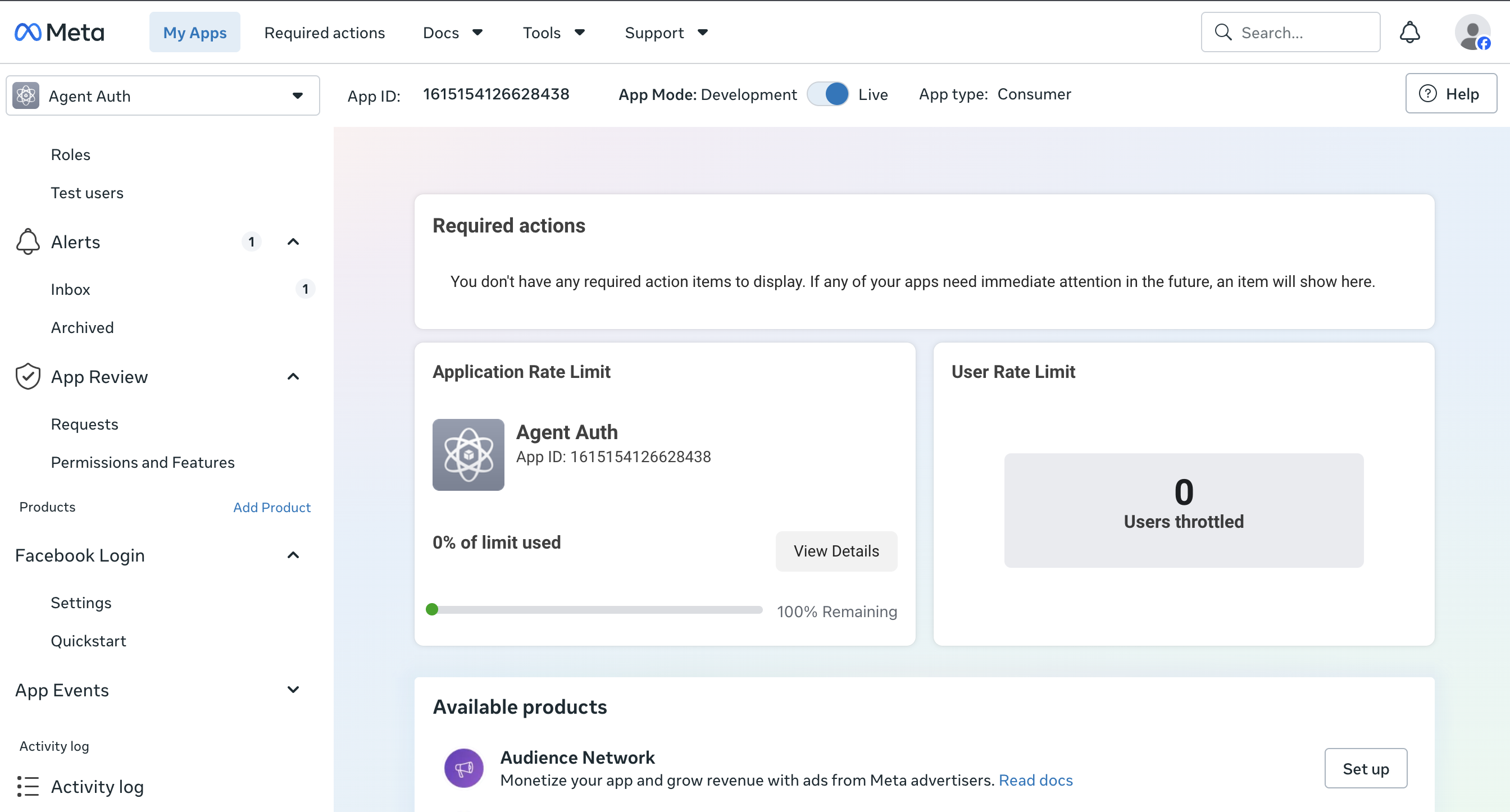
Create or open a Meta app
-
Go to the Meta for Developers dashboard.
-
Select an existing app or click Create App and choose the Business app type.
-
-
Add the Facebook Login product
-
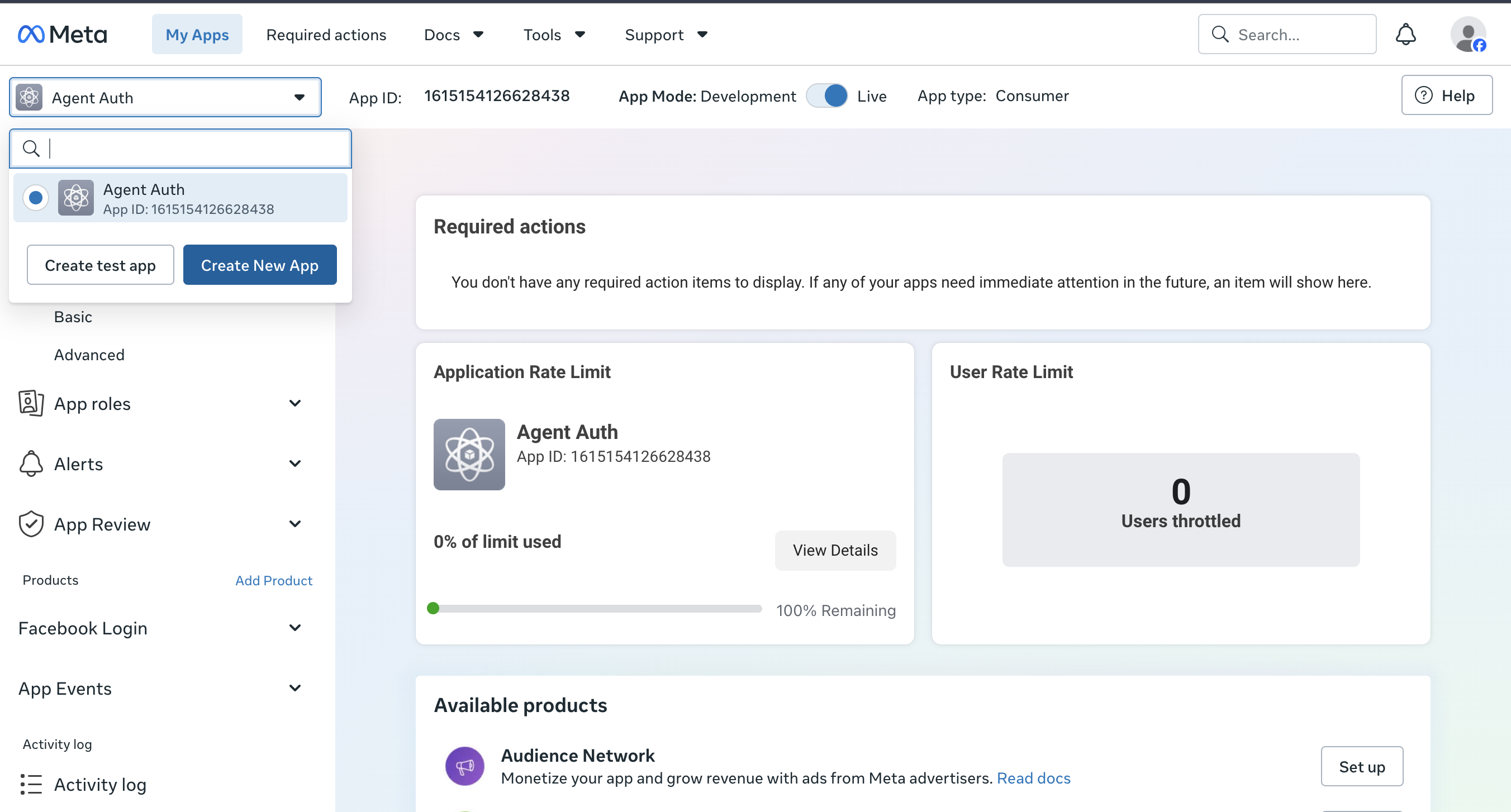
From the app’s Add Product page, add Facebook Login. Scalekit uses it to run the OAuth authorization flow.
-
Use the app switcher at the top of the dashboard to move between apps or create a new one.
-
-
Copy the redirect URI from Scalekit
-
In the Scalekit dashboard, go to AgentKit > Connections > Create Connection. Find Facebook and click Create.
-
Click Use your own credentials and copy the redirect URI. It looks like
https://<SCALEKIT_ENVIRONMENT_URL>/sso/v1/oauth/<CONNECTION_ID>/callback.
-
-
Add the redirect URI to Facebook Login settings
-
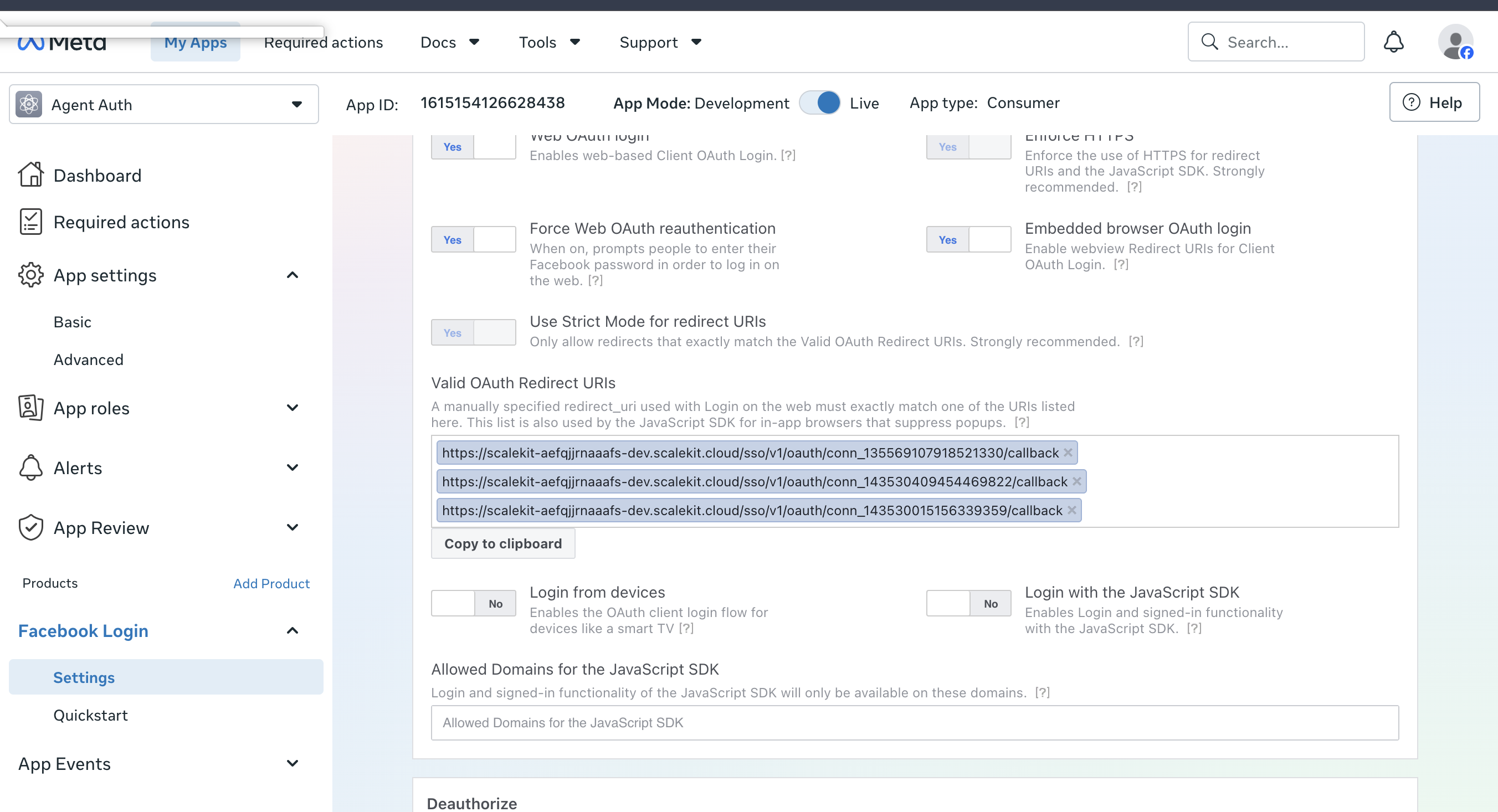
In your Meta app, go to Facebook Login > Settings.
-
Paste the redirect URI you copied into Valid OAuth Redirect URIs and save changes.
-
-
Copy your App ID and App secret
-
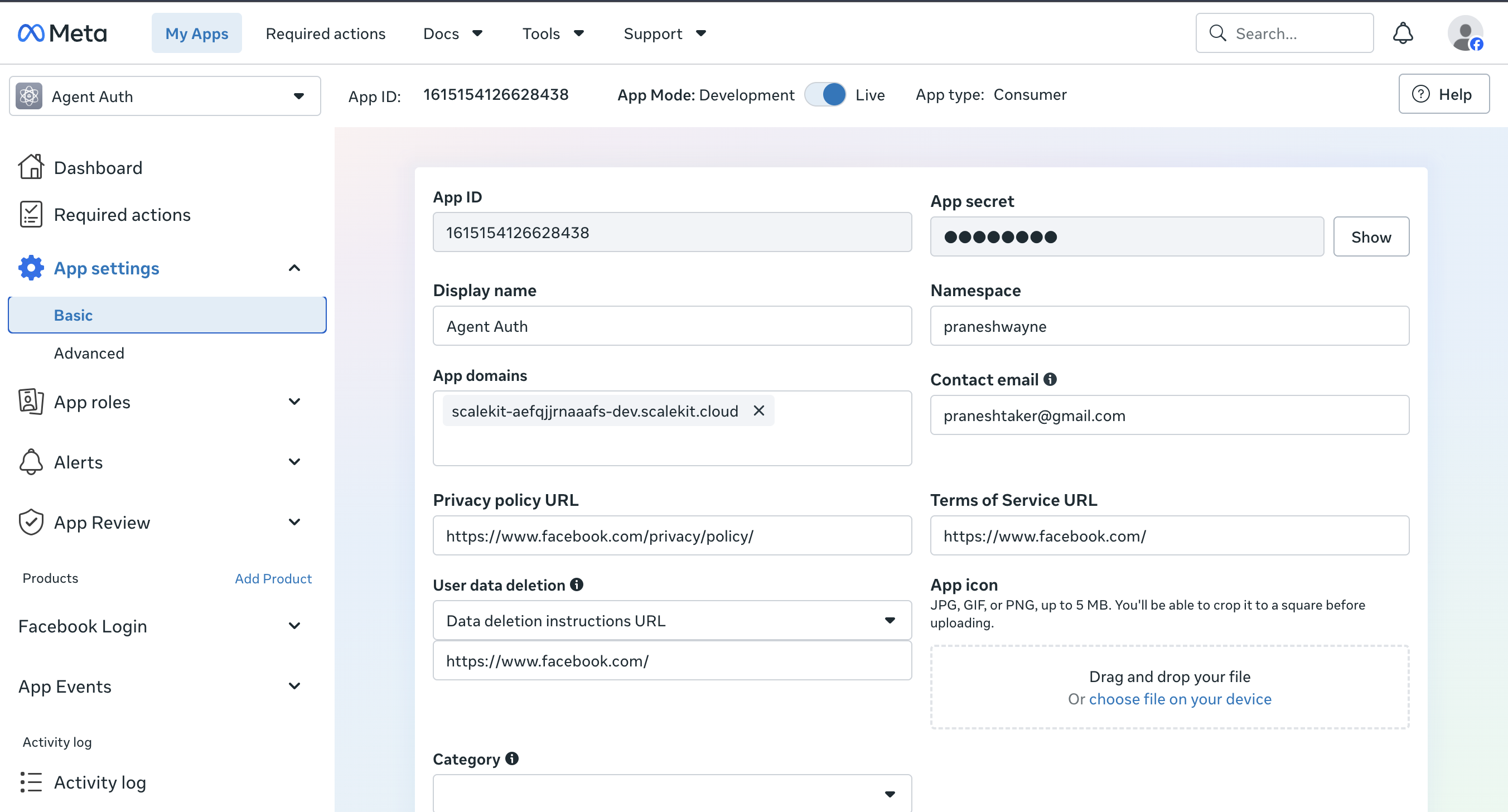
Go to App settings > Basic.
-
Copy the App ID and click Show to reveal and copy the App secret.
-
-
Add credentials in Scalekit
- Return to the connection you created in Scalekit and enter:
- Client ID — your Meta app’s App ID
- Client Secret — your Meta app’s App secret
- Click Save.
- Return to the connection you created in Scalekit and enter:
-
Request permissions and go live
-
In your Meta app, go to App Review > Permissions and Features and request the permissions your tools need, such as
pages_show_list,pages_read_engagement,pages_manage_posts,pages_manage_engagement, orpages_messaging. -
While the app is in Development mode, only people with a role on the app (admins, developers, testers) can authorize it, and permissions work without review for them.
-
To let other users connect, complete App Review for the permissions you requested, then switch the app to Live mode.
-
-
Authorize a user and make your first call
quickstart.mts import { ScalekitClient } from '@scalekit-sdk/node'import 'dotenv/config'import { createInterface } from 'node:readline/promises'const scalekit = new ScalekitClient(process.env.SCALEKIT_ENVIRONMENT_URL,process.env.SCALEKIT_CLIENT_ID,process.env.SCALEKIT_CLIENT_SECRET,)const actions = scalekit.actionsconst connector = 'facebook'const identifier = 'user_123'// Generate an authorization link for the userconst { link } = await actions.getAuthorizationLink({ connectionName: connector, identifier })console.log('Authorize Facebook:', link)const rl = createInterface({ input: process.stdin, output: process.stdout })await rl.question('Press Enter after authorizing...')rl.close()// Make your first callconst result = await actions.executeTool({connector,identifier,toolName: 'facebook_list_message_template_library',toolInput: {},})console.log(result)Terminal window npx tsx quickstart.mtsquickstart.py import osfrom scalekit import ScalekitClientfrom dotenv import load_dotenvload_dotenv()scalekit_client = ScalekitClient(env_url=os.getenv("SCALEKIT_ENVIRONMENT_URL"),client_id=os.getenv("SCALEKIT_CLIENT_ID"),client_secret=os.getenv("SCALEKIT_CLIENT_SECRET"),)actions = scalekit_client.actionsconnection_name = "facebook"identifier = "user_123"# Generate an authorization link for the userlink_response = actions.get_authorization_link(connection_name=connection_name,identifier=identifier,)print("Authorize Facebook:", link_response.link)input("Press Enter after authorizing...")# Make your first callresult = actions.execute_tool(tool_input={},tool_name="facebook_list_message_template_library",connection_name=connection_name,identifier=identifier,)print(result)Terminal window python quickstart.pyEach user signs in once. See Authorize a user for the full flow and statuses.
Tools
Pass the exact name toexecute_toolfacebook_debug_access_tokenInspect an access token (input_token) to see its owning app, token type, user, validity, expiry, granted scopes and the Page or object IDs each granular scope covers.Read-onlyDebug Access Token
Inspect an access token (input_token) to see its owning app, token type, user, validity, expiry, granted scopes and the Page or object IDs each granular scope covers. Returns a data object with app_id, application, type, user_id, is_valid, issued_at, expires_at, data_access_expires_at, scopes, and granular_scopes pairing each scope with its target_ids. Use it to check whether a token is valid and which scopes and Pages it covers. Works only when the connected user has a role on the app: the calling token must be an app access token or an app developer's token from the same app as input_token.
Inputs
input_tokenstringrequired- The access token (user, Page or session-info token) to inspect.
page_access_tokenstring- Optional Page access token to use instead of the connected user token. Required for most Page-scoped reads/writes (feed, posts, comments, insights, photos) — get it from facebook_list_my_pages (request the access_token field).
facebook_get_canvas_previewGet the preview of an Instant Experience (canvas) as an HTML embed element.Read-onlyGet Canvas Preview
Get the preview of an Instant Experience (canvas) as an HTML embed element. Returns the embed element in a paginated Graph API response. Use it to get embeddable preview HTML for a canvas. Permissions per Meta's Page canvases edge: pages_show_list, pages_manage_posts and pages_read_user_content. Needs a Page access token: call facebook_list_my_pages and pass the Page's access_token as page_access_token.
Inputs
canvas_idstringrequired- The Canvas ID to operate on.
afterstring- Pagination cursor to fetch the next page of results.
fieldsstring- Comma-separated list of fields to return.
limitinteger- Max number of items to return per page.
page_access_tokenstring- Optional Page access token to use instead of the connected user token. Required for most Page-scoped reads/writes (feed, posts, comments, insights, photos) — get it from facebook_list_my_pages (request the access_token field).
facebook_get_insightsGet insights metrics for a Page, post, photo or Page story (object_id is the Page, post, photo or story ID).Read-onlyGet Insights
Get insights metrics for a Page, post, photo or Page story (object_id is the Page, post, photo or story ID). Returns an array of metrics, each with name, period, values (value and end_time) and title; metric is required and the valid metrics depend on the object type. Use facebook_get_video_insights for video metrics. Story insights are unverified against Meta's v26.0 reference (parameters from Meta's SDK spec). Needs a Page access token: call facebook_list_my_pages and pass the Page's access_token as page_access_token.
Inputs
metricstringrequired- Comma-separated list of metric names. Required: Meta returns error 3001 when none is given. The valid metrics depend on the object, for example page_media_view for a Page or post_media_view,post_total_media_view_unique,post_reactions_by_type_total for a post or photo.
object_idstringrequired- ID of the Page, post, photo or Page story to read metrics for.
afterstring- Pagination cursor to fetch the next page of results.
breakdownstring- Comma-separated breakdown dimension(s) for the metric(s), e.g. is_from_ads or is_from_followers for page_media_view; valid values depend on the metric.
date_presetstring- Predefined date range used instead of since/until.one of
todayyesterdaythis_monthlast_monththis_quartermaximumdata_maximumlast_3dlast_7dlast_14dlast_28dlast_30dlast_90dlast_week_mon_sunlast_week_sun_satlast_quarterlast_yearthis_week_mon_todaythis_week_sun_todaythis_year fieldsstring- Comma-separated list of fields to return, for example id,name. Omit it to get Graph's default fields.
limitinteger- Max number of items to return per page.
page_access_tokenstring- Optional Page access token to use instead of the connected user token. Required for most Page-scoped reads/writes (feed, posts, comments, insights, photos) — get it from facebook_list_my_pages (request the access_token field).
periodstring- Aggregation period: day, week, days_28, month, lifetime or total_over_range; the valid values depend on the metric.
show_description_from_api_docboolean- Return Meta's API-doc description for each metric in the response (default false).
sincestring- Lower bound of the time range (Unix timestamp or date string).
untilstring- Upper bound of the time range (Unix timestamp or date string); at most a 90-day window together with since.
facebook_get_messenger_call_permissionsCheck whether one Messenger user, identified by psid, has granted the Page permission to call them, and which call actions the Page can currently take.Read-onlyGet Messenger Call Permissions
Check whether one Messenger user, identified by psid, has granted the Page permission to call them, and which call actions the Page can currently take. Returns permission (status no_permission or has_permission, with expiration_time) and actions (send_call_permission_request, start_call), each with can_perform and limits. Use to see whether the Page can ask the user for call permission or start a call. Errors when audio calling is not enabled or business-initiated calling is not allowed. Needs a Page access token: call facebook_list_my_pages and pass the Page's access_token as page_access_token.
Inputs
page_idstringrequired- The Page ID to operate on.
psidstringrequired- Page-scoped ID (PSID) of the consumer to check.
fieldsstring- Comma-separated list of fields to return.
page_access_tokenstring- Optional Page access token to use instead of the connected user token. Required for most Page-scoped reads/writes (feed, posts, comments, insights, photos) — get it from facebook_list_my_pages (request the access_token field).
facebook_get_messenger_call_settingsRead a Page's Messenger calling settings: audio and video availability, call icon, call hours and inbound call routing.Read-onlyGet Messenger Call Settings
Read a Page's Messenger calling settings: audio and video availability, call icon, call hours and inbound call routing. Returns audio_enabled, video_enabled, icon_enabled, call_hours (timezone_id, weekly_operating_hours) and call_routing (ring_target); list the ones you need in fields. Use to inspect current settings; use facebook_update_messenger_call_settings to change them. Needs the app's calling capability and a calling-eligible Page (messenger_api_calling ENABLED, limited countries). Needs a Page access token: call facebook_list_my_pages and pass the Page's access_token as page_access_token.
Inputs
page_idstringrequired- The Page ID to operate on.
fieldsstring- Comma-separated list of fields to return.
page_access_tokenstring- Optional Page access token to use instead of the connected user token. Required for most Page-scoped reads/writes (feed, posts, comments, insights, photos) — get it from facebook_list_my_pages (request the access_token field).
facebook_get_messenger_profileRead the Messenger Profile settings of a Page: get started button, persistent menu, ice breakers, commands, allowlisted domains and account linking URL.Read-onlyGet Messenger Profile
Read the Messenger Profile settings of a Page: get started button, persistent menu, ice breakers, commands, allowlisted domains and account linking URL. Returns a data array holding one object with the requested properties; name them in fields (get_started, persistent_menu, ice_breakers, commands, whitelisted_domains, account_linking_url). Use facebook_update_messenger_profile to set properties. Use facebook_delete_messenger_profile to remove them. Standard Access apps see settings only for people with a role on the app. Needs a Page access token: call facebook_list_my_pages and pass the Page's access_token as page_access_token.
Inputs
page_idstringrequired- The Page ID to operate on.
fieldsstring- Comma-separated list of fields to return.
page_access_tokenstring- Optional Page access token to use instead of the connected user token. Required for most Page-scoped reads/writes (feed, posts, comments, insights, photos) — get it from facebook_list_my_pages (request the access_token field).
platformstring- Messaging platform whose profile is read; defaults to MESSENGER.one of
MESSENGERINSTAGRAM
facebook_get_objectRead any Facebook Graph object by ID (a Page, user or me, post, photo, album, comment, video, live video, persona, poll, app, message and more) and return the fields you ask for.Read-onlyGet Object
Read any Facebook Graph object by ID (a Page, user or me, post, photo, album, comment, video, live video, persona, poll, app, message and more) and return the fields you ask for. Returns the object's id plus the fields named in fields; without fields Graph returns only a few default fields. Use it for one object whose ID you have; use facebook_list_posts, facebook_list_comments, facebook_list_photos or facebook_list_likes for an object's connections and facebook_list_my_pages to find Page IDs. A Page access token (page_access_token from facebook_list_my_pages) is needed for Page-owned objects; some node types need extra permissions or Meta features.
Inputs
object_idstringrequired- ID of the Graph object to read: a Page, post, photo, video, album, comment, live video, persona, poll, app, message and so on, or me for the connected user.
account_linking_tokenstring- Page nodes only: a short-lived (5 min) Messenger account linking token; with fields=recipient it returns the PSID for the user-Page pair.
fieldsstring- Comma-separated list of fields to return, for example id,name,created_time. The available fields depend on the object type; Graph returns only a few default fields when omitted.
icon_sizestring- Place topic nodes only: size in pixels of the topic icon to return.one of
24364872 page_access_tokenstring- Optional Page access token to use instead of the connected user token. Required for most Page-scoped reads/writes (feed, posts, comments, insights, photos) — get it from facebook_list_my_pages (request the access_token field).
target_tokenstring- Live video and live video input stream nodes only: a target token recently returned by Meta's speed test API.
facebook_get_page_oembedGet oEmbed JSON with ready-to-paste Page plugin HTML for a public Facebook Page URL, with options for cover, header, facepile, posts and size.Read-onlyGet Page Oembed
Get oEmbed JSON with ready-to-paste Page plugin HTML for a public Facebook Page URL, with options for cover, header, facepile, posts and size. Returns html, width, height, type, version, provider_name and provider_url; the fields parameter trims the response. Use it to embed a public Facebook Page; Meta lifted the token requirement on 2026-06-15, and sending a token needs Meta oEmbed Read approval (App Review and business verification). For a post or video URL use facebook_get_post_oembed or facebook_get_video_oembed.
Inputs
urlstringrequired- Public Facebook Page URL to embed.
adapt_container_widthboolean- Try to fit inside the container width (default true).
hide_coverboolean- Hide the cover photo in the header (default false).
maxheightinteger- Maximum height of the returned media.
maxwidthinteger- Maximum width of the returned media.
omitscriptboolean- If true the embed HTML omits the JavaScript (default false).
page_access_tokenstring- Optional Page access token to use instead of the connected user token. Required for most Page-scoped reads/writes (feed, posts, comments, insights, photos) — get it from facebook_list_my_pages (request the access_token field).
sdklocalestring- Locale for the embedded plugin, e.g. en_US.
show_facepileboolean- Show profile photos of friends who like the Page (default true).
show_postsboolean- Show the Page timeline posts (default true).
small_headerboolean- Use the small header instead of the cover header (default false).
facebook_get_page_statusGet the integrity and business-messaging status of a Facebook Page.Read-onlyGet Page Status
Get the integrity and business-messaging status of a Facebook Page. Returns the overall status (ok, warning, restricted or suspended), violations with severity LOW, MEDIUM or HIGH, restrictions with applied and expiration times, recommended actions, and action events with OPEN, PENDING or CLOSED status. Use it to check whether a Page has violations or restrictions. Requires pages_manage_metadata; Meta states no token type, so a Page token is assumed. Needs a Page access token: call facebook_list_my_pages and pass the Page's access_token as page_access_token.
Inputs
page_idstringrequired- The Page ID to operate on.
page_access_tokenstring- Optional Page access token to use instead of the connected user token. Required for most Page-scoped reads/writes (feed, posts, comments, insights, photos) — get it from facebook_list_my_pages (request the access_token field).
facebook_get_pictureGet the profile picture of a user or Page, or the picture of a photo or album (object_id is the node ID, or me).Read-onlyGet Picture
Get the profile picture of a user or Page, or the picture of a photo or album (object_id is the node ID, or me). Returns the picture url, width, height and is_silhouette as JSON; redirect defaults to false so you get JSON instead of the image itself. Use facebook_get_object with fields=picture to read a picture inside another object's response.
Inputs
object_idstringrequired- ID of the user, Page, album or photo whose picture to read, or me for the connected user.
fieldsstring- Comma-separated list of fields to return, for example id,name. Omit it to get Graph's default fields.
heightinteger- Height of the picture in pixels.
page_access_tokenstring- Optional Page access token to use instead of the connected user token. Required for most Page-scoped reads/writes (feed, posts, comments, insights, photos) — get it from facebook_list_my_pages (request the access_token field).
redirectboolean- Defaults to false, which returns JSON (url, width, height, is_silhouette); send true only if you want Graph to redirect to the image itself.default
false typestring- Picture size preset: small, normal, large, square, album or thumbnail; albums accept only thumbnail, small and album.one of
smallnormallargesquarealbumthumbnail widthinteger- Width of the picture in pixels.
facebook_get_post_oembedGet oEmbed JSON with embed HTML for a public Facebook post URL (JS SDK markup or iframe), with width, script and locale options.Read-onlyGet Post Oembed
Get oEmbed JSON with embed HTML for a public Facebook post URL (JS SDK markup or iframe), with width, script and locale options. Returns html, width, height, type, version, provider_name and provider_url. Use it to embed a public post; tokenless calls allow 1,000 requests per endpoint per hour, while a token from an app approved for Meta oEmbed Read allows 5 million per day. For a video URL use facebook_get_video_oembed; for a Page URL use facebook_get_page_oembed.
Inputs
urlstringrequired- Public Facebook post URL to embed.
maxwidthinteger- Maximum width of the returned post.
omitscriptboolean- If true the embed HTML omits the JavaScript (default false).
page_access_tokenstring- Optional Page access token to use instead of the connected user token. Required for most Page-scoped reads/writes (feed, posts, comments, insights, photos) — get it from facebook_list_my_pages (request the access_token field).
sdklocalestring- Locale for the embedded plugin, e.g. en_US.
useiframeboolean- Return an iframe-based embed (default false).
facebook_get_thread_ownerGet which app currently owns (has thread control of) a Messenger conversation with a person.Read-onlyGet Thread Owner
Get which app currently owns (has thread control of) a Messenger conversation with a person. Returns a data array with thread_owner holding app_id and expiration (Unix timestamp); data is empty when the thread is idle and the caller is not the default app. Use to see which app holds a conversation; app_id is shown only to the thread owner or the Page's default app, and other callers get the expiration alone. Needs a Page access token: call facebook_list_my_pages and pass the Page's access_token as page_access_token.
Inputs
page_idstringrequired- The Page ID to operate on.
recipientstringrequired- Page-scoped ID (PSID) of the person whose conversation owner to look up.
page_access_tokenstring- Optional Page access token to use instead of the connected user token. Required for most Page-scoped reads/writes (feed, posts, comments, insights, photos) — get it from facebook_list_my_pages (request the access_token field).
facebook_get_urlGet engagement counts (reactions, comments, shares), the canonical Open Graph object and app links for a URL shared on Facebook, taking the URL as id.Read-onlyGet Url
Get engagement counts (reactions, comments, shares), the canonical Open Graph object and app links for a URL shared on Facebook, taking the URL as id. Returns id, engagement (reaction_count, comment_count, share_count, comment_plugin_count), og_object (id, title, description, type, updated_time) and app_links; engagement numbers are intentionally imprecise. Use it to read engagement and Open Graph data for a URL; use facebook_scrape_url to refresh that data. Allows 10 GET requests per URL per app per hour.
Inputs
idstringrequired- The URL to look up (URL-encoded); sent as the root-node id query parameter.
fieldsstring- Comma-separated list of fields to return.
page_access_tokenstring- Optional Page access token to use instead of the connected user token. Required for most Page-scoped reads/writes (feed, posts, comments, insights, photos) — get it from facebook_list_my_pages (request the access_token field).
scopesstring- News Tab scopes to return for the URL (docs: comma-separated list). Provide as a JSON array, for example ["a","b"].
facebook_get_video_insightsGet aggregated insights for one Page video (views, watch time, retention, reactions, ad breaks and reels), or per-video results for the videos in a Page A/B test (object_id is the video or test ID).Read-onlyGet Video Insights
Get aggregated insights for one Page video (views, watch time, retention, reactions, ad breaks and reels), or per-video results for the videos in a Page A/B test (object_id is the video or test ID). Returns a data array of InsightsResult nodes with name, period, values, title, description and id; paging is since and until based, and data covers Page videos from the past 2 years. Use facebook_get_insights for Page, post and photo metrics. The A/B-test form is unverified against Meta's v26.0 reference (parameters from Meta's SDK spec). Needs a Page access token: call facebook_list_my_pages and pass the Page's access_token as page_access_token.
Inputs
object_idstringrequired- ID of the video to read metrics for, or of the Page A/B test whose videos to read.
afterstring- Pagination cursor to fetch the next page of results.
limitinteger- Max number of items to return per page.
metricstring- Comma-separated metric names, e.g. total_video_views,total_video_avg_time_watched,total_video_complete_views,total_video_reactions_by_type_total. Omit for the default set. Impression metrics (total_video_impressions*, total_video_views_unique, total_video_views_organic_unique, total_video_views_paid_unique, post_impressions_unique) were removed in v26.0.
page_access_tokenstring- Optional Page access token to use instead of the connected user token. Required for most Page-scoped reads/writes (feed, posts, comments, insights, photos) — get it from facebook_list_my_pages (request the access_token field).
periodstring- Aggregation period; most video metrics support lifetime only, ad-break metrics support day and lifetime.one of
dayweekdays_28monthlifetimetotal_over_range sinceinteger- Start of the time range as a Unix timestamp in seconds.
untilinteger- End of the time range as a Unix timestamp in seconds.
facebook_get_video_oembedGet oEmbed JSON with embed HTML for a public Facebook video URL (JS SDK markup or iframe), with width, script and locale options.Read-onlyGet Video Oembed
Get oEmbed JSON with embed HTML for a public Facebook video URL (JS SDK markup or iframe), with width, script and locale options. Returns html, width, type (video), version, provider_name and provider_url. Use it to embed a public video; tokenless calls allow 1,000 requests per endpoint per hour, while a token from an app approved for Meta oEmbed Read allows 5 million per day. Use it for facebook.com/{page}/videos/{id} URLs; use facebook_get_post_oembed for /posts/ and photo URLs and facebook_get_page_oembed for a Page URL.
Inputs
urlstringrequired- Public Facebook video URL to embed.
maxwidthinteger- Maximum width of the returned video.
omitscriptboolean- If true the embed HTML omits the JavaScript (default false).
page_access_tokenstring- Optional Page access token to use instead of the connected user token. Required for most Page-scoped reads/writes (feed, posts, comments, insights, photos) — get it from facebook_list_my_pages (request the access_token field).
sdklocalestring- Locale for the embedded plugin, e.g. en_US.
useiframeboolean- Return an iframe-based embed (default false).
facebook_list_albumsList the photo albums of a Page or of the connected user (object_id is the Page ID, or me for the user's own albums).Read-onlyList Albums
List the photo albums of a Page or of the connected user (object_id is the Page ID, or me for the user's own albums). Returns Album nodes in data (id, name, count, created_time, cover_photo and more) plus paging cursors. Use facebook_list_photos for an album's photos and facebook_get_object to read one album. A user's albums need user_photos (App Review) and are unverified against Meta's v26.0 reference (parameters from Meta's SDK spec). Page-owned objects need a Page access token: pass page_access_token from facebook_list_my_pages.
Inputs
object_idstringrequired- ID of the Page, or me for the connected user's own albums.
afterstring- Pagination cursor to fetch the next page of results.
fieldsstring- Comma-separated list of fields to return, for example id,name. Omit it to get Graph's default fields.
limitinteger- Max number of items to return per page.
page_access_tokenstring- Optional Page access token to use instead of the connected user token. Required for most Page-scoped reads/writes (feed, posts, comments, insights, photos) — get it from facebook_list_my_pages (request the access_token field).
facebook_list_attachmentsList the attachments of a Facebook post (photos, videos, links, albums and sub-attachments) or the files attached to a Messenger message.Read-onlyList Attachments
List the attachments of a Facebook post (photos, videos, links, albums and sub-attachments) or the files attached to a Messenger message. Returns StoryAttachment nodes for a post (12 by default; for more, expand the post, for example fields=attachments{subattachments.limit(18)}) or id, mime_type, name, size and file_url for a message. Use facebook_get_object to read the post or message itself. Apps in Development Mode can read message attachments only for people with an app role. Needs a Page access token: call facebook_list_my_pages and pass the Page's access_token as page_access_token.
Inputs
object_idstringrequired- ID of the post or Messenger message.
afterstring- Pagination cursor to fetch the next page of results.
fieldsstring- Comma-separated list of fields to return, for example id,name. Omit it to get Graph's default fields.
limitinteger- Max number of items to return per page.
page_access_tokenstring- Optional Page access token to use instead of the connected user token. Required for most Page-scoped reads/writes (feed, posts, comments, insights, photos) — get it from facebook_list_my_pages (request the access_token field).
facebook_list_audio_recommendationsList music recommendations from Meta's library for videos and reels: popular, newly added or personalized for you, optionally filtered by country.Read-onlyList Audio Recommendations
List music recommendations from Meta's library for videos and reels: popular, newly added or personalized for you, optionally filtered by country. Returns a data list of recommended tracks, each with title, artist and display_image_uri. Use it to find music for a video or reel; the type input is required. Business Pages may see limited results.
Inputs
typestringrequired- Recommendation list to return.one of
FACEBOOK_POPULAR_MUSICFACEBOOK_NEW_MUSICFACEBOOK_FOR_YOU available_countriesstring- Comma-separated ISO 3166-1 alpha-2 country codes (e.g. US,GB) to get popular music for those countries; invalid codes return error 100/4138001.
page_access_tokenstring- Optional Page access token to use instead of the connected user token. Required for most Page-scoped reads/writes (feed, posts, comments, insights, photos) — get it from facebook_list_my_pages (request the access_token field).
facebook_list_commentsList the comments on an album, link, live video, photo, post or video, or the replies to a comment (object_id is the comment ID).Read-onlyList Comments
List the comments on an album, link, live video, photo, post or video, or the replies to a comment (object_id is the comment ID). Returns comment nodes with paging, plus a summary (total_count, order, can_comment) when summary is set; filter=stream returns all levels in chronological order. Use facebook_create_comment to add a comment or reply, facebook_update_comment to edit one and facebook_get_object to read one comment by ID. Comment id and from need the MODERATE task for Page Public Content Access apps. Page-owned objects need a Page access token: pass page_access_token from facebook_list_my_pages.
Inputs
object_idstringrequired- ID of the album, link, live video, photo, post or video to read comments from, or of a comment to read its replies.
afterstring- Pagination cursor to fetch the next page of results.
fieldsstring- Comma-separated list of fields to return, for example id,name. Omit it to get Graph's default fields.
filterstring- toplevel returns only top-level comments (default); stream returns all comments including replies, in chronological order.one of
toplevelstream limitinteger- Max number of items to return per page.
live_filterstring- Live video comments only: filter_low_quality (default) hides low-quality comments, no_filter returns all.one of
filter_low_qualityno_filter orderstring- Preferred ordering of comments: chronological or reverse_chronological; Graph uses ranked order when the comments can be ranked.one of
chronologicalreverse_chronological page_access_tokenstring- Optional Page access token to use instead of the connected user token. Required for most Page-scoped reads/writes (feed, posts, comments, insights, photos) — get it from facebook_list_my_pages (request the access_token field).
sincestring- Lower bound of the time range to consider (Unix timestamp or date string).
summarystring- Set true to include a summary object (total_count, order, can_comment), or list its fields, for example total_count,order,can_comment.
facebook_list_conversation_messagesList the messages in one Messenger conversation, using a conversation_id taken from the Page's conversation list.Read-onlyList Conversation Messages
List the messages in one Messenger conversation, using a conversation_id taken from the Page's conversation list. Returns data (Message objects) with paging; only id and created_time by default, so request fields such as from, to, message and reply_to to read the content. Use facebook_send_messenger_message to send a message. Details are readable only for the 20 most recent messages; older message ids error as deleted. For Instagram Direct use instagram_conversations_list and instagram_conversation_messages_list; this tool is for Messenger. Needs a Page access token: call facebook_list_my_pages and pass the Page's access_token as page_access_token.
Inputs
conversation_idstringrequired- The Conversation ID to operate on.
afterstring- Pagination cursor to fetch the next page of results.
fieldsstring- Comma-separated list of fields to return.
limitinteger- Max number of items to return per page.
page_access_tokenstring- Optional Page access token to use instead of the connected user token. Required for most Page-scoped reads/writes (feed, posts, comments, insights, photos) — get it from facebook_list_my_pages (request the access_token field).
sourcestring- Which messages to return: ALL or PARTICIPANTS (Meta SDK spec enum; not described in the reference table).one of
ALLPARTICIPANTS
facebook_list_conversationsList a Page's Messenger conversations, optionally narrowed to one person with user_id (object_id is the Page ID, or me when the Page token resolves /me to the Page).Read-onlyList Conversations
List a Page's Messenger conversations, optionally narrowed to one person with user_id (object_id is the Page ID, or me when the Page token resolves /me to the Page). Returns conversation threads with paging; default fields are id and updated_time, and you can request participants, snippet, message_count, unread_count, is_owner, can_reply, link and messages; Requests-folder threads idle 30+ days are omitted. Use facebook_get_object to read one conversation and facebook_list_custom_labels for labels. The me form is unverified against Meta's v26.0 reference (parameters from Meta's SDK spec). For Instagram Direct use instagram_conversations_list and instagram_conversation_messages_list; this tool is for Messenger. Needs a Page access token: call facebook_list_my_pages and pass the Page's access_token as page_access_token.
Inputs
object_idstringrequired- ID of the Page, or me when the Page access token resolves /me to the Page.
afterstring- Pagination cursor to fetch the next page of results.
fieldsstring- Comma-separated list of fields to return, for example id,name. Omit it to get Graph's default fields.
folderstring- Inbox folder to read (string; values not enumerated in Meta docs, the guide mentions the Requests folder).
limitinteger- Max number of items to return per page.
page_access_tokenstring- Optional Page access token to use instead of the connected user token. Required for most Page-scoped reads/writes (feed, posts, comments, insights, photos) — get it from facebook_list_my_pages (request the access_token field).
platformstring- Which inbox to read: only MESSENGER is offered here (Instagram Direct is in the instagram connector); set it explicitly, as Meta's guide always passes it.one of
MESSENGER tagsstring- Filter by conversation tags (Meta SDK spec param; not described in the reference table). Provide as a JSON array, for example ["a","b"].
user_idstring- Page-scoped ID of one person to find the conversation with.
facebook_list_crosspost_whitelisted_pagesList the Pages that have established a crossposting relationship with a Page, which are the eligible targets for crossposted videos.Read-onlyList Crosspost Whitelisted Pages
List the Pages that have established a crossposting relationship with a Page, which are the eligible targets for crossposted videos. Returns Page nodes in data, each with an allows_live_crossposts flag, plus paging cursors. Use to check which Pages can receive a video crossposted from this Page; the Page access token must be that of the original Page. Needs a Page access token: call facebook_list_my_pages and pass the Page's access_token as page_access_token.
Inputs
page_idstringrequired- The Page ID to operate on.
afterstring- Pagination cursor to fetch the next page of results.
fieldsstring- Comma-separated list of fields to return.
limitinteger- Max number of items to return per page.
page_access_tokenstring- Optional Page access token to use instead of the connected user token. Required for most Page-scoped reads/writes (feed, posts, comments, insights, photos) — get it from facebook_list_my_pages (request the access_token field).
facebook_list_custom_labelsList the Messenger custom labels defined for a Page, or the labels assigned to one customer when object_id is their Page-scoped ID (PSID).Read-onlyList Custom Labels
List the Messenger custom labels defined for a Page, or the labels assigned to one customer when object_id is their Page-scoped ID (PSID). Returns data with id and page_label_name per label (request fields=page_label_name for the names), plus paging; Messenger accounts created with a phone number are unsupported. Use facebook_create_page_custom_label to add a label to a Page. Needs a Page access token: call facebook_list_my_pages and pass the Page's access_token as page_access_token.
Inputs
object_idstringrequired- ID of the Page, or the Page-scoped ID (PSID) of one customer to list that customer's labels, or me.
afterstring- Pagination cursor to fetch the next page of results.
fieldsstring- Comma-separated list of fields to return, for example id,name. Omit it to get Graph's default fields.
limitinteger- Max number of items to return per page.
page_access_tokenstring- Optional Page access token to use instead of the connected user token. Required for most Page-scoped reads/writes (feed, posts, comments, insights, photos) — get it from facebook_list_my_pages (request the access_token field).
facebook_list_feedList posts on a Page's feed (the Page's own posts plus posts by visitors and others) or on a user's profile timeline (object_id is the Page or user ID, or me), newest first.Read-onlyList Feed
List posts on a Page's feed (the Page's own posts plus posts by visitors and others) or on a user's profile timeline (object_id is the Page or user ID, or me), newest first. Returns a cursor-paginated list of posts, up to 100 per page, with the post fields you request; Meta limits results to about 600 ranked posts per year. Use facebook_list_posts for only the posts the Page or user published themselves and facebook_create_page_post to publish a Page post. A user's timeline is read-only and needs user_posts (App Review). Also contains what facebook_list_page_visitor_posts (visitor posts only) and facebook_list_page_tagged_posts (posts that tag the Page) return; queued posts are listed by facebook_list_page_scheduled_posts. Page-owned objects need a Page access token: pass page_access_token from facebook_list_my_pages.
Inputs
object_idstringrequired- ID of the Page or user whose feed to list, or me for the connected user.
afterstring- Pagination cursor to fetch the next page of results.
fieldsstring- Comma-separated list of fields to return, for example id,name. Omit it to get Graph's default fields.
include_hiddenboolean- Include posts that are hidden from the Page timeline (is_hidden=true).
limitinteger- Max number of items to return per page.
page_access_tokenstring- Optional Page access token to use instead of the connected user token. Required for most Page-scoped reads/writes (feed, posts, comments, insights, photos) — get it from facebook_list_my_pages (request the access_token field).
qstring- Free-text search filter for posts (SDK spec only; undocumented).
show_expiredboolean- Include expired posts (is_expired=true); expired content is otherwise not returned.
sincestring- Start of the time range for the feed. Unix timestamp (seconds) or any strtotime-parsable date string such as 2026-10-01.
untilstring- End of the time range for the feed. Unix timestamp (seconds) or any strtotime-parsable date string such as 2026-10-01.
withstring- Restrict results to posts that carry a location tag.
facebook_list_global_brand_childrenList the child Pages of a Global Pages root Page or default Page.Read-onlyList Global Brand Children
List the child Pages of a Global Pages root Page or default Page. Returns Page nodes in data (id, name and more) with paging cursors. Use to discover the Pages that belong under a Global Pages root; calls may fail for Pages migrated to the New Pages Experience. A Page access token (page_access_token from facebook_list_my_pages) is recommended for Page-owned objects.
Inputs
page_idstringrequired- The Page ID to operate on.
afterstring- Pagination cursor to fetch the next page of results.
fieldsstring- Comma-separated list of fields to return.
limitinteger- Max number of items to return per page.
page_access_tokenstring- Optional Page access token to use instead of the connected user token. Required for most Page-scoped reads/writes (feed, posts, comments, insights, photos) — get it from facebook_list_my_pages (request the access_token field).
facebook_list_likesList who liked an album, comment, link, photo, post or video, or the Pages that a Page or user likes (object_id is that Page or user ID, or me).Read-onlyList Likes
List who liked an album, comment, link, photo, post or video, or the Pages that a Page or user likes (object_id is that Page or user ID, or me). Returns Profile nodes with paging, plus a summary (total_count, can_like, has_liked) when summary is set; for posts only aggregated counts are available. Use facebook_list_reactions for per-reaction-type data and facebook_like_object or facebook_unlike_object to change a like. A user's likes need user_likes (App Review). For a post or comment Meta recommends facebook_list_reactions for like counts and for who reacted; with a Page or user ID this returns the Pages that Page or user likes (not available for New Page Experience Pages). Page-owned objects need a Page access token: pass page_access_token from facebook_list_my_pages.
Inputs
object_idstringrequired- ID of the album, comment, link, photo, post or video to read likes from, or of the Page or user whose liked Pages to list (use me for the connected user).
afterstring- Pagination cursor to fetch the next page of results.
fieldsstring- Comma-separated list of fields to return, for example id,name. Omit it to get Graph's default fields.
limitinteger- Max number of items to return per page.
page_access_tokenstring- Optional Page access token to use instead of the connected user token. Required for most Page-scoped reads/writes (feed, posts, comments, insights, photos) — get it from facebook_list_my_pages (request the access_token field).
summarystring- Set true to return the like summary, or list its fields, for example total_count,can_like,has_liked; for posts only aggregated counts are available.
target_idstring- Page and user nodes only: ID of a Page to check whether the person or Page likes it; returns only that Page when it is liked.
facebook_list_live_video_blocked_usersList the users blocked from a live video broadcast, optionally looking up one specific user ID.Read-onlyList Live Video Blocked Users
List the users blocked from a live video broadcast, optionally looking up one specific user ID. Returns a data list of User nodes. Use it to audit who is blocked from a broadcast, or pass uid to check one user. A Page access token (page_access_token from facebook_list_my_pages) is recommended for Page-owned objects.
Inputs
live_video_idstringrequired- The Live Video ID to operate on.
fieldsstring- Comma-separated list of fields to return.
page_access_tokenstring- Optional Page access token to use instead of the connected user token. Required for most Page-scoped reads/writes (feed, posts, comments, insights, photos) — get it from facebook_list_my_pages (request the access_token field).
uidstring- ID of a user blocked from the video broadcast, to look up that specific user.
facebook_list_live_video_crossposted_broadcastsList the crossposted copies of a live video broadcast that were already posted to other Pages.Read-onlyList Live Video Crossposted Broadcasts
List the crossposted copies of a live video broadcast that were already posted to other Pages. Returns a data list of LiveVideo nodes with fields such as id, status and the from field's name. Use it to see where a broadcast was crossposted. Unverified against Meta's v26.0 reference: the edge page lists reading as unsupported, but the Crossposting guide and SDK spec document it. Needs a Page access token: call facebook_list_my_pages and pass the Page's access_token as page_access_token.
Inputs
live_video_idstringrequired- The Live Video ID to operate on.
fieldsstring- Comma-separated list of fields to return.
page_access_tokenstring- Optional Page access token to use instead of the connected user token. Required for most Page-scoped reads/writes (feed, posts, comments, insights, photos) — get it from facebook_list_my_pages (request the access_token field).
facebook_list_live_video_errorsList the stream errors and info events logged for a live video broadcast.Read-onlyList Live Video Errors
List the stream errors and info events logged for a live video broadcast. Returns a paginated list of entries with error_code, error_type, error_message and creation_time. Use it to diagnose stream problems such as copyright violations and live stream errors. A Page access token (page_access_token from facebook_list_my_pages) is recommended for Page-owned objects.
Inputs
live_video_idstringrequired- The Live Video ID to operate on.
afterstring- Pagination cursor to fetch the next page of results.
fieldsstring- Comma-separated list of fields to return.
limitinteger- Max number of items to return per page.
page_access_tokenstring- Optional Page access token to use instead of the connected user token. Required for most Page-scoped reads/writes (feed, posts, comments, insights, photos) — get it from facebook_list_my_pages (request the access_token field).
facebook_list_live_videosList the live video broadcasts of a Page or a user (object_id is the Page or user ID, or me), optionally filtered by broadcast_status.Read-onlyList Live Videos
List the live video broadcasts of a Page or a user (object_id is the Page or user ID, or me), optionally filtered by broadcast_status. Returns LiveVideo nodes with paging; broadcast_status takes an array of statuses. Use facebook_create_live_video to create a broadcast and facebook_get_object to read one. Needs publish_video and Live Video API App Review; the edge reference lists reading as unsupported, but the Live Video API docs document it. Page-owned objects need a Page access token: pass page_access_token from facebook_list_my_pages.
Inputs
object_idstringrequired- ID of the Page or user whose live videos to list, or me for the connected user.
afterstring- Pagination cursor to fetch the next page of results.
broadcast_statusstring- Only return broadcasts with these statuses; sent as a JSON array, e.g. ["SCHEDULED_UNPUBLISHED"]. Provide as a JSON array, for example ["a","b"].
fieldsstring- Comma-separated list of fields to return, for example id,name. Omit it to get Graph's default fields.
limitinteger- Max number of items to return per page.
page_access_tokenstring- Optional Page access token to use instead of the connected user token. Required for most Page-scoped reads/writes (feed, posts, comments, insights, photos) — get it from facebook_list_my_pages (request the access_token field).
sourcestring- Which broadcasts to list: owner (owned by the Page) or target (targeted at the Page), per the SDK enum.one of
ownertarget
facebook_list_message_template_librarySearch Meta's pre-approved utility message template library by name or content and language.Read-onlyList Message Template Library
Search Meta's pre-approved utility message template library by name or content and language. Returns a data array of templates, each with name, language, category UTILITY, topic, usecase, industry, body, body_params, body_param_types, buttons, and id. Use it to find a template name to clone into a Page as a message template; needs the pages_utility_messaging permission. Needs a Page access token: call facebook_list_my_pages and pass the Page's access_token as page_access_token.
Inputs
afterstring- Pagination cursor to fetch the next page of results.
languagestring- Language code of the templates to return, for example 'en'.
limitinteger- Max number of items to return per page.
name_or_contentstring- Search text matched against the template name or message content, for example 'order'.
page_access_tokenstring- Optional Page access token to use instead of the connected user token. Required for most Page-scoped reads/writes (feed, posts, comments, insights, photos) — get it from facebook_list_my_pages (request the access_token field).
facebook_list_message_templatesList a Page's Messenger utility message templates, filtered by name, content, language, category or review status.Read-onlyList Message Templates
List a Page's Messenger utility message templates, filtered by name, content, language, category or review status. Returns data (templates with id, name, language, category, status, components, parameter_format and rejected_reason) with paging. Use facebook_create_message_template to submit a new template. Use facebook_delete_message_template to delete one. Requires the pages_utility_messaging permission. Needs a Page access token: call facebook_list_my_pages and pass the Page's access_token as page_access_token.
Inputs
page_idstringrequired- The Page ID to operate on.
afterstring- Pagination cursor to fetch the next page of results.
categorystring- Template categories to include (only UTILITY exists). Provide as a JSON array, for example ["a","b"].
contentstring- Template content to match.
fieldsstring- Comma-separated list of fields to return.
languagestring- Languages to include, e.g. ["en_US"]. Provide as a JSON array, for example ["a","b"].
limitinteger- Max number of items to return per page.
namestring- Exact template name to match.
name_or_contentstring- Return templates whose name or content matches this value.
page_access_tokenstring- Optional Page access token to use instead of the connected user token. Required for most Page-scoped reads/writes (feed, posts, comments, insights, photos) — get it from facebook_list_my_pages (request the access_token field).
statusstring- Review statuses to include. Provide as a JSON array, for example ["a","b"].
facebook_list_messaging_feature_reviewsList the Messenger Platform feature review status of a Page for subscription messaging, gender, locale and time_zone.Read-onlyList Messaging Feature Reviews
List the Messenger Platform feature review status of a Page for subscription messaging, gender, locale and time_zone. Returns data of feature and status (PENDING, REJECTED, APPROVED or LIMITED); the list is empty when nothing was submitted. Use to check whether a Messenger Platform feature is approved for the Page. Needs a Page access token: call facebook_list_my_pages and pass the Page's access_token as page_access_token.
Inputs
page_idstringrequired- The Page ID to operate on.
afterstring- Pagination cursor to fetch the next page of results.
fieldsstring- Comma-separated list of fields to return.
limitinteger- Max number of items to return per page.
page_access_tokenstring- Optional Page access token to use instead of the connected user token. Required for most Page-scoped reads/writes (feed, posts, comments, insights, photos) — get it from facebook_list_my_pages (request the access_token field).
facebook_list_my_app_request_former_recipientsList the users to whom the connected user previously sent app requests.Read-onlyList My App Request Former Recipients
List the users to whom the connected user previously sent app requests. Returns AppRequestFormerRecipient nodes in the data array, each with id (the viewer ID) and recipient_id, plus paging. Use to review past app-request recipients; results may be empty because this belongs to the legacy app requests feature.
Inputs
afterstring- Pagination cursor to fetch the next page of results.
fieldsstring- Comma-separated list of fields to return.
limitinteger- Max number of items to return per page.
facebook_list_my_app_requestsList the pending app requests of the connected user that were sent by the calling app.Read-onlyList My App Requests
List the pending app requests of the connected user that were sent by the calling app. Returns AppRequest nodes in the data array (action_type, application, created_time, data, from, id, message, object, to) with paging. Use to review which app requests from the calling app remain pending for the user. Meta limits this edge to Game apps, so other app types may get nothing or an error; its reference page lists reading as unsupported and the call comes from Meta's SDK spec.
Inputs
afterstring- Pagination cursor to fetch the next page of results.
fieldsstring- Comma-separated list of fields to return.
limitinteger- Max number of items to return per page.
facebook_list_my_pagesList the Facebook Pages the connected user manages, including each Page's ID.Read-onlyList My Pages
List the Facebook Pages the connected user manages, including each Page's ID. Returns a data array of Page nodes, each with an added tasks field, plus paging cursors and an optional summary.total_count. Call this first to get the page_id and Page access_token that other Facebook Page tools need; use facebook_create_page to create a new Page. The response includes each Page's access_token (a secret); request fields=id,name,tasks when you only need IDs. Note: business_management is not in this connector's scope list, so the cases that need it work only if the token already holds it. Since v17.0, Pages linked to a Meta business are omitted unless the user granted business_management and has a role there.
Inputs
ad_idstring- Filter Pages by a specific ad ID.
fieldsstring- Comma-separated list of fields to return per Page.
is_placeboolean- If specified, filter Pages by whether they are places or not.
is_promotableboolean- If specified, filter Pages by whether they can be promoted or not.
limitinteger- Max number of Pages to return per page of results.
facebook_list_notification_message_tokensList Marketing Messages subscription (notification message) tokens for a Page, optionally filtered by custom audience, opt-in source, dates or duplicates.Read-onlyList Notification Message Tokens
List Marketing Messages subscription (notification message) tokens for a Page, optionally filtered by custom audience, opt-in source, dates or duplicates. Returns a data array of tokens (notification_messages_token, recipient_id, creation_timestamp, token_expiry_timestamp, user_token_status, topic_title, next_eligible_time, custom_audience_ids) plus paging cursors. Use to review token status and expiry per recipient; tokens carry over from Recurring Notifications. The Marketing Message API is documented for tech providers whose app passed App Review (ads_management, pages_messaging, paid_marketing_messages or marketing_messages_messenger). Note: ads_management is not in this connector's scope list, so the cases that need it work only if the token already holds it. Needs a Page access token: call facebook_list_my_pages and pass the Page's access_token as page_access_token.
Inputs
page_idstringrequired- The Page ID to operate on.
afterstring- Pagination cursor to fetch the next page of results.
custom_audience_idsstring- Only return tokens matched in these custom audience IDs (audiences with fewer than 100 matched users are excluded). Provide as a JSON array, for example ["a","b"].
do_not_return_duplicatesboolean- Return a single token per recipient (limits the fetch to at most 10,000 tokens).
fieldsstring- Comma-separated list of fields to return.
has_received_marketing_messageboolean- Filter tokens by whether the recipient has already received a marketing message (from Meta's SDK spec).
limitinteger- Max number of items to return per page.
opt_in_sourcestring- Only return tokens created through these opt-in sources (from Meta's SDK spec). Provide as a JSON array, for example ["a","b"].
page_access_tokenstring- Optional Page access token to use instead of the connected user token. Required for most Page-scoped reads/writes (feed, posts, comments, insights, photos) — get it from facebook_list_my_pages (request the access_token field).
sincestring- Only tokens created after this time (Unix timestamp or date string; from Meta's SDK spec).
subscriber_tag_idsstring- Only return tokens carrying these subscriber tag IDs (from Meta's SDK spec). Provide as a JSON array, for example ["a","b"].
untilstring- Only tokens created before this time (Unix timestamp or date string; from Meta's SDK spec).
facebook_list_page_ab_testsList the video A/B test experiments on a Page, covering control and experiment videos, optimization goal, status and declared winner.Read-onlyList Page Ab Tests
List the video A/B test experiments on a Page, covering control and experiment videos, optimization goal, status and declared winner. Returns PagePostExperiment nodes in data (id, name, description, control_video_id, experiment_video_ids, optimization_goal, publish_status, declared_winning_video_id and more) with paging. Use to review existing tests and declared winners; use facebook_create_page_ab_test to start a new test. Documented in Meta's v26.0 A/B Testing guide (the edge reference wrongly lists every operation as unsupported); since and until limit the tests by date, and the Page token must come from a CREATE_CONTENT user. Needs a Page access token: call facebook_list_my_pages and pass the Page's access_token as page_access_token.
Inputs
page_idstringrequired- The Page ID to operate on.
afterstring- Pagination cursor to fetch the next page of results.
fieldsstring- Comma-separated list of fields to return.
limitinteger- Max number of items to return per page.
page_access_tokenstring- Optional Page access token to use instead of the connected user token. Required for most Page-scoped reads/writes (feed, posts, comments, insights, photos) — get it from facebook_list_my_pages (request the access_token field).
sincestring- Only return A/B tests run on or after this date. Accepts today, yesterday, an epoch timestamp such as 1676057525, or a date such as 31 jan 2023 or 31-1-2023.
untilstring- Only return A/B tests run up to this date; must be later than since. Same formats as since.
facebook_list_page_ar_experiencesList the AR (augmented reality) experiences attached to a Page.Read-onlyList Page Ar Experiences
List the AR (augmented reality) experiences attached to a Page. Returns ArAdsDataContainer nodes (id, name, effect, is_published, camera_facing_override, creation_time, last_modified_time) with paging. Use to see which AR experiences a Page has. Meta's v26.0 reference for this edge is an empty stub and its Instant Experiences guide says the AR Experience template is available only through Ads Manager, so this call may be rejected. Needs a Page access token: call facebook_list_my_pages and pass the Page's access_token as page_access_token.
Inputs
page_idstringrequired- The Page ID to operate on.
afterstring- Pagination cursor to fetch the next page of results.
fieldsstring- Comma-separated list of fields to return.
limitinteger- Max number of items to return per page.
page_access_tokenstring- Optional Page access token to use instead of the connected user token. Required for most Page-scoped reads/writes (feed, posts, comments, insights, photos) — get it from facebook_list_my_pages (request the access_token field).
facebook_list_page_blocked_usersList the people and Pages blocked from a Page, optionally looking up one specific blocked person.Read-onlyList Page Blocked Users
List the people and Pages blocked from a Page, optionally looking up one specific blocked person. Returns Profile nodes in data (id, name, link, profile_type, username and more) with paging cursors. Use to check who is blocked; use facebook_block_page_user to add a block and facebook_unblock_page_user to remove one. Needs a Page access token: call facebook_list_my_pages and pass the Page's access_token as page_access_token.
Inputs
page_idstringrequired- The Page ID to operate on.
afterstring- Pagination cursor to fetch the next page of results.
fieldsstring- Comma-separated list of fields to return.
limitinteger- Max number of items to return per page.
page_access_tokenstring- Optional Page access token to use instead of the connected user token. Required for most Page-scoped reads/writes (feed, posts, comments, insights, photos) — get it from facebook_list_my_pages (request the access_token field).
uidstring- Same as user: ID of a specific blocked person to look up.
userstring- ID of a specific blocked person to look up in the Page's block list.
facebook_list_page_call_to_actionsList the call-to-action buttons (such as BOOK_NOW, CALL_NOW and SIGN_UP) configured on a Facebook Page.Read-onlyList Page Call To Actions
List the call-to-action buttons (such as BOOK_NOW, CALL_NOW and SIGN_UP) configured on a Facebook Page. Returns PageCallToAction nodes with id, type, web_url, email_address, intl_number_with_plus, android and iphone destination types, status, created_time and updated_time, in a single data array. Use to check which action buttons a Page already has configured. May need the Page Public Content Access feature. A Page access token (page_access_token from facebook_list_my_pages) is recommended for Page-owned objects.
Inputs
page_idstringrequired- The Page ID to operate on.
fieldsstring- Comma-separated list of fields to return.
page_access_tokenstring- Optional Page access token to use instead of the connected user token. Required for most Page-scoped reads/writes (feed, posts, comments, insights, photos) — get it from facebook_list_my_pages (request the access_token field).
facebook_list_page_canvas_elementsList the Instant Experience (canvas) body elements created on a Page.Read-onlyList Page Canvas Elements
List the Instant Experience (canvas) body elements created on a Page. Returns a data array of CanvasBodyElement nodes, each holding an element object; request fields=element to receive it. Use it to review existing elements; use facebook_create_page_canvas_element to add one. Requires the ADVERTISE task on the Page. Needs a Page access token: call facebook_list_my_pages and pass the Page's access_token as page_access_token.
Inputs
page_idstringrequired- The Page ID to operate on.
fieldsstring- Comma-separated list of fields to return.
page_access_tokenstring- Optional Page access token to use instead of the connected user token. Required for most Page-scoped reads/writes (feed, posts, comments, insights, photos) — get it from facebook_list_my_pages (request the access_token field).
facebook_list_page_canvasesList the Instant Experiences (canvases) of a Page, optionally filtered by published and hidden state.Read-onlyList Page Canvases
List the Instant Experiences (canvases) of a Page, optionally filtered by published and hidden state. Returns a paginated list of Canvas nodes with id, name, is_published, is_hidden, canvas_link, body_elements, background_color, owner, last_editor, and update_time. Use it to browse existing canvases; use facebook_create_page_canvas to create a new one. Requires the ADVERTISE task on the Page. To search canvases by name across all Pages use facebook_list_user_rich_media_documents. Needs a Page access token: call facebook_list_my_pages and pass the Page's access_token as page_access_token.
Inputs
page_idstringrequired- The Page ID to operate on.
afterstring- Pagination cursor to fetch the next page of results.
fieldsstring- Comma-separated list of fields to return.
is_hiddenboolean- Filter by hidden (true) or not hidden (false) Instant Experiences.
is_publishedboolean- Filter by published (true) or unpublished (false) Instant Experiences.
limitinteger- Max number of items to return per page.
page_access_tokenstring- Optional Page access token to use instead of the connected user token. Required for most Page-scoped reads/writes (feed, posts, comments, insights, photos) — get it from facebook_list_my_pages (request the access_token field).
facebook_list_page_chat_pluginsList the Messenger chat plugin settings (theme color, greeting, entry point, guest mode, spacing) saved for a Facebook Page.Read-onlyList Page Chat Plugins
List the Messenger chat plugin settings (theme color, greeting, entry point, guest mode, spacing) saved for a Facebook Page. Returns ChatPlugin nodes with alignment, theme_color, entry_point_icon, entry_point_label, greeting_dialog_display, guest_chat_mode, welcome_screen_greeting, desktop and mobile spacing, and mobile_chat_display. Use to read a Page's chat plugin setup. A third-party help article reports the Chat Plugin retired on May 9, 2024, though the v26.0 reference still lists this edge. Needs a Page access token: call facebook_list_my_pages and pass the Page's access_token as page_access_token.
Inputs
page_idstringrequired- The Page ID to operate on.
fieldsstring- Comma-separated list of fields to return.
page_access_tokenstring- Optional Page access token to use instead of the connected user token. Required for most Page-scoped reads/writes (feed, posts, comments, insights, photos) — get it from facebook_list_my_pages (request the access_token field).
facebook_list_page_image_copyrightsList the image copyrights (Rights Manager reference images) registered on a Facebook Page.Read-onlyList Page Image Copyrights
List the image copyrights (Rights Manager reference images) registered on a Facebook Page. Returns a paginated list of ImageCopyright records with id, title, filename, artist, creator, custom_id, description, copyright_monitoring_status, matches_count, ownership_countries, tags, creation_time, update_time, image, and original_content_creation_date. Use it to review registered images; use facebook_create_page_image_copyright to register a new one. Rights Manager entitlement may be required in practice. Needs a Page access token: call facebook_list_my_pages and pass the Page's access_token as page_access_token.
Inputs
page_idstringrequired- The Page ID to operate on.
afterstring- Pagination cursor to fetch the next page of results.
fieldsstring- Comma-separated list of fields to return.
limitinteger- Max number of items to return per page.
page_access_tokenstring- Optional Page access token to use instead of the connected user token. Required for most Page-scoped reads/writes (feed, posts, comments, insights, photos) — get it from facebook_list_my_pages (request the access_token field).
facebook_list_page_indexed_videosList the videos Meta has indexed for a Page.Read-onlyList Page Indexed Videos
List the videos Meta has indexed for a Page. Returns AdVideo nodes (for example id, description, updated_time) with cursor paging. Use it to see which of a Page's videos Meta has indexed. Unverified against Meta's v26.0 reference; parameters from Meta's SDK spec. Meta does not document what indexed means for this edge; for all of a Page's videos use facebook_list_videos and for Reels use facebook_list_page_video_reels. Needs a Page access token: call facebook_list_my_pages and pass the Page's access_token as page_access_token.
Inputs
page_idstringrequired- The Page ID to operate on.
afterstring- Pagination cursor to fetch the next page of results.
fieldsstring- Comma-separated list of fields to return.
limitinteger- Max number of items to return per page.
page_access_tokenstring- Optional Page access token to use instead of the connected user token. Required for most Page-scoped reads/writes (feed, posts, comments, insights, photos) — get it from facebook_list_my_pages (request the access_token field).
facebook_list_page_locationsList the location Pages (child Pages, one per branch) attached to a parent business Page.Read-onlyList Page Locations
List the location Pages (child Pages, one per branch) attached to a parent business Page. Returns Page objects, one per location, with paging. Use facebook_create_page_location to add a location and facebook_delete_page_location to remove one. For the Page's StoreLocation records (address, hours, store code) use facebook_list_page_store_locations. A Page access token (page_access_token from facebook_list_my_pages) is recommended for Page-owned objects.
Inputs
page_idstringrequired- The Page ID to operate on.
afterstring- Pagination cursor to fetch the next page of results.
fieldsstring- Comma-separated list of fields to return.
limitinteger- Max number of items to return per page.
page_access_tokenstring- Optional Page access token to use instead of the connected user token. Required for most Page-scoped reads/writes (feed, posts, comments, insights, photos) — get it from facebook_list_my_pages (request the access_token field).
facebook_list_page_media_fingerprintsList the Rights Manager media fingerprints uploaded to a Page, optionally filtered by universal_content_id.Read-onlyList Page Media Fingerprints
List the Rights Manager media fingerprints uploaded to a Page, optionally filtered by universal_content_id. Returns a paginated list of MediaFingerprint records with id, title, duration_in_sec, fingerprint_content_type, fingerprint_type, metadata, and universal_content_id. Use it to review a Page's fingerprinted media or find one by universal_content_id. Rights Manager entitlement may be required in practice. Needs a Page access token: call facebook_list_my_pages and pass the Page's access_token as page_access_token.
Inputs
page_idstringrequired- The Page ID to operate on.
afterstring- Pagination cursor to fetch the next page of results.
fieldsstring- Comma-separated list of fields to return.
limitinteger- Max number of items to return per page.
page_access_tokenstring- Optional Page access token to use instead of the connected user token. Required for most Page-scoped reads/writes (feed, posts, comments, insights, photos) — get it from facebook_list_my_pages (request the access_token field).
universal_content_idstring- Custom ID set by the fingerprint owner (for example an ISRC); used to look up matching fingerprints.
facebook_list_page_published_postsList only the published posts of a Page, with optional hidden, expired and location filters.Read-onlyList Page Published Posts
List only the published posts of a Page, with optional hidden, expired and location filters. Returns PagePost nodes in data with cursor paging, plus summary.total_count when summary=total_count; limit maximum is 100. Use to browse what a Page has published; the edge covers about 600 ranked posts per year. Use facebook_list_posts for the same Page view with a q search filter and for a user's posts; the two may return the same posts for a Page. Needs a Page access token: call facebook_list_my_pages and pass the Page's access_token as page_access_token.
Inputs
page_idstringrequired- The Page ID to operate on.
afterstring- Pagination cursor to fetch the next page of results.
fieldsstring- Comma-separated list of fields to return.
include_hiddenboolean- Include posts that are hidden from the Page timeline (is_hidden=true).
limitinteger- Max number of items to return per page.
page_access_tokenstring- Optional Page access token to use instead of the connected user token. Required for most Page-scoped reads/writes (feed, posts, comments, insights, photos) — get it from facebook_list_my_pages (request the access_token field).
show_expiredboolean- Include expired posts (is_expired=true); expired content is otherwise not returned.
sincestring- Start of the time range for the posts. Unix timestamp (seconds) or any strtotime-parsable date string such as 2026-10-01.
summarystring- Set to total_count to add the edge's total_count aggregate to the response summary.
untilstring- End of the time range for the posts. Unix timestamp (seconds) or any strtotime-parsable date string such as 2026-10-01.
withstring- Restrict results to posts that carry a location tag.one of
LOCATION
facebook_list_page_ratingsList the recommendations and reviews left on a Page, each with a rating, review text and reviewer.Read-onlyList Page Ratings
List the recommendations and reviews left on a Page, each with a rating, review text and reviewer. Returns Recommendation nodes in data (created_time, has_rating, has_review, rating, recommendation_type, review_text, reviewer id and name, open_graph_story) with paging. Use to read the reviews and recommendations people left on a Page; a child Page needs its own Page access token, not its parent's. Needs a Page access token: call facebook_list_my_pages and pass the Page's access_token as page_access_token.
Inputs
page_idstringrequired- The Page ID to operate on.
afterstring- Pagination cursor to fetch the next page of results.
fieldsstring- Comma-separated list of fields to return.
limitinteger- Max number of items to return per page.
page_access_tokenstring- Optional Page access token to use instead of the connected user token. Required for most Page-scoped reads/writes (feed, posts, comments, insights, photos) — get it from facebook_list_my_pages (request the access_token field).
facebook_list_page_rolesList the people who have a role on a Page, along with the tasks each can perform.Read-onlyList Page Roles
List the people who have a role on a Page, along with the tasks each can perform. Returns User nodes in data (id, name) with is_active and a tasks array (MANAGE, CREATE_CONTENT, MODERATE, ADVERTISE, ANALYZE), plus paging cursors. Use to see who holds a role on a Page; covers only people outside a business, while business users appear on the Page assigned_users edge. Needs a Page access token: call facebook_list_my_pages and pass the Page's access_token as page_access_token.
Inputs
page_idstringrequired- The Page ID to operate on.
afterstring- Pagination cursor to fetch the next page of results.
fieldsstring- Comma-separated list of fields to return.
include_deactivatedboolean- Include deactivated accounts in the results (default false).
limitinteger- Max number of items to return per page.
page_access_tokenstring- Optional Page access token to use instead of the connected user token. Required for most Page-scoped reads/writes (feed, posts, comments, insights, photos) — get it from facebook_list_my_pages (request the access_token field).
uidstring- Return only the person with this ID who has a role on the Page.
facebook_list_page_scheduled_postsList the unpublished posts on a Page that are scheduled to go out at a future date, each with a scheduled_publish_time.Read-onlyList Page Scheduled Posts
List the unpublished posts on a Page that are scheduled to go out at a future date, each with a scheduled_publish_time. Returns PagePost nodes in data; request fields such as id, message, created_time, scheduled_publish_time and is_published. Use to review what is queued to publish later on a Page. Needs a Page access token: call facebook_list_my_pages and pass the Page's access_token as page_access_token.
Inputs
page_idstringrequired- The Page ID to operate on.
afterstring- Pagination cursor to fetch the next page of results.
fieldsstring- Comma-separated list of fields to return.
limitinteger- Max number of items to return per page.
page_access_tokenstring- Optional Page access token to use instead of the connected user token. Required for most Page-scoped reads/writes (feed, posts, comments, insights, photos) — get it from facebook_list_my_pages (request the access_token field).
facebook_list_page_settingsList a Page's configurable settings (posting and messaging permissions, moderation, age and country restrictions, publish state) as setting and value pairs.Read-onlyList Page Settings
List a Page's configurable settings (posting and messaging permissions, moderation, age and country restrictions, publish state) as setting and value pairs. Returns a data array of PageSettings nodes, each with a setting name and a value (boolean, string or object), plus paging cursors. Use it to read current settings; use facebook_update_page_setting to change one. Needs a Page access token: call facebook_list_my_pages and pass the Page's access_token as page_access_token.
Inputs
page_idstringrequired- The Page ID to operate on.
afterstring- Pagination cursor to fetch the next page of results.
fieldsstring- Comma-separated list of fields to return.
limitinteger- Max number of items to return per page.
page_access_tokenstring- Optional Page access token to use instead of the connected user token. Required for most Page-scoped reads/writes (feed, posts, comments, insights, photos) — get it from facebook_list_my_pages (request the access_token field).
facebook_list_page_space_participantsList the space participants of a Page.Read-onlyList Page Space Participants
List the space participants of a Page. Returns an undocumented response shape (the SDK spec types the result as Page). Use it to read a Page's space participants; use facebook_create_page_space_participant to add one to a named space. Unverified against Meta's v26.0 reference; parameters from Meta's SDK spec. Needs a Page access token: call facebook_list_my_pages and pass the Page's access_token as page_access_token.
Inputs
page_idstringrequired- The Page ID to operate on.
afterstring- Pagination cursor to fetch the next page of results.
fieldsstring- Comma-separated list of fields to return.
limitinteger- Max number of items to return per page.
page_access_tokenstring- Optional Page access token to use instead of the connected user token. Required for most Page-scoped reads/writes (feed, posts, comments, insights, photos) — get it from facebook_list_my_pages (request the access_token field).
facebook_list_page_store_locationsList the store locations associated with a Page (address, phone, hours, pickup options, price range, store code).Read-onlyList Page Store Locations
List the store locations associated with a Page (address, phone, hours, pickup options, price range, store code). Returns a data array of StoreLocation nodes with id, full_address, zip_code, phone_number, hours, pickup_options, price_range and store_code, plus paging cursors. Use it to look up a Page's store addresses, opening hours and store codes; the edge is read-only. For the child location Pages use facebook_list_page_locations. Needs a Page access token: call facebook_list_my_pages and pass the Page's access_token as page_access_token.
Inputs
page_idstringrequired- The Page ID to operate on.
afterstring- Pagination cursor to fetch the next page of results.
fieldsstring- Comma-separated list of fields to return.
limitinteger- Max number of items to return per page.
page_access_tokenstring- Optional Page access token to use instead of the connected user token. Required for most Page-scoped reads/writes (feed, posts, comments, insights, photos) — get it from facebook_list_my_pages (request the access_token field).
facebook_list_page_storiesList the Facebook Stories published, and optionally archived, on a Page, with media type, media ID, creation time and story URL.Read-onlyList Page Stories
List the Facebook Stories published, and optionally archived, on a Page, with media type, media ID, creation time and story URL. Returns Stories in data with post_id, status (PUBLISHED or ARCHIVED), creation_time, media_type (video or photo), media_id and url. Use to review a Page's Stories; pass status as a comma-separated list such as PUBLISHED,ARCHIVED to include archived Stories. Needs the CREATE_CONTENT task. Needs a Page access token: call facebook_list_my_pages and pass the Page's access_token as page_access_token.
Inputs
page_idstringrequired- The Page ID to operate on.
afterstring- Pagination cursor to fetch the next page of results.
fieldsstring- Comma-separated list of fields to return.
limitinteger- Max number of items to return per page.
page_access_tokenstring- Optional Page access token to use instead of the connected user token. Required for most Page-scoped reads/writes (feed, posts, comments, insights, photos) — get it from facebook_list_my_pages (request the access_token field).
sincestring- Start of the time range for the stories. Unix timestamp (seconds) or any strtotime-parsable date string such as 2026-10-01.
statusstring- Comma-separated story statuses to return: PUBLISHED and/or ARCHIVED (archived stories require the Page's story archive to be on).
untilstring- End of the time range for the stories. Unix timestamp (seconds) or any strtotime-parsable date string such as 2026-10-01.
facebook_list_page_subscribed_appsList the apps subscribed to a Page's webhooks, with each app's subscribed_fields (only the calling app is returned).Read-onlyList Page Subscribed Apps
List the apps subscribed to a Page's webhooks, with each app's subscribed_fields (only the calling app is returned). Returns a data array of Application nodes plus subscribed_fields (the list of webhook fields) and paging; data is empty if the Page has not installed the app. Use it to check which webhook fields the app receives; use facebook_subscribe_page_webhooks to subscribe fields and facebook_unsubscribe_page_webhooks to remove the subscription. Needs a Page access token: call facebook_list_my_pages and pass the Page's access_token as page_access_token.
Inputs
page_idstringrequired- The Page ID to operate on.
afterstring- Pagination cursor to fetch the next page of results.
fieldsstring- Comma-separated list of fields to return.
limitinteger- Max number of items to return per page.
page_access_tokenstring- Optional Page access token to use instead of the connected user token. Required for most Page-scoped reads/writes (feed, posts, comments, insights, photos) — get it from facebook_list_my_pages (request the access_token field).
facebook_list_page_tabsList the tabs on a Page (name, link, position, app, permanent flag).Read-onlyList Page Tabs
List the tabs on a Page (name, link, position, app, permanent flag). Returns a data array of Tab nodes with id, name, link, position, application, custom_name, custom_image_url, image_url, is_permanent and is_non_connection_landing_tab, plus paging cursors. Use it to read a Page's tab layout; expect errors on Pages migrated to the New Pages Experience, and the feature is limited to Pages with 2000+ likes. Needs a Page access token: call facebook_list_my_pages and pass the Page's access_token as page_access_token.
Inputs
page_idstringrequired- The Page ID to operate on.
afterstring- Pagination cursor to fetch the next page of results.
fieldsstring- Comma-separated list of fields to return.
limitinteger- Max number of items to return per page.
page_access_tokenstring- Optional Page access token to use instead of the connected user token. Required for most Page-scoped reads/writes (feed, posts, comments, insights, photos) — get it from facebook_list_my_pages (request the access_token field).
tabstring- Optional list of tab identifiers to filter on (Meta's reference gives only the description 'SELF_EXPLANATORY'). Provide as a JSON array, for example ["a","b"].
facebook_list_page_tagged_postsList the public posts, photos and videos in which a Page has been tagged, which covers its mentions.Read-onlyList Page Tagged Posts
List the public posts, photos and videos in which a Page has been tagged, which covers its mentions. Returns PagePost nodes in data, each with tagged_time, plus paging. Use to find public content that tags a Page; the Page access token must come from a person with the CREATE_CONTENT, MANAGE or MODERATE task. It is a server-side subset of facebook_list_feed; use that to see everything in one list. Needs a Page access token: call facebook_list_my_pages and pass the Page's access_token as page_access_token.
Inputs
page_idstringrequired- The Page ID to operate on.
afterstring- Pagination cursor to fetch the next page of results.
fieldsstring- Comma-separated list of fields to return.
limitinteger- Max number of items to return per page.
page_access_tokenstring- Optional Page access token to use instead of the connected user token. Required for most Page-scoped reads/writes (feed, posts, comments, insights, photos) — get it from facebook_list_my_pages (request the access_token field).
sincestring- Start of the time range for the tagged posts. Unix timestamp (seconds) or any strtotime-parsable date string such as 2026-10-01.
untilstring- End of the time range for the tagged posts. Unix timestamp (seconds) or any strtotime-parsable date string such as 2026-10-01.
facebook_list_page_video_listsList the video playlists (VideoList nodes) of a Page.Read-onlyList Page Video Lists
List the video playlists (VideoList nodes) of a Page. Returns a paginated list of VideoList nodes with creation_time, description, id, last_modified, owner, season_number, thumbnail, title, and videos_count. Use it to browse a Page's playlists and see how many videos each holds. Needs a Page access token: call facebook_list_my_pages and pass the Page's access_token as page_access_token.
Inputs
page_idstringrequired- The Page ID to operate on.
afterstring- Pagination cursor to fetch the next page of results.
fieldsstring- Comma-separated list of fields to return.
limitinteger- Max number of items to return per page.
page_access_tokenstring- Optional Page access token to use instead of the connected user token. Required for most Page-scoped reads/writes (feed, posts, comments, insights, photos) — get it from facebook_list_my_pages (request the access_token field).
facebook_list_page_video_reelsList the Reels published on a Page, optionally limited to a since and until date window.Read-onlyList Page Video Reels
List the Reels published on a Page, optionally limited to a since and until date window. Returns reel videos with id, description, and updated_time, using cursor paging. Use it to browse a Page's published Reels. Documented in Meta's Reels Publishing guide, though the edge reference page marks reading unsupported. Needs a Page access token: call facebook_list_my_pages and pass the Page's access_token as page_access_token.
Inputs
page_idstringrequired- The Page ID to operate on.
afterstring- Pagination cursor to fetch the next page of results.
fieldsstring- Comma-separated list of fields to return.
limitinteger- Max number of items to return per page.
page_access_tokenstring- Optional Page access token to use instead of the connected user token. Required for most Page-scoped reads/writes (feed, posts, comments, insights, photos) — get it from facebook_list_my_pages (request the access_token field).
sincestring- Lower bound of the date range: today, yesterday, Unix timestamp, or yyyy-mm-dd.
untilstring- Upper bound of the date range (same formats as since); must be later than since.
facebook_list_page_visitor_postsList the public posts published on a Page by its visitors rather than by the Page, with optional hidden, expired and location filters.Read-onlyList Page Visitor Posts
List the public posts published on a Page by its visitors rather than by the Page, with optional hidden, expired and location filters. Returns PagePost nodes in data (posts authored by visitors) with cursor paging. Use to read what visitors posted on a Page; results may be empty for Pages migrated to the New Pages Experience. It is a server-side subset of facebook_list_feed; use that to see everything in one list. Needs a Page access token: call facebook_list_my_pages and pass the Page's access_token as page_access_token.
Inputs
page_idstringrequired- The Page ID to operate on.
afterstring- Pagination cursor to fetch the next page of results.
fieldsstring- Comma-separated list of fields to return.
include_hiddenboolean- Include posts that are hidden from the Page timeline (is_hidden=true).
limitinteger- Max number of items to return per page.
page_access_tokenstring- Optional Page access token to use instead of the connected user token. Required for most Page-scoped reads/writes (feed, posts, comments, insights, photos) — get it from facebook_list_my_pages (request the access_token field).
show_expiredboolean- Include expired posts (is_expired=true); expired content is otherwise not returned.
sincestring- Start of the time range for the visitor posts. Unix timestamp (seconds) or any strtotime-parsable date string such as 2026-10-01.
untilstring- End of the time range for the visitor posts. Unix timestamp (seconds) or any strtotime-parsable date string such as 2026-10-01.
withstring- Restrict results to posts that carry a location tag.one of
LOCATION
facebook_list_personasList the Messenger bot personas created for a Page.Read-onlyList Personas
List the Messenger bot personas created for a Page. Returns a data array of personas with id, name and profile_picture_url, plus paging cursors. Use to browse a Page's personas; use facebook_create_persona to add a new one. Needs a Page access token: call facebook_list_my_pages and pass the Page's access_token as page_access_token.
Inputs
page_idstringrequired- The Page ID to operate on.
afterstring- Pagination cursor to fetch the next page of results.
fieldsstring- Comma-separated list of fields to return.
limitinteger- Max number of items to return per page.
page_access_tokenstring- Optional Page access token to use instead of the connected user token. Required for most Page-scoped reads/writes (feed, posts, comments, insights, photos) — get it from facebook_list_my_pages (request the access_token field).
facebook_list_photosList photos for a Page (profile, tagged or uploaded), the photos and videos in an album, or a user's photos (object_id is the Page, album or user ID, or me).Read-onlyList Photos
List photos for a Page (profile, tagged or uploaded), the photos and videos in an album, or a user's photos (object_id is the Page, album or user ID, or me). Returns a cursor-paginated list of Photo nodes with the fields you request; request images rather than the deprecated source field. Use facebook_upload_photo to add a photo and facebook_get_object to read one photo by ID. A user's photos need user_photos (App Review for other users). Page photos need a Page access token from a person with the MODERATE task: call facebook_list_my_pages and pass it as page_access_token.
Inputs
object_idstringrequired- ID of the Page, album or user whose photos to list, or me for the connected user.
afterstring- Pagination cursor to fetch the next page of results.
biz_tag_idinteger- Business tag ID used to filter photos.
business_idstring- Optional business ID that assists with filters such as recently used.
fieldsstring- Comma-separated list of fields to return, for example id,name. Omit it to get Graph's default fields.
limitinteger- Max number of items to return per page.
page_access_tokenstring- Optional Page access token to use instead of the connected user token. Required for most Page-scoped reads/writes (feed, posts, comments, insights, photos) — get it from facebook_list_my_pages (request the access_token field).
typestring- Which photos to return for a Page or user: profile (default for Pages), tagged (default for users), or uploaded. Not used for albums.one of
taggeduploadedprofile
facebook_list_pollsList the polls created on a video or live video broadcast (object_id is the video or live video ID).Read-onlyList Polls
List the polls created on a video or live video broadcast (object_id is the video or live video ID). Returns VideoPoll nodes with id, question, show_results, status (closed, voting_open or results_open) and the poll_options edge. Use facebook_create_poll to add a poll and facebook_update_video_poll to change a poll's state. May need the Live Video API feature (App Review) and the token of whoever created the video or live video. Use the token of the user or Page that created the video or live video; for a Page pass its access_token as page_access_token (from facebook_list_my_pages).
Inputs
object_idstringrequired- ID of the video or live video.
fieldsstring- Comma-separated list of fields to return, for example id,name. Omit it to get Graph's default fields.
page_access_tokenstring- Optional Page access token to use instead of the connected user token. Required for most Page-scoped reads/writes (feed, posts, comments, insights, photos) — get it from facebook_list_my_pages (request the access_token field).
facebook_list_post_mentioned_profilesList the profiles mentioned or targeted in a Facebook Page post, read from the post's to edge.Read-onlyList Post Mentioned Profiles
List the profiles mentioned or targeted in a Facebook Page post, read from the post's to edge. Returns a paginated data list of Profile objects. Use it to see who a post mentions or targets; ordinary Page posts without mentions or a target usually return an empty list. Needs a Page access token: call facebook_list_my_pages and pass the Page's access_token as page_access_token.
Inputs
post_idstringrequired- The Post ID to operate on.
afterstring- Pagination cursor to fetch the next page of results.
fieldsstring- Comma-separated list of fields to return.
limitinteger- Max number of items to return per page.
page_access_tokenstring- Optional Page access token to use instead of the connected user token. Required for most Page-scoped reads/writes (feed, posts, comments, insights, photos) — get it from facebook_list_my_pages (request the access_token field).
facebook_list_postsList posts that a Page published itself, or a user's timeline posts including posts they are tagged in (object_id is the Page or user ID, or me); for a Page this leaves out visitor and tagged posts.Read-onlyList Posts
List posts that a Page published itself, or a user's timeline posts including posts they are tagged in (object_id is the Page or user ID, or me); for a Page this leaves out visitor and tagged posts. Returns a cursor-paginated list of posts, up to 100 per page, with the post fields you request. Use facebook_list_feed to include posts by visitors and others and facebook_get_object to read one post. A user's posts need user_posts (App Review). For a Page, Meta documents facebook_list_page_published_posts as a separate edge for published posts; the two may return the same posts. Page-owned objects need a Page access token: pass page_access_token from facebook_list_my_pages.
Inputs
object_idstringrequired- ID of the Page or user whose posts to list, or me for the connected user.
afterstring- Pagination cursor to fetch the next page of results.
fieldsstring- Comma-separated list of fields to return, for example id,name. Omit it to get Graph's default fields.
include_hiddenboolean- Include posts that are hidden from the Page timeline (is_hidden=true).
limitinteger- Max number of items to return per page.
page_access_tokenstring- Optional Page access token to use instead of the connected user token. Required for most Page-scoped reads/writes (feed, posts, comments, insights, photos) — get it from facebook_list_my_pages (request the access_token field).
qstring- Free-text search query to filter posts (SDK spec param q; not described in the reference).
show_expiredboolean- Include expired posts (is_expired=true); expired content is otherwise not returned.
sincestring- Start of the time range for the posts. Unix timestamp (seconds) or any strtotime-parsable date string such as 2026-10-01.
untilstring- End of the time range for the posts. Unix timestamp (seconds) or any strtotime-parsable date string such as 2026-10-01.
withstring- Restrict results to posts that carry a location tag.one of
LOCATION
facebook_list_reactionsList the reactions (with reaction type) on a comment, live video or post (object_id is the comment, live video or post ID).Read-onlyList Reactions
List the reactions (with reaction type) on a comment, live video or post (object_id is the comment, live video or post ID). Returns Profile nodes with a type in data, paging cursors, and a summary of total_count and viewer_reaction. Use summary=total_count (with type and limit=0) for per-type counts, because reactions from other people are hidden for privacy; use facebook_list_likes for likes. Page-owned objects need a Page access token: pass page_access_token from facebook_list_my_pages.
Inputs
object_idstringrequired- ID of the comment, live video or post to read reactions from.
afterstring- Pagination cursor to fetch the next page of results.
fieldsstring- Comma-separated list of fields to return, for example id,name. Omit it to get Graph's default fields.
limitinteger- Max number of items to return per page.
page_access_tokenstring- Optional Page access token to use instead of the connected user token. Required for most Page-scoped reads/writes (feed, posts, comments, insights, photos) — get it from facebook_list_my_pages (request the access_token field).
summarystring- Set true to include a summary (total_count, viewer_reaction), or list its fields, for example total_count,viewer_reaction.
typestring- Return only reactions of this type.one of
NONELIKELOVEWOWHAHASADANGRYTHANKFULPRIDECAREFIREHUNDRED
facebook_list_user_friendsList the Facebook friends of the connected person who also use the app.Read-onlyList User Friends
List the Facebook friends of the connected person who also use the app. Returns User objects in the data array for friends who granted user_friends, plus paging; summary.total_count holds the total number of friends of the person. Use to find which friends also use the app. The reference page carries a notice that the feature was removed after Graph API v3.2, yet its body and the v26.0 permissions reference still document it.
Inputs
afterstring- Pagination cursor to fetch the next page of results.
fieldsstring- Comma-separated list of fields to return.
limitinteger- Max number of items to return per page.
uidstring- ID of one specific person to check for friendship with the connected user (same as the /friends/{user-id} path modifier); returns that person only if they are a friend.
facebook_list_user_fundraisersList the Facebook fundraisers that the calling app created for the connected person.Read-onlyList User Fundraisers
List the Facebook fundraisers that the calling app created for the connected person. Returns FundraiserPersonToCharity nodes in the data array (id, name, description, goal_amount, currency, end_time, amount_raised, donations_count, donors_count, charity_id, external_id, other external fields, uri) with paging. Use to review fundraisers the app already created; use facebook_create_user_fundraiser to start a new one. Available to apps that pass App Review; the nonprofit must be onboarded to Meta Fundraising tools, and test users are unsupported.
Inputs
afterstring- Pagination cursor to fetch the next page of results.
fieldsstring- Comma-separated list of fields to return.
limitinteger- Max number of items to return per page.
facebook_list_user_ids_for_businessList the IDs the connected person has in all apps owned by the calling app's business, optionally limited to one specific app.Read-onlyList User Ids For Business
List the IDs the connected person has in all apps owned by the calling app's business, optionally limited to one specific app. Returns a paginated data array of entries with id (the person's app-scoped ID in that app), app and instant_game_player_id. Use it to see how every app owned by the business knows the person. The calling app must be business-owned; otherwise Meta can return error 200.
Inputs
afterstring- Pagination cursor to fetch the next page of results.
appstring- App ID to return the person's ID for; omit to list the IDs in all apps owned by the business.
fieldsstring- Comma-separated list of fields to return.
limitinteger- Max number of items to return per page.
facebook_list_user_ids_for_pagesList the Page-scoped IDs the connected person has in Pages owned by the calling app's business, optionally limited to one specific Page.Read-onlyList User Ids For Pages
List the Page-scoped IDs the connected person has in Pages owned by the calling app's business, optionally limited to one specific Page. Returns a data array of entries with id (the person's Page-scoped ID) and page. Use it to see how each Page owned by the business knows the person.
Inputs
fieldsstring- Comma-separated list of fields to return.
pagestring- Page ID to return the person's Page-scoped ID for; omit to list all Pages owned by the business.
facebook_list_user_musicList the music Pages (bands, artists, albums) the connected person likes, optionally checking one specific Page and returning the total count.Read-onlyList User Music
List the music Pages (bands, artists, albums) the connected person likes, optionally checking one specific Page and returning the total count. Returns a paginated data array of Page nodes, each with created_time (when the person liked it), plus summary.total_count when requested. Use it to read a person's music interests or to confirm that they like one specific music Page. Same data as facebook_list_likes with object_id=me, limited to music Pages. Needs the user_likes permission (inferred from Meta's Permissions Reference, since the edge returns liked Pages).
Inputs
afterstring- Pagination cursor to fetch the next page of results.
fieldsstring- Comma-separated list of fields to return.
limitinteger- Max number of items to return per page.
summarystring- Set to total_count to include summary.total_count (number of music Pages) in the response.
target_idstring- Page ID to check whether the person likes it; returns only that Page when it is liked.
facebook_list_user_permissionsList the permissions the connected user has granted, declined or let expire for this app, optionally filtered by permission name or status.Read-onlyList User Permissions
List the permissions the connected user has granted, declined or let expire for this app, optionally filtered by permission name or status. Returns a paginated data array of {permission, status} entries. Use it to check which scopes the connection really holds before calling other tools; use facebook_revoke_user_permissions to remove one.
Inputs
afterstring- Pagination cursor to fetch the next page of results.
limitinteger- Max number of items to return per page.
permissionstring- Return only this permission, e.g. user_photos.
statusstring- Return only permissions with this status.one of
granteddeclinedexpired
facebook_list_user_rich_media_documentsList rich media documents (Canvas or Instant Experiences) of Pages the connected user has advertiser permissions on, optionally searched by name or ID.Read-onlyList User Rich Media Documents
List rich media documents (Canvas or Instant Experiences) of Pages the connected user has advertiser permissions on, optionally searched by name or ID. Returns a paginated data array of Canvas nodes with id, canvas_link, body_elements and other fields. Use it to discover which Canvas documents exist on Pages where the person has advertiser access. To list one Page's canvases use facebook_list_page_canvases; this tool searches across every Page where the user has advertiser access.
Inputs
afterstring- Pagination cursor to fetch the next page of results.
fieldsstring- Comma-separated list of fields to return.
limitinteger- Max number of items to return per page.
querystring- Typeahead text; returns rich media documents whose name or ID matches.
facebook_list_video_captionsList the captions (VideoCaption nodes) attached to a video.Read-onlyList Video Captions
List the captions (VideoCaption nodes) attached to a video. Returns VideoCaption nodes with paging. Use facebook_update_video_captions to set the default caption locale or delete caption locales. Needs a Page access token: call facebook_list_my_pages and pass the Page's access_token as page_access_token.
Inputs
video_idstringrequired- The Video ID to operate on.
afterstring- Pagination cursor to fetch the next page of results.
fieldsstring- Comma-separated list of fields to return.
limitinteger- Max number of items to return per page.
page_access_tokenstring- Optional Page access token to use instead of the connected user token. Required for most Page-scoped reads/writes (feed, posts, comments, insights, photos) — get it from facebook_list_my_pages (request the access_token field).
facebook_list_video_collaboratorsList the collaborator invitations sent for a reel or video, with each invitation's Accepted, Declined or Pending status.Read-onlyList Video Collaborators
List the collaborator invitations sent for a reel or video, with each invitation's Accepted, Declined or Pending status. Returns id, name (the collaborator Page), invite_status and invitation_link for each invitation, with paging. Use facebook_invite_video_collaborator to send a new invitation. A Page access token (page_access_token from facebook_list_my_pages) is recommended for Page-owned objects.
Inputs
video_idstringrequired- The Video ID to operate on.
afterstring- Pagination cursor to fetch the next page of results.
fieldsstring- Comma-separated list of fields to return.
limitinteger- Max number of items to return per page.
page_access_tokenstring- Optional Page access token to use instead of the connected user token. Required for most Page-scoped reads/writes (feed, posts, comments, insights, photos) — get it from facebook_list_my_pages (request the access_token field).
facebook_list_video_copyright_update_recordsList the update records of a Rights Manager video copyright.Read-onlyList Video Copyright Update Records
List the update records of a Rights Manager video copyright. Returns a paginated list of records with id, action_types, actor, actor_type, creation_time, ownership_countries and whitelisted_accounts. Use it to see which actor made which update to a video copyright and when. Needs Rights Manager enrollment. Unverified against Meta's v26.0 reference (its edge page says reading is unsupported); parameters from Meta's SDK spec. Needs a Page access token: call facebook_list_my_pages and pass the Page's access_token as page_access_token.
Inputs
video_copyright_idstringrequired- The Video Copyright ID to operate on.
afterstring- Pagination cursor to fetch the next page of results.
fieldsstring- Comma-separated list of fields to return.
limitinteger- Max number of items to return per page.
page_access_tokenstring- Optional Page access token to use instead of the connected user token. Required for most Page-scoped reads/writes (feed, posts, comments, insights, photos) — get it from facebook_list_my_pages (request the access_token field).
facebook_list_video_poll_optionsList the answer options of a video poll, with each option's vote count.Read-onlyList Video Poll Options
List the answer options of a video poll, with each option's vote count. Returns a data array of VideoPollOption nodes with id, text, order, total_votes and is_correct; no paging block is documented. Use it to read the vote tally per option for one poll; the Live Video API feature may be required. A Page access token (page_access_token from facebook_list_my_pages) is recommended for Page-owned objects.
Inputs
poll_idstringrequired- The Poll ID to operate on.
fieldsstring- Comma-separated list of fields to return.
page_access_tokenstring- Optional Page access token to use instead of the connected user token. Required for most Page-scoped reads/writes (feed, posts, comments, insights, photos) — get it from facebook_list_my_pages (request the access_token field).
facebook_list_video_poll_settingsList the poll settings configured for a video.Read-onlyList Video Poll Settings
List the poll settings configured for a video. Returns a data array of PollSettings nodes plus paging; the PollSettings node has no public reference page, so its fields are undocumented. Use it to read the poll configuration of a video owned by the Page whose token you pass. Needs a Page access token: call facebook_list_my_pages and pass the Page's access_token as page_access_token.
Inputs
video_idstringrequired- The Video ID to operate on.
afterstring- Pagination cursor to fetch the next page of results.
fieldsstring- Comma-separated list of fields to return.
limitinteger- Max number of items to return per page.
page_access_tokenstring- Optional Page access token to use instead of the connected user token. Required for most Page-scoped reads/writes (feed, posts, comments, insights, photos) — get it from facebook_list_my_pages (request the access_token field).
facebook_list_video_thumbnailsList the thumbnails of a video, including which one is the preferred thumbnail.Read-onlyList Video Thumbnails
List the thumbnails of a video, including which one is the preferred thumbnail. Returns a paged data array of VideoThumbnail nodes with id, uri, width, height, scale, name and is_preferred. Use it to find a video's preferred thumbnail and each thumbnail's uri; it reads thumbnails only, with no upload. Needs a Page access token: call facebook_list_my_pages and pass the Page's access_token as page_access_token.
Inputs
video_idstringrequired- The Video ID to operate on.
afterstring- Pagination cursor to fetch the next page of results.
fieldsstring- Comma-separated list of fields to return.
limitinteger- Max number of items to return per page.
page_access_tokenstring- Optional Page access token to use instead of the connected user token. Required for most Page-scoped reads/writes (feed, posts, comments, insights, photos) — get it from facebook_list_my_pages (request the access_token field).
facebook_list_videosList videos on a Page, videos a user is tagged in or has uploaded, or the videos in a playlist (object_id is the Page, user or playlist ID, or me).Read-onlyList Videos
List videos on a Page, videos a user is tagged in or has uploaded, or the videos in a playlist (object_id is the Page, user or playlist ID, or me). Returns a paginated data array of video nodes; request fields explicitly, for example id, title, description, created_time and permalink_url. Use facebook_upload_video to add a video and facebook_get_object to read one video. Reading a Page's videos needs the MANAGE task plus pages_read_engagement, or a user token with Page Public Content Access. Page-owned objects need a Page access token: pass page_access_token from facebook_list_my_pages.
Inputs
object_idstringrequired- ID of the Page, user or video playlist whose videos to list, or me for the connected user.
afterstring- Pagination cursor to fetch the next page of results.
fieldsstring- Comma-separated list of fields to return, for example id,name. Omit it to get Graph's default fields.
limitinteger- Max number of items to return per page.
page_access_tokenstring- Optional Page access token to use instead of the connected user token. Required for most Page-scoped reads/writes (feed, posts, comments, insights, photos) — get it from facebook_list_my_pages (request the access_token field).
typestring- Which videos to list: 'uploaded' (posted by the Page) or 'tagged' (videos the Page is tagged in).one of
taggeduploaded
facebook_list_welcome_message_flowsList the welcome message flows of a Page, or fetch a single flow by flow_id.Read-onlyList Welcome Message Flows
List the welcome message flows of a Page, or fetch a single flow by flow_id. Returns a paginated list of flows with id, name, welcome_message_flow (JSON string), eligible_platforms, last_update_time and is_used_in_ad. Use to browse or look up flows. Use facebook_save_welcome_message_flow to create or update one. Use facebook_delete_welcome_message_flow to delete one. Needs a Page access token: call facebook_list_my_pages and pass the Page's access_token as page_access_token.
Inputs
page_idstringrequired- The Page ID to operate on.
afterstring- Pagination cursor to fetch the next page of results.
app_idstring- Filter flows by app ID (from Meta's SDK spec; the guide returns flows of the calling app).
fieldsstring- Comma-separated list of fields to return.
flow_idstring- Return only this welcome message flow.
limitinteger- Max number of items to return per page.
page_access_tokenstring- Optional Page access token to use instead of the connected user token. Required for most Page-scoped reads/writes (feed, posts, comments, insights, photos) — get it from facebook_list_my_pages (request the access_token field).
facebook_search_pagesSearch public Facebook Pages by keyword and return selected Page fields (id, name, link, location, verification_status, is_unclaimed, is_eligible_for_branded_content).Read-onlySearch Pages
Search public Facebook Pages by keyword and return selected Page fields (id, name, link, location, verification_status, is_unclaimed, is_eligible_for_branded_content). Returns a paginated data array of Page objects limited to the requested fields, with location carrying city, country, latitude, longitude, state, street and zip. Profile pictures come from the Page picture edge. Use it to find Pages by keyword when no Page ID is known, then read a found Page with a Page lookup tool. Live apps need Page Public Content Access (App Review and business verification); Page Public Metadata Access is superseded.
Inputs
qstringrequired- Keyword or search term to match against public Pages (e.g. Facebook).
afterstring- Pagination cursor to fetch the next page of results.
fieldsstring- Comma-separated list of fields to return.
limitinteger- Max number of items to return per page.
facebook_assign_custom_label_to_userAssign a custom label to one Messenger user (PSID passed as user), so Page Inbox and Messenger conversations can be filtered by that label.WriteAssign Custom Label To User
Assign a custom label to one Messenger user (PSID passed as user), so Page Inbox and Messenger conversations can be filtered by that label. Returns {success: true}. Use facebook_remove_custom_label_from_user to take a label off a person. Page Contact Terms must be accepted. Needs a Page access token: call facebook_list_my_pages and pass the Page's access_token as page_access_token.
- Idempotent
Inputs
label_idstringrequired- The Label ID to operate on.
userstringrequired- Page-scoped ID (PSID) of the person to assign the label to (numeric; SDK type int64).
page_access_tokenstring- Optional Page access token to use instead of the connected user token. Required for most Page-scoped reads/writes (feed, posts, comments, insights, photos) — get it from facebook_list_my_pages (request the access_token field).
facebook_create_commentPublish a comment on a link, photo, post or video as a Page, or reply to an existing comment (object_id is the comment ID); give message or an attachment.WriteCreate Comment
Publish a comment on a link, photo, post or video as a Page, or reply to an existing comment (object_id is the comment ID); give message or an attachment. Returns the id of the new comment. Use facebook_list_comments to read comments or replies, facebook_update_comment to edit or hide one and facebook_delete_object to remove one. Needs pages_manage_engagement and the MODERATE task on the Page. This replies publicly; to reply privately (a direct message to the commenter) use facebook_send_messenger_message with recipient.comment_id. A Page access token (page_access_token from facebook_list_my_pages) is required.
Inputs
object_idstringrequired- ID of the link, photo, post or video to comment on, or of the comment to reply to.
attachment_idstring- ID of an unpublished photo to attach as a photo comment.
attachment_share_urlstring- URL of a GIF to post as an animated GIF comment.
attachment_urlstring- URL of an image to attach to the comment.
fieldsstring- Comma-separated list of fields to return, for example id,name. Omit it to get Graph's default fields.
is_offlineboolean- Whether the comment was originally made while offline.
messagestring- The comment text. Required unless an attachment (attachment_id, attachment_share_url or attachment_url) or text is given.
page_access_tokenstring- Optional Page access token to use instead of the connected user token. Required for most Page-scoped reads/writes (feed, posts, comments, insights, photos) — get it from facebook_list_my_pages (request the access_token field).
textstring- Reply text (supports emoji); documented alias of message, send one of message or text.
facebook_create_live_videoCreate a live video broadcast on a Page or a user's profile (go live now, preview, or schedule) and get back the RTMPS ingest stream URL (object_id is the Page or user ID, or me).WriteCreate Live Video
Create a live video broadcast on a Page or a user's profile (go live now, preview, or schedule) and get back the RTMPS ingest stream URL (object_id is the Page or user ID, or me). Returns the new live video id with ingest URLs (secure_stream_url is the RTMPS one, plus stream_url, secondary and DASH URLs) and event_id; use the stream URL within 24 hours. Use facebook_list_live_videos to read broadcasts and facebook_update_live_video to end or edit one. Needs publish_video and Live Video API App Review; a Page needs 100+ followers and the account 60+ days. To plan a broadcast set status=SCHEDULED_UNPUBLISHED or SCHEDULED_LIVE with event_params.start_time, and change it later with facebook_update_live_video. Page-owned objects need a Page access token: pass page_access_token from facebook_list_my_pages.
Inputs
object_idstringrequired- ID of the Page or user that goes live, or me for the connected user.
content_tagsarray- Interest IDs describing the video content; find IDs with GET /search?type=adinterest&q=<term>.
crossposting_actionsarray- Crossposting changes, each {page_id, action}; action is enable_crossposting, disable_crossposting or enable_crossposting_and_create_post.
custom_labelsarray- Labels for the video; not published, only shown in insights.
descriptionstring- Description of the live video.
donate_button_charity_idstring- ID of the charity for which a donate button is added to the live video.
enable_backup_ingestboolean- Set true to enable a backup ingest URL (stop_on_delete_stream then defaults to false).
encoding_settingsstring- Identifier of the encoding settings preset (live-360 only); presets come from GET /broadcaster_encoding_settings.
event_paramsobject- Live Online Event / schedule params, e.g. {"start_time": 1641013200, "cover": "https://example.com/image.jpg"}; start_time is Unix time, cover a hosted image URL.
fisheye_video_croppedboolean- Whether the single fisheye video is cropped.
front_z_rotationnumber- Front z rotation in degrees of the single fisheye video.
game_showobject- Configure the stream as a game show: {"game_type":"KNOCKOUT"} (game_type is required).
is_audio_onlyboolean- Whether the broadcast is audio-only (SDK-spec param).
is_sphericalboolean- Marks the broadcast as a 360 live broadcast.
original_fovinteger- Original field of view of the camera.
page_access_tokenstring- Optional Page access token to use instead of the connected user token. Required for most Page-scoped reads/writes (feed, posts, comments, insights, photos) — get it from facebook_list_my_pages (request the access_token field).
privacyobject- Audience as a Graph privacy object, for example {"value":"SELF"}; value is one of EVERYONE, ALL_FRIENDS, FRIENDS_OF_FRIENDS, SELF, CUSTOM. SELF makes the stream visible only to you.
projectionstring- Expected projection for 360 live streams (default EQUIRECTANGULAR).one of
EQUIRECTANGULARCUBEMAPHALF_EQUIRECTANGULAR spatial_audio_formatstring- Format of the spatial audio stream; unspecified means mono or stereo audio.one of
ambiX_4 statusstring- LIVE_NOW goes live when data arrives; UNPUBLISHED is a preview (may be auto-deleted after hours); SCHEDULED_* creates a planned broadcast.one of
UNPUBLISHEDLIVE_NOWSCHEDULED_UNPUBLISHEDSCHEDULED_LIVESCHEDULED_CANCELED stereoscopic_modestring- Stereoscopic mode of the video.one of
MONOLEFT_RIGHTTOP_BOTTOMMULTI_VIEW stop_on_delete_streamboolean- Set true to stop the stream when an RTMP deleteStream command is received.
stream_typestring- Stream type of the broadcast (SDK-spec param).one of
REGULARAMBIENT targetingobject- Audience restriction, e.g. {"geo_locations":{"countries":["US"]},"age_min":18}; also locales, excluded_countries/regions/cities/zipcodes, timezones; age_min is 13, 15, 18, 21 or 25.
titlestring- Title of the live video (max 254 characters).
facebook_create_live_video_input_streamCreate a LiveVideoInputStream (an ingest stream) on a live video broadcast.WriteCreate Live Video Input Stream
Create a LiveVideoInputStream (an ingest stream) on a live video broadcast. Returns the id of the new LiveVideoInputStream. Read ingest URLs and stream health from the live video's ingest_streams field, because input streams are normally created and managed automatically. A Page access token (page_access_token from facebook_list_my_pages) is recommended for Page-owned objects.
Inputs
live_video_idstringrequired- The Live Video ID to operate on.
page_access_tokenstring- Optional Page access token to use instead of the connected user token. Required for most Page-scoped reads/writes (feed, posts, comments, insights, photos) — get it from facebook_list_my_pages (request the access_token field).
facebook_create_message_templateCreate a Messenger utility message template on a Page, or clone a Meta library template, and submit it for review.WriteCreate Message Template
Create a Messenger utility message template on a Page, or clone a Meta library template, and submit it for review. Returns the new template's id, status and category, with rejection_reason and specific_rejection_reason when present. Use facebook_list_message_templates to check existing templates and review status. Use facebook_delete_message_template to delete one. Requires the pages_utility_messaging permission. Needs a Page access token: call facebook_list_my_pages and pass the Page's access_token as page_access_token.
Inputs
categorystringrequired- Template category; only UTILITY is supported.one of
UTILITY languagestringrequired- Template language/locale code, e.g. en_US.
namestringrequired- Name of the template.
page_idstringrequired- The Page ID to operate on.
componentsarray- Components {type: HEADER|BODY|BUTTONS, format: TEXT|IMAGE, text, buttons[{type,text,url,phone_number,payload,example}], example{header_text,body_text,header_handle,header_text_named_params,body_text_named_params}}; examples are required for approval.
library_template_button_inputsarray- Button inputs for a library template: {type, phone_number, url:{base_url, url_suffix_example}}.
library_template_namestring- Name of the Meta library template to clone.
page_access_tokenstring- Optional Page access token to use instead of the connected user token. Required for most Page-scoped reads/writes (feed, posts, comments, insights, photos) — get it from facebook_list_my_pages (request the access_token field).
parameter_formatstring- Placeholder style: NAMED ({{order_id}}) or POSITIONAL ({{1}}, the default).one of
NAMEDPOSITIONAL
facebook_create_pageCreate a new Facebook Page owned by the connected user, with a name and optional category, about text, address, contact details, picture and cover photo.WriteCreate Page
Create a new Facebook Page owned by the connected user, with a name and optional category, about text, address, contact details, picture and cover photo. Returns the new Page's id; pass fields to read the created Page back in the same call. Use facebook_list_my_pages to see the Pages the user already manages. Meta allows this only for test users or apps allowlisted by a Meta representative, so other callers get an API error. Needs pages_manage_metadata, pages_show_list and a category_enum.
Inputs
namestringrequired- Name of the new Page.
aboutstring- Short description of the Page (About).
addressstring- Street address of the Page.
category_enumstring- Page category: the api_enum value of a Page Category (list them with GET /fb_page_categories); Meta's Permissions section requires a category for Page creation.
category_listarray- List of Page category IDs (numeric strings) from GET /fb_page_categories.
city_idstring- Facebook city ID for the Page location; cannot be combined with location.
coordinatesobject- JSON-encoded coordinates (latitude/longitude); must lie inside the chosen city_id or location. Docs only say 'JSON-encoded coordinate list'.
cover_photoobject- Cover photo JSON: url (required, hosted image URL) plus optional offset_x, offset_y (int, default 50), focus_x, focus_y, zoom_scale_x, zoom_scale_y (float), no_feed_story, no_notification (bool, default false).
descriptionstring- Long description of the Page.
fieldsstring- Comma-separated list of fields to return.
ignore_coordinate_warningsboolean- Ignore warnings raised by coordinate validation.
locationobject- Page location as JSON: {city_id} or {city, state, country} (state optional outside the U.S.); cannot be combined with city_id.
phonestring- Phone number of the Page.
picturestring- Profile picture as a hosted image URL.
websitestring- Website URL of the Page.
zipstring- Zip or postal code.
facebook_create_page_ab_testCreate a video A/B test on a Page that compares experiment videos against a control video for a chosen optimization goal.WriteCreate Page Ab Test
Create a video A/B test on a Page that compares experiment videos against a control video for a chosen optimization goal. Returns the created PagePostExperiment with its id. Use to start a new test; use facebook_list_page_ab_tests to review existing tests and winners. Documented in Meta's v26.0 A/B Testing guide (the edge reference wrongly lists every operation as unsupported): the videos must be unpublished drafts already on the Page, 2 to 4 per test. Needs a Page access token: call facebook_list_my_pages and pass the Page's access_token as page_access_token.
Inputs
control_video_idstringrequired- ID of the Page video used as the control in the experiment.
descriptionstringrequired- Description of the experiment.
durationintegerrequired- Experiment duration in seconds (1800 to 604800 per Meta's A/B Testing guide).
experiment_video_idsarrayrequired- IDs of the Page videos tested against the control video.
namestringrequired- Name of the experiment.
optimization_goalstringrequired- Metric used to decide the winning video.one of
AUTO_RESOLVE_TO_CONTROLAVG_TIME_WATCHEDCOMMENTSIMPRESSIONSIMPRESSIONS_UNIQUELINK_CLICKSOTHERREACTIONSREELS_PLAYSSHARESVIDEO_VIEWS_60SVIEWERSVIEWS page_idstringrequired- The Page ID to operate on.
page_access_tokenstring- Optional Page access token to use instead of the connected user token. Required for most Page-scoped reads/writes (feed, posts, comments, insights, photos) — get it from facebook_list_my_pages (request the access_token field).
scheduled_experiment_timestampinteger- Unix timestamp (seconds) at which the experiment is scheduled to run.
facebook_create_page_canvasCreate an Instant Experience (canvas) on a Page from element IDs or a template, optionally publishing it.WriteCreate Page Canvas
Create an Instant Experience (canvas) on a Page from element IDs or a template, optionally publishing it. Returns the id of the new canvas. Use it to build a new canvas; use facebook_list_page_canvases to browse existing ones. All parameters are optional; requires the ADVERTISE task on the Page. Needs a Page access token: call facebook_list_my_pages and pass the Page's access_token as page_access_token.
Inputs
page_idstringrequired- The Page ID to operate on.
background_colorstring- Canvas background color as a hex string (default FFFFFFFF).
body_element_idsarray- IDs of the canvas elements (see facebook_create_page_canvas_element) that make up the canvas body.
enable_swipe_to_openboolean- Whether swipe-to-open is enabled (default false).
hero_asset_facebook_post_idstring- ID of a Facebook post to use as the hero asset.
hero_asset_instagram_media_idstring- ID of an Instagram media object to use as the hero asset.
is_hiddenboolean- Whether the canvas is hidden (not visible).
is_publishedboolean- Publish state of the canvas (default false); only unpublished canvases can be edited.
namestring- Label of the canvas (default "Untitled Canvas").
page_access_tokenstring- Optional Page access token to use instead of the connected user token. Required for most Page-scoped reads/writes (feed, posts, comments, insights, photos) — get it from facebook_list_my_pages (request the access_token field).
source_template_idstring- ID of the EntRichMediaDocumentTemplate to create the canvas from.
facebook_create_page_canvas_elementCreate one Instant Experience (canvas) body element on a Page, such as a button, carousel, photo, text, video, lead form, or product list or set, by passing the single canvas object for that element type.WriteCreate Page Canvas Element
Create one Instant Experience (canvas) body element on a Page, such as a button, carousel, photo, text, video, lead form, or product list or set, by passing the single canvas object for that element type. Returns the id of the new canvas element. Use it to add an element, then pass the returned id in body_element_ids when creating the canvas; use facebook_list_page_canvas_elements to review existing elements. Needs a Page access token: call facebook_list_my_pages and pass the Page's access_token as page_access_token.
Inputs
page_idstringrequired- The Page ID to operate on.
canvas_buttonobject- Button element: {rich_text (object e.g. {plain_text}, required), name, button_color, button_style (BUTTON_OUTLINE|BUTTON_FILLED), open_url_action {url}, text_alignment (LEFT|CENTER|RIGHT), text_color, font_size, font_family, line_height, top_padding, bottom_padding, deep_link, background_color}.
canvas_carouselobject- Carousel element: {child_elements (array of element IDs, required, typically photo elements), name, style (FIT_TO_WIDTH|FIT_TO_HEIGHT), top_padding, bottom_padding}.
canvas_existing_postobject- Element built from an existing post: {source_facebook_post_id, source_instagram_media_id}.
canvas_footerobject- Footer element: {child_elements (array of element IDs, required, typically a button), name, background_color}.
canvas_headerobject- Header element: {child_elements (array of element IDs, typically a photo), name, background_color}.
canvas_lead_formobject- Lead form element: {leadgen_data_id (ID of a published lead form, required), name, top_padding, bottom_padding}.
canvas_photoobject- Photo element: {photo_id (Facebook photo ID) or photo_url, style (FIT_TO_WIDTH|FIT_TO_WIDTH_EXPANDABLE|FIT_TO_HEIGHT), open_url_action {url}, deep_link, destination_set_id, name, top_padding, bottom_padding, product_tags [{product_id (required), coordinates [x,y], hide_product_prices}]}.
canvas_product_listobject- Product list element: {product_id_list (array of product IDs), name, item_headline, item_description, top_padding, bottom_padding}.
canvas_product_setobject- Product set element: {product_set_id, name, max_items (default 50), item_headline, item_description, retailer_item_ids, show_in_feed, storefront_setting, enable_sections, top_padding, bottom_padding, image_overlay_spec {overlay_template, text_type, text_font, position, theme_color (all required), float_with_margin, text_template_tags, custom_text_type}}.
canvas_store_locatorobject- Store locator element: {name, typeface, header_background_color}.
canvas_template_videoobject- Template (automatic) video element: {product_set_id (required), template_video_spec (object, required), customization (map string to string), name, top_padding, bottom_padding}.
canvas_textobject- Text element: {rich_text (object e.g. {plain_text}, required), name, text_alignment (LEFT|CENTER|RIGHT), text_color, font_size, font_family, line_height, background_color, top_padding, bottom_padding}.
canvas_videoobject- Video element: {video_id (Facebook video ID) or video_url, style (FIT_TO_WIDTH|FIT_TO_HEIGHT), name, top_padding, bottom_padding}.
page_access_tokenstring- Optional Page access token to use instead of the connected user token. Required for most Page-scoped reads/writes (feed, posts, comments, insights, photos) — get it from facebook_list_my_pages (request the access_token field).
facebook_create_page_custom_labelCreate a Messenger custom label (for example VIP) on a Page, named with page_label_name, that can later be assigned to people by PSID.WriteCreate Page Custom Label
Create a Messenger custom label (for example VIP) on a Page, named with page_label_name, that can later be assigned to people by PSID. Returns the new label's id. Use facebook_list_custom_labels to see the labels that already exist. Page Contact Terms must be accepted. Needs a Page access token: call facebook_list_my_pages and pass the Page's access_token as page_access_token.
Inputs
page_idstringrequired- The Page ID to operate on.
page_label_namestringrequired- Name of the new custom label.
namestring- Alternate label name field listed in Meta's SDK spec; page_label_name is the documented one.
page_access_tokenstring- Optional Page access token to use instead of the connected user token. Required for most Page-scoped reads/writes (feed, posts, comments, insights, photos) — get it from facebook_list_my_pages (request the access_token field).
facebook_create_page_image_copyrightRegister a Rights Manager image copyright on a Page from an uploaded unpublished temporary photo, with the territories where the copyright is held.WriteCreate Page Image Copyright
Register a Rights Manager image copyright on a Page from an uploaded unpublished temporary photo, with the territories where the copyright is held. Returns the id of the created ImageCopyright. Use it to register a new reference image; use facebook_list_page_image_copyrights to review registered ones. Requires filename, geo_ownership, and reference_photo; Rights Manager entitlement may be required in practice. Needs a Page access token: call facebook_list_my_pages and pass the Page's access_token as page_access_token.
Inputs
filenamestringrequired- Filename of the copyrighted image.
geo_ownershiparrayrequired- Territories (ISO 3166-1 alpha-2 country codes) in which the copyright on the image is held. Allowed values include AC, AD, AE, AF, AG, AI, … (253 total; see Meta docs).
page_idstringrequired- The Page ID to operate on.
reference_photostringrequired- ID of the uploaded image to protect; it must be an unpublished, temporary photo (created via the Page photos edge).
artiststring- Artist or photographer related to the copyright.
attribution_linkstring- Link to the rights holder where a viewer can license the image.
creatorstring- Creator of the asset; intended for image agencies.
custom_idstring- Any ID used internally by the copyright holder.
descriptionstring- Description of the copyrighted image.
original_content_creation_dateinteger- When the copyrighted image was created (int64 Unix timestamp).
page_access_tokenstring- Optional Page access token to use instead of the connected user token. Required for most Page-scoped reads/writes (feed, posts, comments, insights, photos) — get it from facebook_list_my_pages (request the access_token field).
titlestring- Title of the copyrighted image.
facebook_create_page_locationAdd an existing location Page to a parent Page's locations by store_number, or create or update a location Page keyed by store_number.WriteCreate Page Location
Add an existing location Page to a parent Page's locations by store_number, or create or update a location Page keyed by store_number. Returns success: true. Use facebook_list_page_locations to see the current locations and facebook_delete_page_location to remove one. Adding an existing location Page works for all apps; creating new location Pages is limited to select developers. Needs a Page access token: call facebook_list_my_pages and pass the Page's access_token as page_access_token.
Inputs
page_idstringrequired- The Page ID to operate on.
store_numberintegerrequired- Developer-defined ID for this location, usually keyed to your internal location database; identifies the location to add or update.
always_openboolean- Whether the location is always open.
delivery_and_pickup_option_infoarray- URLs of delivery/pickup option pages for the location.
differently_open_offeringsobject- Services offered while temporary_status is DIFFERENTLY_OPEN: {ONLINE_SERVICES|DELIVERY|PICKUP|OTHER: boolean}.
hoursobject- Opening hours map keyed {mon..sun}_{1|2}_{open|close} with HH:MM values, e.g. {"mon_1_open":"17:00","mon_1_close":"21:15"}.
ignore_warningsboolean- Disable non-error warnings such as latitude/longitude not matching the street address.
locationobject- Address of the location: street, latitude, longitude plus city_id or city/state/country (zip for US); required when location_page_id is omitted.
location_page_idstring- ID of an existing Facebook Page to add as a location; if omitted, provide location, place_topics and phone to create a new location Page.
old_store_numberinteger- Previous store number of the location. (SDK spec only; not on the live reference page)
page_access_tokenstring- Optional Page access token to use instead of the connected user token. Required for most Page-scoped reads/writes (feed, posts, comments, insights, photos) — get it from facebook_list_my_pages (request the access_token field).
page_usernamestring- Username (vanity URL) for the location Page. (SDK spec only; not on the live reference page)
permanently_closedboolean- Whether the location is permanently closed.
phonestring- Phone number of the location; required when location_page_id is omitted.
pickup_optionsarray- Pickup options available at the location.
place_topicsarray- Place topic (category) IDs for the location; required when location_page_id is omitted.
price_rangestring- Price range of the location, e.g. $, $$, $$$, $$$$.
recommendation_actionstring- Action on a Meta-generated location recommendation. (SDK spec only; not on the live reference page)one of
ACCEPT_CLOSEDACCEPT_NEWREJECT_CLOSEDREJECT_NEW recommendation_dsstring- Recommendation datestamp. (SDK spec only; not on the live reference page)
recommendation_store_idinteger- Store ID of the recommendation being acted on. (SDK spec only; not on the live reference page)
store_codestring- Store code of the location.
store_location_descriptorstring- Store location descriptor of the location Page.
store_namestring- Name of the store/location.
temporary_statusstring- How the location is operating versus usual; pair DIFFERENTLY_OPEN with differently_open_offerings.one of
DIFFERENTLY_OPENNO_DATAOPERATING_AS_USUALTEMPORARILY_CLOSED typestring- Location type; no description in Meta docs. (SDK spec only; not on the live reference page)
websitestring- Website URL of the location.
facebook_create_page_postCreate a post on a Facebook Page with text and/or a link, publishing it immediately or scheduling it for later.WriteCreate Page Post
Create a post on a Facebook Page with text and/or a link, publishing it immediately or scheduling it for later. Returns the ID of the new post. Use facebook_list_feed to read a Page's or a user's feed. For photo or video posts use facebook_upload_photo or facebook_upload_video with a hosted URL. Needs a Page access token: call facebook_list_my_pages and pass the Page's access_token as page_access_token.
Inputs
page_idstringrequired- The Facebook Page ID to post to.
actionsarray- Action links shown on the post, each {name, link}.
attached_mediaarray- Existing unpublished photos to attach for a multi-photo post, each {media_fbid: <photo_id>}.
backdated_timeinteger- Unix timestamp (seconds) to backdate the post to a time in the past.
backdated_time_granularitystring- How the backdated time is displayed (e.g. month shows '2 months ago').one of
yearmonthdayhourminnone call_to_actionobject- Call-to-action button for a link post: {type, value:{link}}; type e.g. LEARN_MORE, SHOP_NOW, SIGN_UP, WATCH_VIDEO, MESSAGE_PAGE, NO_BUTTON.
child_attachmentsarray- Multi-link (carousel) items, 2-5 (10 with multi_share_optimized), each {link, name, description, picture or image_hash}.
descriptionstring- Overrides the description in the link preview.
feed_targetingobject- Feed targeting: age_min, age_max, genders, geo_locations, interests, locales, relationship_statuses, education_statuses, college_years.
linkstring- A URL to attach to the post (Facebook will generate a link preview).
messagestring- The text content of the post.
multi_share_end_cardboolean- Set false to hide the end card of a carousel link post (default true).
multi_share_optimizedboolean- Let Facebook choose the order of child_attachments when used in an ad (default true).
namestring- Overrides the title of the link preview.
object_attachmentstring- ID of an existing photo owned by the poster to use as the link thumbnail.
og_action_type_idstring- Feeling/activity action type ID; required together with og_object_id.
og_icon_idstring- Optional icon ID for the feeling/activity; auto-selected from og_object_id when omitted.
og_object_idstring- Target of the feeling/activity (predefined object or any Page ID).
page_access_tokenstring- Optional Page access token to use instead of the connected user token. Required for most Page-scoped reads/writes (feed, posts, comments, insights, photos) — get it from facebook_list_my_pages (request the access_token field).
picturestring- URL of the preview image for a link post.
placestring- ID of a location Page to associate with the post.
publishedboolean- Whether to publish the post immediately. Set false with scheduled_publish_time to schedule.
scheduled_publish_timeinteger- Unix timestamp for when to publish the post. Required if published is false.
sponsor_idstring- ID of the Page tagged as sponsor of the post (branded content).
sponsor_relationshipinteger- Sponsor relationship type, such as Presented By or Paid Partnership With.
tagsarray- User IDs of people tagged in the post; requires place.
targetingobject- Audience restriction: {geo_locations:{countries,regions,cities,zips}, age_min: 13|15|18|21|25}.
unpublished_content_typestring- Type of unpublished content to create when published=false.one of
ADS_POSTDRAFTINLINE_CREATEDPUBLISHEDPUBLISH_PENDINGREVIEWABLE_BRANDED_CONTENTSCHEDULEDSCHEDULED_RECURRING
facebook_create_page_space_participantAdd a participant (recipient) to a named space (space_name) on a Page.WriteCreate Page Space Participant
Add a participant (recipient) to a named space (space_name) on a Page. Returns an undocumented response (the SDK spec types the result as Page). Use facebook_list_page_space_participants to read existing participants. Unverified against Meta's v26.0 reference; parameters from Meta's SDK spec. Needs a Page access token: call facebook_list_my_pages and pass the Page's access_token as page_access_token.
Inputs
page_idstringrequired- The Page ID to operate on.
recipientobjectrequired- Recipient object identifying the participant to add; shape is undocumented for this edge (SDK types it only as Object), Messenger-style recipients such as {"id":"<PSID>"} are the likely form.
space_namestringrequired- Name of the space the participant is added to.
page_access_tokenstring- Optional Page access token to use instead of the connected user token. Required for most Page-scoped reads/writes (feed, posts, comments, insights, photos) — get it from facebook_list_my_pages (request the access_token field).
facebook_create_page_video_copyrightCreate a Rights Manager video copyright (reference file) for a video or live video on a Page, with ownership, monitoring, and whitelist settings.WriteCreate Page Video Copyright
Create a Rights Manager video copyright (reference file) for a video or live video on a Page, with ownership, monitoring, and whitelist settings. Returns the id of the created VideoCopyright. Use it to register a video or live video as a Rights Manager reference. Requires copyright_content_id; Rights Manager entitlement may be required in practice. Needs a Page access token: call facebook_list_my_pages and pass the Page's access_token as page_access_token.
Inputs
copyright_content_idstringrequired- ID of the video or live video to be copyrighted.
page_idstringrequired- The Page ID to operate on.
attribution_idstring- Rights Manager Lite: ID of the Page the attribution links to (0 unlinks); Rights Manager Pro: ID of the attribution shown on matched videos.
content_categorystring- Content category of the reference file.one of
episodemovieweb excluded_ownership_countriesarray- ISO 3166 country codes where the owner does not own the rights to the content.
excluded_ownership_segmentsarray- Match segments to exclude: objects {start_time_in_sec (float, required), duration_in_sec (float, required), media_type (VIDEO_AND_AUDIO|VIDEO_ONLY|AUDIO_ONLY, required), segment_source (default PUBLISHER_DEFINED; also PAUSE_LIVE_MONITORING, LABEL_MUTED, PUBLISHER_MUTED, MUSIC_RESTRICTION_MUTED_STILL_VIDEO, MUSIC_RESTRICTION_MUTED_MULTI_TRACK, AUDIO_LIBRARY_USAGE, MELODY, INELIGIBLE_CONTENT)}.
is_reference_disabledboolean- If true, stop creating matches for the reference file.
is_reference_videoboolean- True if the content is only a reference video and is not available for consumption on Facebook (default false).
monitoring_typestring- Whether the content has copyright ownership on video, audio or both.one of
VIDEO_AND_AUDIOVIDEO_ONLYAUDIO_ONLY ownership_countriesarray- ISO 3166 country codes where the owner owns the rights to the content.
page_access_tokenstring- Optional Page access token to use instead of the connected user token. Required for most Page-scoped reads/writes (feed, posts, comments, insights, photos) — get it from facebook_list_my_pages (request the access_token field).
rule_idstring- Copyright rule ID to apply to the copyrighted content.
tagsarray- Tags or keywords associated with the copyright.
whitelisted_idsarray- Page IDs or user IDs allowed to use the copyrighted content.
whitelisted_ig_user_idsarray- Instagram user IDs allowed to use the copyrighted content.
facebook_create_personaCreate a Messenger persona (display name plus profile picture URL) that a Page can use when sending messages.WriteCreate Persona
Create a Messenger persona (display name plus profile picture URL) that a Page can use when sending messages. Returns the new persona id. Use facebook_list_personas to see existing personas; pass the returned id as persona_id when sending messages via the Send API. Needs a Page access token: call facebook_list_my_pages and pass the Page's access_token as page_access_token.
Inputs
namestringrequired- Display name of the persona, freeform, max 50 characters (for example John Z.).
page_idstringrequired- The Page ID to operate on.
profile_picture_urlstringrequired- URL of the persona profile picture; Meta downloads and re-hosts it (max 8 MB).
page_access_tokenstring- Optional Page access token to use instead of the connected user token. Required for most Page-scoped reads/writes (feed, posts, comments, insights, photos) — get it from facebook_list_my_pages (request the access_token field).
facebook_create_pollCreate a poll with a question and ordered answer options on a video or live video whose broadcast status is LIVE (object_id is the video or live video ID).WriteCreate Poll
Create a poll with a question and ordered answer options on a video or live video whose broadcast status is LIVE (object_id is the video or live video ID). Returns the new VideoPoll id and option_ids (the IDs of its answer options). Use facebook_list_polls to read existing polls and facebook_update_video_poll to close or change one. May need the Live Video API feature (App Review) and the token of whoever created the live video. Use the token of the user or Page that created the video or live video; for a Page pass its access_token as page_access_token (from facebook_list_my_pages).
Inputs
object_idstringrequired- ID of the video or live video whose broadcast status is LIVE.
optionsarrayrequired- Text options for viewers to select, in display order.
questionstringrequired- Question text.
close_after_votingboolean- Whether the poll closes after a person votes (SDK-spec param, not in the public reference table).
correct_optioninteger- Number of the correct option (in order, starting from 1).
default_openboolean- Whether the poll is open for voting by default when created (SDK-spec param, not in the public reference table).
page_access_tokenstring- Optional Page access token to use instead of the connected user token. Required for most Page-scoped reads/writes (feed, posts, comments, insights, photos) — get it from facebook_list_my_pages (request the access_token field).
show_gradientboolean- Whether to show the poll with a gradient background (SDK-spec param, not in the public reference table).
show_resultsboolean- True to show the results after voting, otherwise false.
facebook_create_user_fundraiserCreate a Facebook fundraiser for a charity on behalf of the connected person, mirroring an external fundraising campaign.WriteCreate User Fundraiser
Create a Facebook fundraiser for a charity on behalf of the connected person, mirroring an external fundraising campaign. Returns the id of the created fundraiser. Use to open a new fundraiser; use facebook_list_user_fundraisers to review those the app already created. Apps in development mode create developer-only fundraisers. Pass page_id, or charity_id in its place. Available to apps that pass App Review, with the nonprofit onboarded to Meta Fundraising tools; test users are unsupported.
Inputs
currencystringrequired- ISO 4217 currency code of the goal amount, e.g. USD.
descriptionstringrequired- Fundraiser description, up to 50,000 characters.
end_timeintegerrequired- Unix timestamp (seconds) when the fundraiser stops accepting donations; must be within 5 years from now.
external_idstringrequired- Your own ID identifying this fundraiser in your system.
fundraiser_typestringrequired- Fundraiser type; must be person_for_charity.one of
person_for_charity goal_amountintegerrequired- Goal in the currency's smallest unit (cents for USD; whole units for zero-decimal currencies like JPY); positive integer.
namestringrequired- Fundraiser title, up to 70 characters.
charity_idstring- ID of the charity beneficiary, alternative to page_id.
external_event_namestring- Name of the event this fundraiser belongs to.
external_event_start_timeinteger- Unix timestamp (seconds) of the day the event takes place.
external_event_uristring- URI of the event this fundraiser belongs to.
external_fundraiser_uristring- URI of the fundraiser on the external site.
page_idstring- Page ID of the charity beneficiary; provide page_id or charity_id.
facebook_extend_thread_controlExtend the app's control of one Messenger conversation thread past the 24-hour response window, for up to 7 days.WriteExtend Thread Control
Extend the app's control of one Messenger conversation thread past the 24-hour response window, for up to 7 days. Returns {success: true}. Use within Conversation Routing (the successor to the Handover Protocol) to keep the app in control of a thread, naming the person as recipient. Needs a Page access token: call facebook_list_my_pages and pass the Page's access_token as page_access_token.
Inputs
page_idstringrequired- The Page ID to operate on.
recipientobjectrequired- Customer whose thread to extend, e.g. {"id": "<PSID>"} (other documented keys: user_ref, comment_id, post_id, phone_number+name, one_time_notif_token).
durationinteger- Seconds to extend the thread-control expiration by (max 7 days = 604800).
page_access_tokenstring- Optional Page access token to use instead of the connected user token. Required for most Page-scoped reads/writes (feed, posts, comments, insights, photos) — get it from facebook_list_my_pages (request the access_token field).
facebook_invite_video_collaboratorInvite another Facebook Page (target_id) to publish your reel on its own Page.WriteInvite Video Collaborator
Invite another Facebook Page (target_id) to publish your reel on its own Page. Returns success, collaborator_id and invitation_link. Use facebook_list_video_collaborators to check whether an invitation is Accepted, Declined or Pending. Limited to 10 invitations per Page per 24 hours. Needs a Page access token: call facebook_list_my_pages and pass the Page's access_token as page_access_token.
Inputs
target_idstringrequired- ID of the collaborator's Facebook Page (for New Page Experience use the delegate Page ID).
video_idstringrequired- The Video ID to operate on.
page_access_tokenstring- Optional Page access token to use instead of the connected user token. Required for most Page-scoped reads/writes (feed, posts, comments, insights, photos) — get it from facebook_list_my_pages (request the access_token field).
facebook_like_objectLike an album, comment, photo, post or video as a Page (the path Meta documents: a Page access token with the CREATE_CONTENT task and pages_manage_engagement); a like as the connected user has no documented path.WriteLike Object
Like an album, comment, photo, post or video as a Page (the path Meta documents: a Page access token with the CREATE_CONTENT task and pages_manage_engagement); a like as the connected user has no documented path. Returns success: true. Use facebook_unlike_object to remove the like and facebook_list_likes to see who liked the object. Meta's docs conflict on whether albums can be liked; on New Page Experience Pages a video may need its post_id instead of the video ID. Liking as a Page needs a Page access token: pass page_access_token from facebook_list_my_pages.
- Idempotent
Inputs
object_idstringrequired- ID of the album, comment, photo, post or video to like.
notifyboolean- Whether to send a notification for this like (in Meta's SDK spec only; semantics undocumented).
page_access_tokenstring- Optional Page access token to use instead of the connected user token. Required for most Page-scoped reads/writes (feed, posts, comments, insights, photos) — get it from facebook_list_my_pages (request the access_token field).
facebook_log_app_eventLog an App Events API event for an app; Meta documents it for Messenger bots using CUSTOM_APP_EVENTS, an extinfo array containing mb1, page_id, and page_scoped_user_id.WriteLog App Event
Log an App Events API event for an app; Meta documents it for Messenger bots using CUSTOM_APP_EVENTS, an extinfo array containing mb1, page_id, and page_scoped_user_id. Returns success: true, or applink and attribution data for MOBILE_APP_INSTALL and DEFERRED_APP_LINK events, or success with a drop_reason. Use it to record app events, including Messenger bot custom events; this endpoint supports create only.
Inputs
app_idstringrequired- The App ID to operate on.
eventstringrequired- Event type; use CUSTOM_APP_EVENTS for Messenger bot events. MOBILE_APP_INSTALL requires attribution or advertiser_id.one of
MOBILE_APP_INSTALLCUSTOM_APP_EVENTSDEFERRED_APP_LINK add_to_messaging_customer_base_for_whatsappstring- Consent flag: whether the customer opted in to the advertiser's messaging customer base for WhatsApp marketing messages.
advertiser_idstring- Apple IDFA or Google Android advertising ID.
advertiser_tracking_enabledboolean- Whether the person enabled advertising tracking on an iOS 14.5+ device (1 enabled, 0 disabled).
anon_idstring- ID of a person who installed the app anonymously.
application_tracking_enabledboolean- Whether the person enabled ad tracking at the app level (1 enabled, 0 disabled).
attributionstring- mobile_cookie from the device; Android or iOS before iOS 6 only.
attribution_referrerstring- Attribution referrer string (reference gives no further detail).
attribution_sourcesarray- For post-install events credited to Meta: earlier claim details (source_ad_id, source_ad_engagement_time, source_ad_engagement_type, source_event_time, source_event_id, source_install_id, source_auditing_token, source_attribution_method, source_is_primary, source_adgroup_id).
campaign_idsstring- Parameter passed via the deep link for Mobile App Engagement campaigns.
click_idstring- Click ID (reference gives no further detail).
consider_viewsboolean- Consider view-through data when attributing the install; clicks are always considered first.
custom_eventsarray- Custom events (required with CUSTOM_APP_EVENTS): objects with _eventName (required, max 40 chars), optional _valueToSum, _logTime, _eventName_md5, _implicitlyLogged, _isTimedEvent, _session_id, _app_user_id and custom keys such as fb_currency.
device_tokenstring- Token identifying the device on push networks.
event_idstring- Event ID used by MMPs to cross-validate the campaign claim response with Meta.
extinfoarray- Extended device/source info array; first element is the extinfo version ('mb1' marks a Messenger bot), followed by optional package, versions, OS, device model, locale, timezone, carrier, screen and storage values.
google_install_referrerstring- Google install referrer (Android).
include_dwell_databoolean- Return view dwell milliseconds as part of view-through data.
include_video_databoolean- Return video view completion percentages as part of view-through data.
install_idstring- MMP-generated install ID unique across installs; for post-install events, the ID of the preceding install event.
install_referrerstring- 3rd-party install referrer, Android only.
install_timestampnumber- Timestamp of the app install or app event.
is_fbboolean- Set on post-install events when the attribution result is already available.
is_redownloadboolean- True when the SDK detects the session follows a redownload.
last_new_install_timeinteger- Timestamp of the last new app install.
last_session_timeinteger- Timestamp of the app session.
meta_install_referrerstring- Meta install referrer (reference gives no further detail).
operational_parametersarray- Operational/debug parameters per custom_events index, each with iap_parameters, deferral_link_parameters, irev_measurement_annotation_parameters.
page_idinteger- Messenger bots: ID of the Page associated with the bot that logs the event.
page_scoped_user_idinteger- Messenger bots: page-scoped user ID (PSID) of the person the event belongs to.
receipt_datastring- In-app purchase receipts.
sdk_versionstring- SDK version string (reference gives no further detail).
udobject- Hashed user data for advanced matching as key/value pairs like the Pixel (em, fn, ln, ph, ge, dob, ct, st, zp, country, external_id, ...).
user_idstring- User ID (reference gives no further detail).
user_id_typestring- Type of the supplied user_id.one of
INSTANT_GAMES_PLAYER_ID vendor_idstring- Vendor ID (reference gives no further detail).
windows_attribution_idstring- Attribution token used for Windows 10.
facebook_pass_thread_controlPass Messenger thread control for a person to another app, for example the Page Inbox, under Conversation Routing.WritePass Thread Control
Pass Messenger thread control for a person to another app, for example the Page Inbox, under Conversation Routing. Returns success: true. Use to hand a conversation to another app; the caller must be the current thread owner. To return the thread to idle for the default app instead of naming a target app use facebook_release_thread_control. Needs a Page access token: call facebook_list_my_pages and pass the Page's access_token as page_access_token.
Inputs
page_idstringrequired- The Page ID to operate on.
recipientobjectrequired- Person whose thread control is passed, as {"id":"<PSID>"} (the reference also allows user_ref, phone_number, comment_id, post_id, one_time_notif_token, notification_messages_token, login_id).
metadatastring- Free-form context passed to the next thread owner (delivered in the messaging_handovers webhook).
page_access_tokenstring- Optional Page access token to use instead of the connected user token. Required for most Page-scoped reads/writes (feed, posts, comments, insights, photos) — get it from facebook_list_my_pages (request the access_token field).
target_app_idstring- App ID that receives control; Page Inbox app ID is 263902037430900, Instagram Inbox is 1217981644879628.
facebook_publish_page_photo_storyPublish a previously uploaded, unpublished Page photo as a Facebook Page Story.WritePublish Page Photo Story
Publish a previously uploaded, unpublished Page photo as a Facebook Page Story. Returns success: true and the post_id of the new story. Use with the photo_id of an unpublished Page photo (jpeg, bmp, png, gif or tiff, up to 10MB). Needs the CREATE_CONTENT task, plus business_management when using a system user. Note: business_management is not in this connector's scope list, so the cases that need it work only if the token already holds it. Needs a Page access token: call facebook_list_my_pages and pass the Page's access_token as page_access_token.
Inputs
page_idstringrequired- The Page ID to operate on.
photo_idstringrequired- ID of an uploaded unpublished Page photo (upload with facebook_upload_photo and published=false); it must not have been used in a published post.
page_access_tokenstring- Optional Page access token to use instead of the connected user token. Required for most Page-scoped reads/writes (feed, posts, comments, insights, photos) — get it from facebook_list_my_pages (request the access_token field).
facebook_release_thread_controlRelease the app's control of a Messenger conversation so the thread returns to idle for the default app.WriteRelease Thread Control
Release the app's control of a Messenger conversation so the thread returns to idle for the default app. Returns success: true. Use when the app's flow ends, which Meta recommends over waiting for expiry; only the current thread owner can release. Use facebook_pass_thread_control to hand the thread to a specific app. Needs a Page access token: call facebook_list_my_pages and pass the Page's access_token as page_access_token.
Inputs
page_idstringrequired- The Page ID to operate on.
recipientobjectrequired- Person whose thread control is released, as {"id":"<PSID>"} (the reference also allows user_ref, phone_number, comment_id, post_id, one_time_notif_token, notification_messages_token, login_id).
metadatastring- Free-form context about the conversation (shown in the Conversation Routing guide request; not in the Graph reference).
page_access_tokenstring- Optional Page access token to use instead of the connected user token. Required for most Page-scoped reads/writes (feed, posts, comments, insights, photos) — get it from facebook_list_my_pages (request the access_token field).
facebook_request_thread_controlRequest thread control of a Messenger conversation from the app that currently owns it.WriteRequest Thread Control
Request thread control of a Messenger conversation from the app that currently owns it. Returns success: true. Use to ask the owning app for control of a conversation; Meta's Conversation Routing guide supports this only in default behavior. Use facebook_take_thread_control when your app may take the thread without asking; facebook_get_thread_owner shows who owns it. Needs a Page access token: call facebook_list_my_pages and pass the Page's access_token as page_access_token.
Inputs
page_idstringrequired- The Page ID to operate on.
recipientobjectrequired- Person whose thread control is requested, as {"id":"<PSID>"} (the reference also allows user_ref, phone_number, comment_id, post_id, one_time_notif_token, notification_messages_token, login_id).
metadatastring- Free-form context passed to the current thread owner (delivered in the messaging_handovers webhook).
page_access_tokenstring- Optional Page access token to use instead of the connected user token. Required for most Page-scoped reads/writes (feed, posts, comments, insights, photos) — get it from facebook_list_my_pages (request the access_token field).
facebook_save_welcome_message_flowCreate a welcome message flow (needs name, welcome_message_flow and eligible_platforms) or update an existing one by passing flow_id plus at least one of those three.WriteSave Welcome Message Flow
Create a welcome message flow (needs name, welcome_message_flow and eligible_platforms) or update an existing one by passing flow_id plus at least one of those three. Returns flow_id when creating and success: true when updating. Use facebook_list_welcome_message_flows to find a flow_id and facebook_delete_welcome_message_flow to remove a flow; including instagram in eligible_platforms needs the instagram_basic and instagram_manage_messages permissions, which this connector does not offer, so use it for Messenger flows. Needs a Page access token: call facebook_list_my_pages and pass the Page's access_token as page_access_token.
Inputs
page_idstringrequired- The Page ID to operate on.
eligible_platformsarray- Platforms the flow can run on (required when creating); the message is validated against them.
flow_idstring- ID of an existing flow to update; omit to create a new flow (flows used in an ad cannot be updated).
namestring- Name of the flow (required when creating).
page_access_tokenstring- Optional Page access token to use instead of the connected user token. Required for most Page-scoped reads/writes (feed, posts, comments, insights, photos) — get it from facebook_list_my_pages (request the access_token field).
welcome_message_flowarray- Welcome message content as [{"message":{<Send API message, e.g. text and quick_replies>}}]; required when creating.
facebook_scrape_urlForce Facebook to re-scrape a URL's Open Graph tags so new shares show the updated title, image and description (Sharing Debugger scrape).WriteScrape Url
Force Facebook to re-scrape a URL's Open Graph tags so new shares show the updated title, image and description (Sharing Debugger scrape). Returns {success: true} by default; the fields parameter can request URL fields. Use it after editing a URL's Open Graph tags; use facebook_get_url to read a URL's engagement and Open Graph data. Only new shares pick up the change, while existing shares keep the old preview.
- Idempotent
Inputs
idstringrequired- The URL to re-scrape; must be URL-encoded so it does not interfere with the scrape parameter.
scrapebooleanrequired- Must be true to trigger the re-scrape.
fieldsstring- Comma-separated list of fields to return.
page_access_tokenstring- Optional Page access token to use instead of the connected user token. Required for most Page-scoped reads/writes (feed, posts, comments, insights, photos) — get it from facebook_list_my_pages (request the access_token field).
facebook_send_canvas_preview_notificationSend a preview notification for an Instant Experience (canvas) to specified Page admins.WriteSend Canvas Preview Notification
Send a preview notification for an Instant Experience (canvas) to specified Page admins. Returns a paginated Graph API response; the notification is sent as a side effect of this GET call. Use it to notify Page admins about a canvas preview. Permissions per Meta's Page canvases edge: pages_show_list, pages_manage_posts and pages_read_user_content. Needs a Page access token: call facebook_list_my_pages and pass the Page's access_token as page_access_token.
Inputs
canvas_idstringrequired- The Canvas ID to operate on.
afterstring- Pagination cursor to fetch the next page of results.
fieldsstring- Comma-separated list of fields to return.
limitinteger- Max number of items to return per page.
page_access_tokenstring- Optional Page access token to use instead of the connected user token. Required for most Page-scoped reads/writes (feed, posts, comments, insights, photos) — get it from facebook_list_my_pages (request the access_token field).
user_idsstring- IDs of the Page admins to notify. Provide as a JSON array, for example ["a","b"].
facebook_send_messenger_messageSend a Messenger message (text, attachment, template or quick replies) or a sender action (typing, seen, react) from a Page to a recipient through the Send API.WriteSend Messenger Message
Send a Messenger message (text, attachment, template or quick replies) or a sender action (typing, seen, react) from a Page to a recipient through the Send API. Returns recipient_id and message_id, plus attachment_id when present; sender actions return recipient_id. Use facebook_list_conversation_messages to read messages in a conversation. The recipient must have messaged the Page within 24 hours (7 days for HUMAN_AGENT or Click-to-Messenger ads) unless a tag or UTILITY applies. recipient.comment_id or post_id sends a private reply to a commenter; facebook_create_comment replies in public. For Instagram Direct use instagram_message_send. Needs a Page access token: call facebook_list_my_pages and pass the Page's access_token as page_access_token.
Inputs
page_idstringrequired- The Page ID to operate on.
recipientobjectrequired- Customer to message, e.g. {"id": "<PSID>"}; other documented keys: user_ref, comment_id, post_id, one_time_notif_token, notification_messages_token, phone_number+name.
folderstring- Inbox folder to send into; only PARTNERSHIP is defined.one of
PARTNERSHIP messageobject- Message content: text, attachment{type,payload{url|attachment_id|is_reusable|template...}}, attachments[], quick_replies[{content_type,title,payload,image_url}], metadata.
messaging_typestring- Message type for policy compliance (the guides always send it): RESPONSE, UPDATE, MESSAGE_TAG (needs tag) or UTILITY.one of
RESPONSEUPDATEMESSAGE_TAGUTILITY notification_typestring- Push notification type for the recipient (default REGULAR).one of
REGULARSILENT_PUSHNO_PUSH page_access_tokenstring- Optional Page access token to use instead of the connected user token. Required for most Page-scoped reads/writes (feed, posts, comments, insights, photos) — get it from facebook_list_my_pages (request the access_token field).
payloadstring- Payload of the sender action.
persona_idstring- ID of the business persona to send as.
reply_toobject- Reply to an existing message in the thread: {"mid": "<message id>"}.
sender_actionstring- Send an action instead of a message: MARK_SEEN, TYPING_ON, TYPING_OFF, REACT, UNREACT.one of
MARK_SEENTYPING_ONTYPING_OFFREACTUNREACT suggestion_actionstring- Report a suggestion interaction: IMPRESSION, ACCEPT or DISMISS (Meta SDK spec param).one of
IMPRESSIONACCEPTDISMISS tagstring- Message tag allowing a send outside the 24-hour window (non-promotional).one of
CUSTOMER_FEEDBACKHUMAN_AGENT thread_controlobject- Conversation Routing control after send: {"control_type": "pass|release", "app_id": "<app id>", "metadata": {...}}.
facebook_submit_messenger_call_metricsSubmit network and call-quality metrics to Meta after a Messenger Calling API call ends.WriteSubmit Messenger Call Metrics
Submit network and call-quality metrics to Meta after a Messenger Calling API call ends. Returns {success: boolean}. Use once per call within 24 hours of the call ending; late or duplicate submissions error. Needs the app's calling capability and a calling-eligible Page (messenger_api_calling ENABLED, limited countries). Needs a Page access token: call facebook_list_my_pages and pass the Page's access_token as page_access_token.
Inputs
audio_statsobjectrequired- RTC audio stats dict: jitter_sec, packets_lost, packets_received, round_trip_time_sec, jitter_buffer_delay_sec, concealed_samples, silent_concealed_samples, total_samples_duration_sec.
call_ended_timeintegerrequired- Unix timestamp when the hangup webhook or terminate success response was received.
call_idstringrequired- ID of the finished call (from the calls webhook or the connect response).
end_call_reasonstringrequired- Why the call ended (guide spells values like 'Hangup_Call'; SDK enum is upper-case).one of
CALLER_NOT_VISIBLECALL_END_ACCEPT_AFTER_HANG_UPCAMERA_PERMISSION_DENIEDCLIENT_ERRORCLIENT_INTERRUPTEDCONNECTION_DROPPEDHANGUP_CALLIGNORE_CALLINACTIVE_TIMEOUTINCOMING_TIMEOUTIN_ANOTHER_CALLMAX_ALLOWED_PARTICIPANTS_REACHEDMICROPHONE_PERMISSION_DENIEDNO_ANSWER_TIMEOUTNO_PERMISSIONREMOVED_BY_PARTICIPANTRING_MUTEDSIGNALING_MESSAGE_FAILEDUNEXPECTED_END_OF_CALLUNKNOWNVERSION_UNSUPPORTEDWEBRTC_ERROR first_audio_packet_received_timeintegerrequired- Unix timestamp when the first audio packet was received from the consumer.
page_idstringrequired- The Page ID to operate on.
platformstringrequired- Platform the call took place on; only MESSENGER is supported (guide examples use lowercase 'messenger').one of
MESSENGER end_call_subreasonstring- Free-form extra detail on why the call ended, e.g. specific error info.
first_video_packet_received_timeinteger- Unix timestamp when the first video packet was received (video calls only).
page_access_tokenstring- Optional Page access token to use instead of the connected user token. Required for most Page-scoped reads/writes (feed, posts, comments, insights, photos) — get it from facebook_list_my_pages (request the access_token field).
video_statsobject- RTC video stats dict in the same style as audio_stats (SDK spec; keys not documented).
facebook_subscribe_page_webhooksSubscribe the app to Page webhook fields (feed, mention, messages, leadgen, ratings and others) so Meta delivers those Page events to the app's webhook.WriteSubscribe Page Webhooks
Subscribe the app to Page webhook fields (feed, mention, messages, leadgen, ratings and others) so Meta delivers those Page events to the app's webhook. Returns {success: bool}. Use facebook_list_page_subscribed_apps to see current subscriptions; use facebook_unsubscribe_page_webhooks to remove them. Pass the full desired subscribed_fields list each time; the reference leaves open whether a call replaces or adds. Needs a Page access token: call facebook_list_my_pages and pass the Page's access_token as page_access_token.
- Idempotent
Inputs
page_idstringrequired- The Page ID to operate on.
subscribed_fieldsarrayrequired- Page webhook fields to subscribe to, e.g. ["feed","messages"]. Allowed values (106): feed, mention, name, picture, category, description, conversations, agent_messages, agent_questions, feature_access_list, inbox_labels, standby, message_mention, messages, message_reactions, messaging_account_linking, messaging_checkout_updates, messaging_customer_information, message_echoes, message_edits, message_deliveries, message_context, messaging_game_plays, messaging_optins, messaging_optouts, messaging_payments, messaging_postbacks, messaging_pre_checkouts, message_reads, messaging_referrals, messaging_handovers, messaging_policy_enforcement, marketing_message_delivery_failed, marketing_message_echoes, marketing_message_deliveries, marketing_message_clicks, marketing_message_reads, messaging_appointments, messaging_direct_sends, messaging_fblogin_account_linking, user_action, messaging_feedback, send_cart, group_feed, calls, call_permission_reply, call_settings_update, response_feedback, messaging_integrity, business_integrity, messaging_in_thread_lead_form_submit, message_template_status_update, founded, company_overview, mission, products, general_info, leadgen, leadgen_fat, leadgen_update, location, hours, parking, public_transit, page_about_story, mcom_invoice_change, invoice_access_invoice_change, invoice_access_invoice_draft_change, invoice_access_onboarding_status_active, invoice_access_bank_slip_events, local_delivery, phone, email, website, ratings, attire, payment_options, culinary_team, general_manager, price_range, awards, hometown, current_location, bio, affiliation, birthday, personal_info, personal_interests, members, checkins, page_upcoming_change, page_change_proposal, merchant_review, product_review, videos, live_videos, video_text_question_responses, registration, payment_request_update, publisher_subscriptions, invalid_topic_placeholder, marketing_messages_subscriber_upload_status, follow, story_share, comment_poll_response, story_poll_response.
page_access_tokenstring- Optional Page access token to use instead of the connected user token. Required for most Page-scoped reads/writes (feed, posts, comments, insights, photos) — get it from facebook_list_my_pages (request the access_token field).
facebook_take_thread_controlTake control of an idle Messenger conversation, or from another app when the caller is the Primary Receiver or allowed to take over.WriteTake Thread Control
Take control of an idle Messenger conversation, or from another app when the caller is the Primary Receiver or allowed to take over. Returns success: true. Use to claim an idle thread, or to take one from another app as Primary Receiver; a default app must be set and the business must allow the app to take control. Use facebook_request_thread_control to ask the owning app instead; facebook_get_thread_owner shows who owns the thread. Needs a Page access token: call facebook_list_my_pages and pass the Page's access_token as page_access_token.
Inputs
page_idstringrequired- The Page ID to operate on.
recipientobjectrequired- Person whose thread control is taken, as {"id":"<PSID>"} (the reference also allows user_ref, phone_number, comment_id, post_id, one_time_notif_token, notification_messages_token, login_id).
metadatastring- Additional information about the conversation, passed to the previous owner via the messaging_handovers webhook.
page_access_tokenstring- Optional Page access token to use instead of the connected user token. Required for most Page-scoped reads/writes (feed, posts, comments, insights, photos) — get it from facebook_list_my_pages (request the access_token field).
facebook_update_business_messaging_feature_statusSet business-messaging feature status flags on a Page by sending the required features list.WriteUpdate Business Messaging Feature Status
Set business-messaging feature status flags on a Page by sending the required features list. Returns an undocumented response body; Meta's spec lists the return type as Page. Use when a Page's business-messaging feature flags need changing. Unverified against Meta's v26.0 reference; parameters from Meta's SDK spec, and the edge has no public reference page. Needs a Page access token: call facebook_list_my_pages and pass the Page's access_token as page_access_token.
Inputs
featuresarrayrequired- Feature objects to set (SDK spec type list<map>); Meta publishes no schema for the item keys.
page_idstringrequired- The Page ID to operate on.
page_access_tokenstring- Optional Page access token to use instead of the connected user token. Required for most Page-scoped reads/writes (feed, posts, comments, insights, photos) — get it from facebook_list_my_pages (request the access_token field).
facebook_update_canvasUpdate an Instant Experience (canvas): name, colors, body elements, and publish and hidden state.WriteUpdate Canvas
Update an Instant Experience (canvas): name, colors, body elements, and publish and hidden state. Returns success: true. Use facebook_get_object to read a canvas; use this tool to change it. Permissions per Meta's Page canvases edge: pages_show_list, pages_manage_posts and pages_read_user_content. Needs a Page access token: call facebook_list_my_pages and pass the Page's access_token as page_access_token.
- Idempotent
Inputs
canvas_idstringrequired- The Canvas ID to operate on.
background_colorstring- Canvas background color as a hex string such as FFFFFFFF.
body_element_idsarray- IDs of the canvas elements (from POST /{page_id}/canvas_elements) in display order.
enable_swipe_to_openboolean- Whether swipe-to-open is enabled.
hero_asset_facebook_post_idstring- Facebook post ID to use as the hero asset.
hero_asset_instagram_media_idstring- Instagram media ID to use as the hero asset.
is_hiddenboolean- Hide a published canvas.
is_publishedboolean- Publish state of the canvas.
namestring- Name used to label the canvas.
page_access_tokenstring- Optional Page access token to use instead of the connected user token. Required for most Page-scoped reads/writes (feed, posts, comments, insights, photos) — get it from facebook_list_my_pages (request the access_token field).
source_template_idstring- ID of the EntRichMediaDocumentTemplate the canvas is created from.
facebook_update_canvas_product_listUpdate a product list element in an Instant Experience (Canvas): its product IDs, headline and description tokens, and padding.WriteUpdate Canvas Product List
Update a product list element in an Instant Experience (Canvas): its product IDs, headline and description tokens, and padding. Returns {success: true}. Use it to change which products a canvas product list shows; only E-commerce and travel hotel vertical catalogs are supported. Needs pages_show_list, pages_manage_posts and pages_read_user_content. Needs a Page access token: call facebook_list_my_pages and pass the Page's access_token as page_access_token.
- Idempotent
Inputs
canvas_product_list_idstringrequired- The Canvas Product List ID to operate on.
product_id_listarrayrequired- Product IDs from a Dynamic Ads (or hotel) catalog; must include more than four IDs.
bottom_paddingnumber- Padding below the product list.
item_descriptionstring- Token for the product field shown as description, e.g. {{product.current_price}}.
item_headlinestring- Token for the product field shown as headline, e.g. See more at {{product.url}}.
namestring- Name of the product list element.
page_access_tokenstring- Optional Page access token to use instead of the connected user token. Required for most Page-scoped reads/writes (feed, posts, comments, insights, photos) — get it from facebook_list_my_pages (request the access_token field).
top_paddingnumber- Padding above the product list.
facebook_update_commentEdit a comment's text or attachment, or hide or unhide a Page comment through is_hidden, by comment ID.WriteUpdate Comment
Edit a comment's text or attachment, or hide or unhide a Page comment through is_hidden, by comment ID. Returns {success: true}. Use facebook_get_object to read a comment. Use facebook_delete_object to delete one. Send at least one parameter. Needs a Page access token: call facebook_list_my_pages and pass the Page's access_token as page_access_token.
- Idempotent
Inputs
comment_idstringrequired- The Comment ID to operate on.
attachment_idstring- ID of an unpublished photo (uploaded without a story) to attach as a photo comment.
attachment_share_urlstring- URL of a GIF to attach as an animated GIF comment; the URL is not added to the message text.
attachment_urlstring- URL of an image to attach as a photo comment.
is_hiddenboolean- true hides the comment, false unhides it; only applicable to Page comments.
messagestring- New text of the comment (supports emoji); replaces the existing text.
page_access_tokenstring- Optional Page access token to use instead of the connected user token. Required for most Page-scoped reads/writes (feed, posts, comments, insights, photos) — get it from facebook_list_my_pages (request the access_token field).
facebook_update_image_copyrightUpdate a Rights Manager image copyright (reference asset): artist, creator, description, title, creation date and ownership countries.WriteUpdate Image Copyright
Update a Rights Manager image copyright (reference asset): artist, creator, description, title, creation date and ownership countries. Returns success: true. Use facebook_get_object to read the current values; use this tool to change them. Part of Rights Manager, where Meta's guide says to apply for access and that Pages must enroll. Needs a Page access token: call facebook_list_my_pages and pass the Page's access_token as page_access_token.
- Idempotent
Inputs
image_copyright_idstringrequired- The Image Copyright ID to operate on.
artiststring- Artist or photographer related to the copyright.
creatorstring- Creator (for agencies).
custom_idstring- Any ID used internally by the copyright holder (in SDK spec and create docs).
descriptionstring- Description of the copyrighted image.
geo_ownershiparray- Country codes where the owner owns the image rights. Allowed values include AC, AD, AE, AF, AG, AI, … (253 total; see Meta docs).
original_content_creation_dateinteger- When the copyrighted image was created (Unix timestamp).
page_access_tokenstring- Optional Page access token to use instead of the connected user token. Required for most Page-scoped reads/writes (feed, posts, comments, insights, photos) — get it from facebook_list_my_pages (request the access_token field).
titlestring- Title of the copyrighted image.
facebook_update_media_fingerprintUpdate a Rights Manager media fingerprint: title, universal content id and metadata (album, artist, episode, season, description).WriteUpdate Media Fingerprint
Update a Rights Manager media fingerprint: title, universal content id and metadata (album, artist, episode, season, description). Returns success: true. Use facebook_get_object to read the current values; use this tool to change them. Part of Rights Manager, where Meta's guide says to apply for access and that Pages must enroll. Needs a Page access token: call facebook_list_my_pages and pass the Page's access_token as page_access_token.
- Idempotent
Inputs
media_fingerprint_idstringrequired- The Media Fingerprint ID to operate on.
metadataobject- Fingerprint metadata object, e.g. {"episode":"E","season":"S"}; album and artist are required for SONGTRACK, episode and season for EPISODE, description for MOVIE and OTHER content types.
page_access_tokenstring- Optional Page access token to use instead of the connected user token. Required for most Page-scoped reads/writes (feed, posts, comments, insights, photos) — get it from facebook_list_my_pages (request the access_token field).
titlestring- The title of the media content.
universal_content_idstring- Your own unique code for the fingerprint, e.g. an ISRC for songtracks.
facebook_update_message_templateUpdate the components of an existing Messenger business (utility) message template.WriteUpdate Message Template
Update the components of an existing Messenger business (utility) message template. Returns success, status, rejection_reason, and specific_rejection_reason. Use it to change a template's components; use facebook_get_object to read a template. Needs the pages_utility_messaging permission. Needs a Page access token: call facebook_list_my_pages and pass the Page's access_token as page_access_token.
- Idempotent
Inputs
message_template_idstringrequired- The Message Template ID to operate on.
componentsarray- Template components: {type: HEADER|BODY|BUTTONS, format: TEXT|IMAGE, text, buttons:[{type, text, url, phone_number, example, payload}], example:{header_text[], body_text[[]], header_handle[], header_text_named_params[{param_name,example}], body_text_named_params[{param_name,example}]}}. Examples are required for approval.
page_access_tokenstring- Optional Page access token to use instead of the connected user token. Required for most Page-scoped reads/writes (feed, posts, comments, insights, photos) — get it from facebook_list_my_pages (request the access_token field).
parameter_formatstring- Placeholder style used in the template text (from SDK spec; not in the reference table).one of
NAMEDPOSITIONAL
facebook_update_nlp_configEnable, disable or configure Built-in NLP (Wit.ai) for a Page's Messenger conversations: language model, custom Wit token, n-best and verbose.WriteUpdate Nlp Config
Enable, disable or configure Built-in NLP (Wit.ai) for a Page's Messenger conversations: language model, custom Wit token, n-best and verbose. Returns success: true. Use to turn Built-in NLP on or off or adjust it; the endpoint is current even though the legacy nlp webhook field was removed in 2024 (nlpv2 remains). Needs a Page access token: call facebook_list_my_pages and pass the Page's access_token as page_access_token.
- Idempotent
Inputs
page_idstringrequired- The Page ID to operate on.
api_versionstring- NLP version to use; the reference lists no allowed values.
custom_tokenstring- Optional Wit.ai token to use your own Wit app and custom entities.
modelstring- Language model used in production (default ENGLISH); CUSTOM uses the Wit.ai app from custom_token.one of
ARABICCHINESECROATIANCUSTOMDANISHDUTCHENGLISHFRENCH_STANDARDGEORGIANGERMAN_STANDARDGREEKHEBREWHUNGARIANIRISHITALIAN_STANDARDKOREANNORWEGIAN_BOKMALPOLISHPORTUGUESEROMANIANSPANISHSWEDISHVIETNAMESE n_bestinteger- Number of intents and traits to return in addition to the best one.
nlp_enabledboolean- Enable (true) or disable (false) Built-in NLP for the Page.
other_language_supportobject- Map of language to a JSON object holding the model type and Wit.ai token used for that language (inner key names not documented).
page_access_tokenstring- Optional Page access token to use instead of the connected user token. Required for most Page-scoped reads/writes (feed, posts, comments, insights, photos) — get it from facebook_list_my_pages (request the access_token field).
verboseboolean- Return more detail about detected entities (App Dashboard verbose flag; from Meta's SDK spec).
facebook_update_pageUpdate editable profile fields of a Facebook Page, such as about, description, phone, website, and publish status.WriteUpdate Page
Update editable profile fields of a Facebook Page, such as about, description, phone, website, and publish status. Returns a success flag of true; the updated values are not echoed back. Use facebook_get_object to read the Page's current values. Needs the MANAGE task on the Page. Who can post or message, moderation and age or country limits are Page settings: use facebook_list_page_settings and facebook_update_page_setting. To subscribe or unsubscribe the app's Page webhooks use facebook_subscribe_page_webhooks or facebook_unsubscribe_page_webhooks. Needs a Page access token: call facebook_list_my_pages and pass the Page's access_token as page_access_token.
- Idempotent
Inputs
page_idstringrequired- The Facebook Page ID to update.
aboutstring- Short description of the Page.
accept_crossposting_handshakearray- Accepts pending video crossposting requests from other Pages; each item {partner_page_id: string, allow_live: boolean}, both required.
allow_spherical_photoboolean- Treat an uploaded photo as spherical when photosphere metadata is present; only used with new image uploads (default false).
attirestring- Dress code of the business (restaurants/nightlife).one of
CasualDressyUnspecified begin_crossposting_handshakearray- Starts a video crossposting handshake with other Pages; each item {partner_page_id: string, allow_live: boolean}, both required.
biostring- Biography text for Pages representing people or bands. (SDK spec only; not on the live reference page)
captionstring- Caption text; no description in Meta docs. (SDK spec only; not on the live reference page)
category_listarray- Page sub-category IDs as numeric strings.
company_overviewstring- Company overview text for company Pages.
contact_addressobject- Mailing/contact address object {city_id, street1, street2, zip}.
coverstring- ID of an already-uploaded photo to use as the cover; needs Page Admin/Editor with EDIT_PROFILE task and business_management.
culinary_teamstring- Culinary team of the business (restaurants).
delivery_and_pickup_option_infoarray- URLs of delivery/pickup option pages; duplicates and invalid URLs are dropped, an empty array clears the field.
descriptionstring- Longer description of the Page.
differently_open_offeringsobject- Services offered while temporary_status is DIFFERENTLY_OPEN: {ONLINE_SERVICES|DELIVERY|PICKUP|OTHER: boolean}.
directed_bystring- Director name for film Pages.
displayed_message_response_timestring- Estimated message response time displayed to users.
emailsarray- Email addresses listed in the Page About section.
focus_xnumber- Cover photo focus x.
focus_ynumber- Cover photo focus y.
food_stylesarray- Food styles served by the business (restaurants).
gen_ai_provenance_typestring- Generative-AI provenance label type; no description in Meta docs.one of
C2PAC2PA_METADATA_EDITEDEXPLICITEXPLICIT_AI_CUTEXPLICIT_AI_EDITEXPLICIT_AI_EDIT_PRESETS_SHEETEXPLICIT_AI_EXPANDEREXPLICIT_AI_REWRITE_WITH_META_AI_INTENTEXPLICIT_AI_TRANSITIONEXPLICIT_AI_V2V_RESTYLEEXPLICIT_ANIMATEEXPLICIT_CLIPGENEXPLICIT_CUTOUTEXPLICIT_DROP_INEXPLICIT_FACE_SWAPEXPLICIT_IMAGINEEXPLICIT_IMAGINE_MEEXPLICIT_MAGIC_CUTEXPLICIT_RESTYLEEXPLICIT_RESTYLE_EFFECTS_MERGEEXPLICIT_SUBJECT_EFFECTEXPLICIT_WARDROBEINVISIBLE_WATERMARKIPTCIPTC_METADATA_EDITEDNONEPAIGM_CLASSIFIER general_infostring- General information about the Page.
general_managerstring- General manager of the business.
hoursobject- Opening hours map keyed {mon..sun}_{1|2}_{open|close} with HH:MM values, e.g. {"mon_1_open":"09:00","mon_1_close":"17:00"}.
ignore_coordinate_warningsboolean- Ignore coordinate warnings when updating the Page location.
impressumstring- Legal information about the Page publisher (impressum).
is_always_openboolean- Whether this location is always open (24/7).
is_permanently_closedboolean- Whether the business is permanently closed.
is_publishedboolean- Whether the Page is published (visible to the public).
is_webhooks_subscribedboolean- Whether the app is subscribed to real-time updates for this Page.
locationobject- Physical location {street, city, city_id, state, country, zip, latitude, longitude}.
menustring- Menu value; no description in Meta docs. (SDK spec only; not on the live reference page)
missionstring- Mission statement of the organization.
no_feed_storyboolean- Do not generate a feed story for the cover photo change (default false).
no_notificationboolean- Do not generate a notification for the cover photo change (default false).
offset_xinteger- Cover photo offset x (default 50).
offset_yinteger- Cover photo offset y (default 50).
page_access_tokenstring- Optional Page access token to use instead of the connected user token. Required for most Page-scoped reads/writes (feed, posts, comments, insights, photos) — get it from facebook_list_my_pages (request the access_token field).
payment_optionsobject- Accepted payment options {cash_only, visa, amex, mastercard, discover, credit_cards: boolean}.
phonestring- Page contact phone number.
pickup_optionsarray- Pickup option types available at the business location.
plot_outlinestring- Plot outline for film Pages.
price_rangestring- Price range of the business, e.g. $, $$, $$$, $$$$ or Not Applicable.
priority_hoursobject- Priority hours map; format undocumented. (SDK spec only; not on the live reference page)
public_transitstring- Public transit information for the location.
restaurant_servicesobject- Restaurant services {reserve, walkins, groups, kids, takeout, delivery, catering, waiter, outdoor: boolean}.
restaurant_specialtiesobject- Restaurant specialties {breakfast, lunch, dinner, coffee, drinks: boolean}.
scrapeboolean- Re-scrape the website associated with the Page.
service_detailsstring- Service details text; no description in Meta docs. (SDK spec only; not on the live reference page)
spherical_metadataobject- Spherical photo metadata (ProjectionType, CroppedAreaImageWidthPixels, FullPanoWidthPixels, ...); only used with new image uploads.
store_location_descriptorstring- Store location descriptor of a location Page.
temporary_statusstring- How the business is operating versus usual; pair DIFFERENTLY_OPEN with differently_open_offerings.one of
DIFFERENTLY_OPENNO_DATAOPERATING_AS_USUALTEMPORARILY_CLOSED websitestring- Page website URL.
zoom_scale_xnumber- Cover photo zoom scale x.
zoom_scale_ynumber- Cover photo zoom scale y.
facebook_update_page_profile_pictureSet a Page's profile picture from a hosted image URL (picture) or an existing photo ID (photo), with an optional crop box.WriteUpdate Page Profile Picture
Set a Page's profile picture from a hosted image URL (picture) or an existing photo ID (photo), with an optional crop box. Returns success: true. Use facebook_get_picture to read the current picture. Requires the MANAGE task on the Page. Needs a Page access token: call facebook_list_my_pages and pass the Page's access_token as page_access_token.
Inputs
page_idstringrequired- The Page ID to operate on.
android_key_hashstring- Android key hash for the proxied app ID.
burn_media_effectboolean- Flag burn_media_effect; no description in Meta docs.
captionstring- Caption for the profile picture.
composer_session_idstring- Composer session ID (Meta logging metadata).
frame_entrypointstring- Frame entrypoint; no description in Meta docs.
has_umgboolean- Whether the picture has edits made in the unified media gallery.
heightinteger- Height of the crop box in pixels.
ios_bundle_idstring- iOS bundle ID for the proxied app ID.
media_effect_idsarray- Media effect IDs used on this picture.
media_effect_source_object_idinteger- FBID of the media the effects were sourced from.
page_access_tokenstring- Optional Page access token to use instead of the connected user token. Required for most Page-scoped reads/writes (feed, posts, comments, insights, photos) — get it from facebook_list_my_pages (request the access_token field).
photostring- ID of an existing photo to use as the profile picture.
picturestring- URL of the hosted image to upload as the new profile picture.
profile_pic_methodstring- Method of the profile picture change (Meta logging metadata).
profile_pic_sourcestring- Source of the profile picture change (Meta logging metadata).
proxied_app_idinteger- ID of the proxied app that performed this action.
qnstring- Waterfall logger session ID (Meta logging metadata).
reuseboolean- Whether to reuse an existing profile picture.
scaled_crop_rectobject- Crop rectangle as fractions of the image {x, y, width, height}.
set_profile_photo_shieldstring- Whether to set the Women in Emerging Markets Profile Photo Safety Shield on or off.
sticker_idinteger- Sticker ID for profile pictures with sticker overlays.
sticker_source_object_idinteger- FBID of the sticker source media.
suppress_storiesboolean- Flag suppress_stories; no description in Meta docs.
widthinteger- Width of the crop box in pixels.
xinteger- Top-left x-coordinate of the crop box in pixels.
yinteger- Top-left y-coordinate of the crop box in pixels.
facebook_update_postUpdate an existing Facebook Page post, such as its message text or hidden state.WriteUpdate Post
Update an existing Facebook Page post, such as its message text or hidden state. Returns a success boolean indicating whether the update applied. Use facebook_get_object to read a post, facebook_delete_object to delete it, and facebook_update_comment to edit a comment. Meta limits updates to posts made by the same app. Needs a Page access token: call facebook_list_my_pages and pass the Page's access_token as page_access_token.
- Idempotent
Inputs
post_idstringrequired- The post ID, in the format {page_id}_{post_id}.
attached_mediaarray- Media attached to the post: list of objects {media_fbid: photo/video ID, message: caption text}.
backdated_timestring- Backdate the post to a past time (UNIX timestamp or ISO 8601).
backdated_time_granularitystring- How the date of a backdated post is displayed (default none).one of
yearmonthdayhourminnone composer_session_idstring- Composer session identifier (listed in Meta docs without a description).
direct_share_statusinteger- Direct share status flag (listed in Meta docs without a description).
explicitly_added_mentionee_idsarray- IDs of profiles explicitly @-mentioned in the message (no Meta description).
feed_story_visibilitystring- Whether the post's story is visible in feed.one of
hiddenvisible is_approvedboolean- Approval flag (in the live v26.0 table without a description; not in the SDK spec).
is_explicit_locationboolean- Whether the post's location was explicitly chosen (no Meta description).
is_hiddenboolean- Whether to hide the post from the Page's timeline (without deleting it).
is_pinnedboolean- Pin (true) or unpin (false) the post on the Page (no Meta description).
is_publishedboolean- Set true to publish a scheduled or unpublished post.
messagestring- New text content for the post.
og_action_type_idstring- Legacy Open Graph action type ID (feeling/activity, e.g. feeling or watching); used with og_object_id.
og_hide_object_attachmentboolean- Legacy Open Graph: hide the object attachment (no Meta description).
og_icon_idstring- Legacy Open Graph icon ID representing the action; optional.
og_object_idstring- Legacy Open Graph target of the action: a predefined object or any page_id.
og_phrasestring- Legacy Open Graph phrase (no Meta description).
og_set_profile_badgeboolean- Legacy Open Graph: set profile badge (no Meta description).
og_suggestion_mechanismstring- Legacy Open Graph suggestion mechanism (no Meta description).
page_access_tokenstring- Optional Page access token to use instead of the connected user token. Required for most Page-scoped reads/writes (feed, posts, comments, insights, photos) — get it from facebook_list_my_pages (request the access_token field).
placestring- Page ID of a location associated with the post.
privacyobject- Meta Privacy Parameter object, e.g. {"value":"SELF"}; see Meta's Privacy Parameter reference.
product_itemobject- Commerce/Marketplace listing object (title, price, currency, condition, description, category, quantity, shipping, variants...).
scheduled_publish_timeinteger- UNIX timestamp when the unpublished post should go live (10 minutes to 30 days ahead per Pages API guide).
should_sync_product_editboolean- Whether to sync product edits to the linked listing (no Meta description).
source_typestring- Source type of the edit (no Meta description).
sponsor_idstring- Page ID of the sponsor tagged on the post (branded content).
sponsor_relationshipinteger- Relationship code of the sponsor to the post (no Meta description).
tagsarray- IDs of people tagged in the post; requires a place.
text_format_preset_idstring- ID of a text format preset (styled text background) for the post.
timeline_visibilitystring- Timeline visibility of the post.one of
hiddennormalforced_allow trackingstring- JSON-encoded tracking string (no Meta description).
facebook_update_userUpdate a Facebook User node by user_id, setting firstname, lastname or emoji_color_pref.WriteUpdate User
Update a Facebook User node by user_id, setting firstname, lastname or emoji_color_pref. Returns an object with a success boolean. Use facebook_delete_object to remove a test user. Meta documents no permission or token type for these fields, so ordinary users will likely get a permissions error (200); renaming a test user or changing its password needs an app access token, so those fields are not offered.
- Idempotent
Inputs
user_idstringrequired- The User ID to operate on.
emoji_color_prefinteger- Emoji color preference value (int64) for the user.
firstnamestring- The person's first name.
lastnamestring- The person's last name.
facebook_upload_message_attachmentUpload a reusable Messenger attachment (image, video, audio or file) from a hosted URL and get an attachment_id to send later.WriteUpload Message Attachment
Upload a reusable Messenger attachment (image, video, audio or file) from a hosted URL and get an attachment_id to send later. Returns {attachment_id}. Use to prepare media for sending later. Accepts hosted URLs only; attachment IDs expire after 90 days; URL size limits are 8 MB for images and 25 MB for other files. Needs a Page access token: call facebook_list_my_pages and pass the Page's access_token as page_access_token.
Inputs
messageobjectrequired- Attachment spec {"attachment": {"type": "image|video|audio|file", "payload": {"url": "<https URL>", "is_reusable": true}}}.
page_idstringrequired- The Page ID to operate on.
page_access_tokenstring- Optional Page access token to use instead of the connected user token. Required for most Page-scoped reads/writes (feed, posts, comments, insights, photos) — get it from facebook_list_my_pages (request the access_token field).
platformstring- Platform the attachment will be sent on: MESSENGER or INSTAGRAM.one of
INSTAGRAMMESSENGER
facebook_upload_photoUpload a photo from a public image URL to a Page or into an album (object_id is the Page or album ID), published now or scheduled, with caption, tags and targeting.WriteUpload Photo
Upload a photo from a public image URL to a Page or into an album (object_id is the Page or album ID), published now or scheduled, with caption, tags and targeting. Returns the new photo's id (and post_id for Page uploads); the image must be a static image under 10MB. Use facebook_list_photos to read photos and facebook_create_page_post for a text or link post. Takes a hosted url; an album must allow uploads (can_upload true). Needs a Page access token: call facebook_list_my_pages and pass the Page's access_token as page_access_token.
Inputs
object_idstringrequired- ID of the Page or album to upload the photo to.
urlstringrequired- Public URL of the image Facebook should fetch (a static image under 10MB, no animated images).
allow_spherical_photoboolean- Allow the photo to be treated as spherical if image metadata supports it; default false.
alt_text_customstring- Accessible alternative text for the image.
android_key_hashstring- Android key hash.
application_idstring- iTunes App ID used by the iOS native Share dialog.
attemptinteger- Number of upload attempts made so far; default 0.
audience_expboolean- Audience experiment flag; default false.
backdated_timestring- Custom creation time for the photo (Unix timestamp or ISO 8601 datetime).
backdated_time_granularitystring- Use only this part of backdated_time; default none.one of
yearmonthdayhourminnone captionstring- Caption text for the photo.
composer_entry_pointstring- Composer entry point (documented without further detail).
composer_session_idstring- Composer session ID.
direct_share_statusinteger- Status allowing the sponsor to directly boost the post.
feed_targetingobject- Pages only: News Feed targeting such as geo_locations{countries,regions,cities,zips}, locales, age_min, age_max, genders, college_years, education_statuses, relationship_statuses, interests.
filter_typeinteger- Documented as unused; default -1.
full_res_is_coming_laterboolean- Full-resolution image will be uploaded later; default false.
initial_view_heading_override_degreesinteger- Initial view heading in degrees (0-360) for a spherical photo; overrides embedded metadata.
initial_view_pitch_override_degreesinteger- Initial view pitch in degrees (-90 to 90) for a spherical photo; overrides embedded metadata.
initial_view_vertical_fov_override_degreesinteger- Initial view vertical field of view in degrees (60-120) for a spherical photo.
ios_bundle_idstring- iOS bundle ID.
is_explicit_locationboolean- Whether the location is explicit.
is_explicit_placeboolean- If true, the tag is a place, not a person.
location_source_idstring- ID of a Page or Page set that provides location information to enable Local Extensions.
manual_privacyboolean- Manual privacy flag; default false.
no_storyboolean- If true, suppresses the News Feed story normally generated by the upload.
offline_idinteger- Offline ID; default 0.
og_action_type_idstring- Open Graph action type ID.
og_icon_idstring- Open Graph icon ID.
og_object_idstring- Open Graph object ID or URL.
og_phrasestring- Open Graph phrase.
og_set_profile_badgeboolean- Whether the post should create a profile badge; default false.
og_suggestion_mechanismstring- Open Graph suggestion mechanism.
page_access_tokenstring- Optional Page access token to use instead of the connected user token. Required for most Page-scoped reads/writes (feed, posts, comments, insights, photos) — get it from facebook_list_my_pages (request the access_token field).
placestring- Page ID of a place associated with the photo.
privacystring- Privacy settings as a JSON string (e.g. {"value":"EVERYONE"}); cannot be more open than the privacy granted to the app.
proxied_app_idstring- Proxied app ID.
publishedboolean- Whether to publish the photo immediately.
qnstring- Photos waterfall ID.
reshare_source_photo_fbidinteger- ID of the source photo being reshared (documented without further detail).
scheduled_publish_timeinteger- Unix timestamp at which an unpublished photo should be published (Pages only); needs published=false.
spherical_metadataobject- Spherical photo metadata JSON: ProjectionType (equirectangular|cylindrical|cubestrip), CroppedAreaImageWidthPixels, CroppedAreaImageHeightPixels, FullPanoWidthPixels, FullPanoHeightPixels (all required), optional CroppedAreaLeftPixels, CroppedAreaTopPixels, Pose*/InitialView* degrees, PreProcessCropLeft/RightPixels.
sponsor_idstring- Facebook Page ID tagged as sponsor in the photo post.
sponsor_relationshipinteger- Sponsor relationship, such as Presented By or Paid Partnership With.
tagsarray- Tags on the photo: objects with x and y (float offsets), tag_uid (tagged user ID) and tag_text.
targetingobject- Pages only: audience restriction such as geo_locations, excluded_countries/regions/cities/zipcodes, locales, timezones, age_min (13, 15, 18, 21 or 25).
temporaryboolean- Marks a temporary photo (published must be false; scheduled_publish_time not allowed); needed for photos used in scheduled posts; default false.
time_since_original_postinteger- Like backdated_time but given as a time delta instead of an absolute time.
unpublished_content_typestring- Content type of the unpublished photo (used with published=false).one of
SCHEDULEDSCHEDULED_RECURRINGDRAFTPUBLISH_PENDINGADS_POSTINLINE_CREATEDPUBLISHEDREVIEWABLE_BRANDED_CONTENT user_selected_tagsboolean- User-selected tags flag; default false.
vault_image_idstring- ID of an image in the person's vault. Meta documents it as an alternative to url, but this tool requires url, so it only takes effect together with a url (user uploads only; not used for Pages).
facebook_upload_videoUpload a video to a Page or a user's profile from a hosted file_url (or a slideshow_spec), publishing it now, scheduling it, or keeping it unpublished as a draft or ad video.WriteUpload Video
Upload a video to a Page or a user's profile from a hosted file_url (or a slideshow_spec), publishing it now, scheduling it, or keeping it unpublished as a draft or ad video. Returns the new video's id. Use facebook_list_videos to browse videos and facebook_update_video to change one afterwards. Takes a hosted file_url; Meta leaves the requirements for user uploads unstated, so apps without special access may get a permissions error (code 200). Page uploads need a Page access token: call facebook_list_my_pages and pass the Page's access_token as page_access_token.
Inputs
object_idstringrequired- ID of the Page or user to upload the video to, or me for the connected user.
ad_breaksarray- Time offsets of ad breaks in milliseconds (short ads that play within the video).
backdated_postarray- Backdating settings as a one-item array: [{backdated_time (datetime, required), backdated_time_granularity (year|month|day|hour|min|none, default none), hide_from_newsfeed (bool, default false)}]; post must be published.
content_categorystring- Content category of the video.one of
BEAUTY_FASHIONBUSINESSCARS_TRUCKSCOMEDYCUTE_ANIMALSENTERTAINMENTFAMILYFOOD_HEALTHHOMELIFESTYLEMUSICNEWSPOLITICSSCIENCESPORTSTECHNOLOGYVIDEO_GAMINGOTHER content_tagsarray- Interest IDs that describe the video (look up via search?type=adinterest&q=...).
crossposted_video_idstring- ID of an existing video this post reuses (crossposting) instead of uploading a file.
custom_labelsarray- Labels for the video that are not published and only appear in insights data.
descriptionstring- Text describing the video post (supports emoji and rich text).
direct_share_statusinteger- Status that allows a sponsor to directly boost the post.
edit_description_specobject- Burned-in text/sticker spec for screen readers: {screen_readers: [objects describing on-screen text, position, timing and accessibility label]}.
embeddableboolean- Whether the video can be embedded on other sites.
expirationobject- When the video expires and what happens: {time: string, type: expire_and_delete|expire_only}.
feed_targetingobject- News feed audience preference: geo_locations{countries, regions[{key}], cities[{key}], zips[{key}]}, locales, age_min, age_max, genders, college_years, education_statuses, relationship_statuses, interests.
file_urlstring- Publicly accessible URL of the video file; Meta downloads it. Supply this or slideshow_spec.
fisheye_video_croppedboolean- Whether the single fisheye video is cropped.
formattingstring- Text format of the description.one of
PLAINTEXTMARKDOWN fovinteger- 360 video only: vertical field of view.
front_z_rotationnumber- Front z rotation in degrees for a single fisheye video.
guidestring- 360 video only: JSON-encoded array of Guide keyframes, each [timestamp_s, pitch -90..90, yaw -180..180, optional fov 40..90], ascending by timestamp.
guide_enabledboolean- 360 video only: whether Guide is active.
initial_headinginteger- 360 video only: horizontal camera perspective shown when the video begins.
initial_pitchinteger- 360 video only: vertical camera perspective shown when the video begins.
is_ai_generatedboolean- Whether the video is AI-generated content.
is_partnership_adboolean- Whether the video is a partnership (branded content) ad.
is_voice_clipboolean- Marks the video as being used as an audio recording.
multilingual_dataarray- Multilingual messages and dialects: [{multilingual_status_lang: string, multilingual_status: string}].
no_storyboolean- If true, suppresses the feed and timeline story for the video.
original_fovinteger- Original field of view of the source camera.
original_projection_typestring- 360 video only: projection type of the uploaded video.one of
flatequirectangularcubemaprotated_cubemapbarrelbarrel_splitcds_barrelhalf_equirectangular page_access_tokenstring- Optional Page access token to use instead of the connected user token. Required for most Page-scoped reads/writes (feed, posts, comments, insights, photos) — get it from facebook_list_my_pages (request the access_token field).
partnership_ad_ad_codestring- Ad code for a partnership ad video.
privacyobject- Privacy object, e.g. {value: SELF}; value is EVERYONE, ALL_FRIENDS, FRIENDS_OF_FRIENDS, SELF or CUSTOM; with CUSTOM also friends, allow, deny.
publishedboolean- Whether a post about the video is published (default true); unpublished videos cannot be backdated.
reference_onlyboolean- If true the video is hidden everywhere and cannot be viewed by permalink; usable only as a copyright reference video (default false).
replace_video_idstring- ID of the existing video this upload replaces (use with swap_mode=replace).
scheduled_publish_timeinteger- Unix timestamp when the video post goes live, 10 minutes to 6 months ahead; use with published=false.
secretboolean- If true the video is not searchable or shown anywhere on Facebook but can be viewed via permalink and embeds (default false).
slideshow_specobject- Build a slideshow video: {images_urls: 3-7 image URLs (required), duration_ms (default 1000), transition_ms (default 1000), reordering_opt_in, music_variations_opt_in}.
social_actionsboolean- Enable or prohibit likes, comments and sharing on an unlisted video (default false).
source_instagram_media_idstring- ID of the Instagram media this video was sourced from.
specified_dialectstring- Default dialect of a multilingual post.
sphericalboolean- Set true if the video was recorded in 360 format (default false).
sponsor_idstring- ID of the Facebook Page tagged as sponsor in the video post.
sponsor_relationshipinteger- Sponsor relationship code, such as Presented By or Paid Partnership With.
swap_modestring- Type of replace request; only 'replace' is supported.one of
replace targetingobject- Audience restriction: geo_locations{countries, regions[{key}], cities[{key}], zips[{key}]}, locales, excluded_countries, excluded_regions, excluded_cities, excluded_zipcodes, timezones, age_min (13, 15, 18, 21 or 25).
text_format_metadatastring- JSON-encoded text formatting metadata for the description.
titlestring- Title of the video.
universal_video_idstring- The publisher's asset management code for the video.
unpublished_content_typestring- Type of unpublished content, such as scheduled, draft or ads_post.one of
SCHEDULEDSCHEDULED_RECURRINGDRAFTPUBLISH_PENDINGADS_POSTINLINE_CREATEDPUBLISHEDREVIEWABLE_BRANDED_CONTENT
facebook_assign_page_userAssign a business-scoped or system user to a Page with specific tasks, or change the tasks of a user who is already assigned.DestructiveAssign Page User
Assign a business-scoped or system user to a Page with specific tasks, or change the tasks of a user who is already assigned. Returns a success flag (success: true). Use facebook_unassign_page_user to remove a user's assignment. The Page access token must come from a person with the MANAGE task. Needs a Page access token: call facebook_list_my_pages and pass the Page's access_token as page_access_token.
- Idempotent
Inputs
page_idstringrequired- The Page ID to operate on.
userstringrequired- Business-scoped user ID or system user ID to assign to the Page.
businessstring- ID of the business that owns the Page (shown in Meta Business Management Pages guide; not in the reference table).
page_access_tokenstring- Optional Page access token to use instead of the connected user token. Required for most Page-scoped reads/writes (feed, posts, comments, insights, photos) — get it from facebook_list_my_pages (request the access_token field).
tasksarray- Page permission tasks to assign (e.g. MANAGE, CREATE_CONTENT, MODERATE, ADVERTISE, ANALYZE); re-posting replaces the previous tasks.
facebook_batch_requestsSend up to 50 Graph API calls in one batched request; POST calls in the batch can change data and DELETE calls can remove it.DestructiveBatch Requests
Send up to 50 Graph API calls in one batched request; POST calls in the batch can change data and DELETE calls can remove it. Returns one array with an entry per call: code, optional headers, and body (a JSON string); an entry is null if its call timed out. Use it for multi-object reads (the supported replacement for the removed GET /?ids=) or several calls at once; each call counts separately toward rate limits.
Inputs
batcharrayrequired- Up to 50 operations: {method: GET|POST|DELETE|PUT, relative_url, body (url-encoded string for POST/PUT), name (for result references), access_token (optional per-call token)}.
include_headersboolean- Set false to strip per-response headers (default true).
page_access_tokenstring- Optional Page access token to use instead of the connected user token. Required for most Page-scoped reads/writes (feed, posts, comments, insights, photos) — get it from facebook_list_my_pages (request the access_token field).
facebook_block_page_userBlock one or more users or Pages from a Page, identified by user ID, app-scoped ID or Page-scoped ID, which adds each to the Page's blocked list.DestructiveBlock Page User
Block one or more users or Pages from a Page, identified by user ID, app-scoped ID or Page-scoped ID, which adds each to the Page's blocked list. Returns a map from each blocked ID to true. Use facebook_unblock_page_user to lift a block; use facebook_list_page_blocked_users to review current blocks. Possible errors: 3801 when the blocked maximum is reached, 3802 when reblocking soon after an unblock. To block a Messenger user from messaging or move a thread to spam use facebook_moderate_conversations; this tool adds a person or Page to the Page's blocked list. Needs a Page access token: call facebook_list_my_pages and pass the Page's access_token as page_access_token.
- Idempotent
Inputs
page_idstringrequired- The Page ID to operate on.
asidarray- App-scoped user IDs to block.
page_access_tokenstring- Optional Page access token to use instead of the connected user token. Required for most Page-scoped reads/writes (feed, posts, comments, insights, photos) — get it from facebook_list_my_pages (request the access_token field).
psidarray- Page-scoped user IDs (PSIDs) to block.
userarray- IDs of Users or Pages to block (guide uses the Page-scoped ID); provide at least one of user, asid, psid.
facebook_control_messenger_callSend one action (connect to start an outbound call, accept, reject, terminate or media_update) to a Messenger Calling API call via SDP signalling; terminate and reject irreversibly end or decline a live call.DestructiveControl Messenger Call
Send one action (connect to start an outbound call, accept, reject, terminate or media_update) to a Messenger Calling API call via SDP signalling; terminate and reject irreversibly end or decline a live call. Returns success, the call id on connect, and a session with sdp_response (sdp_type, sdp) and sdp_renegotiation; terminate and reject return {success: true}. Use connect only after the user has granted call permission. Needs the app's calling capability and a calling-eligible Page (messenger_api_calling ENABLED, limited countries). Needs a Page access token: call facebook_list_my_pages and pass the Page's access_token as page_access_token.
Inputs
actionstringrequired- Call action: CONNECT starts an outbound call, ACCEPT/REJECT answer an inbound call, TERMINATE ends a call, MEDIA_UPDATE changes tracks (guides show lowercase).one of
ACCEPTCONNECTMEDIA_UPDATEREJECTTERMINATE page_idstringrequired- The Page ID to operate on.
call_idstring- Call ID from the connect webhook or connect response; required for accept, reject, terminate and media_update.
from_versioninteger- media_update only: current media version of your client (starts at 0, increments per SDP offer and media_update webhook).
page_access_tokenstring- Optional Page access token to use instead of the connected user token. Required for most Page-scoped reads/writes (feed, posts, comments, insights, photos) — get it from facebook_list_my_pages (request the access_token field).
platformstring- Platform of the call; docs say only Messenger is supported (SDK enum also lists INSTAGRAM).one of
INSTAGRAMMESSENGER sessionobject- SDP payload {"sdp_type": "offer", "sdp": "<RFC 4566 SDP>"}; required for connect, accept and media_update.
tostring- PSID of the consumer to call; used with action CONNECT (needs prior call permission).
to_versioninteger- media_update only: new media version your client is moving to.
tracksarray- media_update only: tracks to add/update, each {msid, label: DEFAULT_AUDIO|DEFAULT_VIDEO, status: ENABLED|DISABLED}.
facebook_create_page_copyright_manual_claimCreate a Rights Manager copyright match claim by hand from a Page, tying a matched asset to a reference asset with an action (monitor, block, claim ad earnings, takedown); block and takedown actions block or take down third-party content.DestructiveCreate Page Copyright Manual Claim
Create a Rights Manager copyright match claim by hand from a Page, tying a matched asset to a reference asset with an action (monitor, block, claim ad earnings, takedown); block and takedown actions block or take down third-party content. Returns the match_id of the created VideoCopyrightMatch. Use it to file a claim manually once a matched asset and a reference asset exist; requires match_content_type, matched_asset_id, and reference_asset_id. The Page needs Rights Manager access. Needs a Page access token: call facebook_list_my_pages and pass the Page's access_token as page_access_token.
Inputs
match_content_typestringrequired- Media type of the matching content: video, audio or both.one of
VIDEO_AND_AUDIOVIDEO_ONLYAUDIO_ONLY matched_asset_idstringrequired- ID of the matched asset (the video that matches) in the claim.
page_idstringrequired- The Page ID to operate on.
reference_asset_idstringrequired- ID of the reference asset for which the Page is manually creating the match.
actionstring- Action to apply to the match (default MANUAL_REVIEW).one of
MANUAL_REVIEWMONITORBLOCKCLAIM_AD_EARNINGSREQUEST_TAKEDOWN action_reasonstring- Reason for the action; required when action is BLOCK.one of
UNAUTHORIZED_COMMERCIAL_USERESTRICTED_CONTENTOBJECTIONABLE_CONTENTARTIST_OBJECTIONPRERELEASE_CONTENTPRODUCT_PARAMETERSPREMIUM_MUSIC_VIDEOARTICLE_17_PREFLAGGING countriesobject- Locations the action applies to (default global): {included_countries: array of ISO 3166 country codes, excluded_countries: array of ISO 3166 country codes}.
page_access_tokenstring- Optional Page access token to use instead of the connected user token. Required for most Page-scoped reads/writes (feed, posts, comments, insights, photos) — get it from facebook_list_my_pages (request the access_token field).
selected_segmentsarray- Manually selected segments of the claim (default []); each {matched_start_time_in_sec (float), duration_in_sec (float), media_type (string, required)}.
facebook_delete_message_templatePermanently delete a Page-owned Messenger utility message template by name, which removes every language version, or a single template by template_id.DestructiveDelete Message Template
Permanently delete a Page-owned Messenger utility message template by name, which removes every language version, or a single template by template_id. Returns {success: true}. Use facebook_list_message_templates to find a template's name and id. Use facebook_create_message_template to submit a new one. Requires the pages_utility_messaging permission. Needs a Page access token: call facebook_list_my_pages and pass the Page's access_token as page_access_token.
- Idempotent
Inputs
namestringrequired- Name of the template to delete in all languages (when no template_id is given).
page_idstringrequired- The Page ID to operate on.
page_access_tokenstring- Optional Page access token to use instead of the connected user token. Required for most Page-scoped reads/writes (feed, posts, comments, insights, photos) — get it from facebook_list_my_pages (request the access_token field).
template_idstring- Limit the deletion to this single template ID.
facebook_delete_messenger_profileDelete selected Messenger Profile properties (get started button, persistent menu, ice breakers, commands, allowlisted domains, account linking URL) from a Page, removing their configured values; deleting ice_breakers removes every locale.DestructiveDelete Messenger Profile
Delete selected Messenger Profile properties (get started button, persistent menu, ice breakers, commands, allowlisted domains, account linking URL) from a Page, removing their configured values; deleting ice_breakers removes every locale. Returns result: success. Use facebook_get_messenger_profile to read properties. Use facebook_update_messenger_profile to set them. Here fields lists the properties to delete. Needs a Page access token: call facebook_list_my_pages and pass the Page's access_token as page_access_token.
- Idempotent
Inputs
fieldsstringrequired- Messenger Profile properties to delete, sent as a JSON array such as ["get_started","persistent_menu"]; only the listed properties are removed. Provide as a JSON array, for example ["a","b"].
page_idstringrequired- The Page ID to operate on.
page_access_tokenstring- Optional Page access token to use instead of the connected user token. Required for most Page-scoped reads/writes (feed, posts, comments, insights, photos) — get it from facebook_list_my_pages (request the access_token field).
platformstring- Messaging platform whose profile is changed; defaults to MESSENGER.one of
MESSENGERINSTAGRAM
facebook_delete_objectPermanently delete a Facebook Graph object by ID: a post, comment, photo, video, live video, persona, custom label, Page call-to-action, Page A/B test, app request or test user.DestructiveDelete Object
Permanently delete a Facebook Graph object by ID: a post, comment, photo, video, live video, persona, custom label, Page call-to-action, Page A/B test, app request or test user. Returns success: true once Meta deleted the object; the deletion cannot be undone. Use facebook_get_object first to confirm the ID, facebook_update_post or facebook_update_comment to change an object instead of deleting it, and facebook_unlike_object to remove a like. The Live Video API needs App Review; comment deletes need a Page token from a user with the MODERATE task. Page-owned objects need a Page access token: pass page_access_token from facebook_list_my_pages.
- Idempotent
Inputs
object_idstringrequired- ID of the object to delete: a post, comment, photo, video, live video, persona, custom label, Page call-to-action, Page A/B test, app request or test user.
page_access_tokenstring- Optional Page access token to use instead of the connected user token. Required for most Page-scoped reads/writes (feed, posts, comments, insights, photos) — get it from facebook_list_my_pages (request the access_token field).
facebook_delete_page_locationRemove location Pages permanently from a parent Page's locations list, matched by location_page_ids and store_numbers (both required).DestructiveDelete Page Location
Remove location Pages permanently from a parent Page's locations list, matched by location_page_ids and store_numbers (both required). Returns success: true. Use facebook_list_page_locations to see current locations and facebook_create_page_location to add one. Needs a Page access token: call facebook_list_my_pages and pass the Page's access_token as page_access_token.
- Idempotent
Inputs
location_page_idsstringrequired- IDs of the location Pages to remove. Provide as a JSON array, for example ["a","b"].
page_idstringrequired- The Page ID to operate on.
store_numbersstringrequired- Developer-defined store numbers of the locations to remove. Provide as a JSON array, for example ["a","b"].
page_access_tokenstring- Optional Page access token to use instead of the connected user token. Required for most Page-scoped reads/writes (feed, posts, comments, insights, photos) — get it from facebook_list_my_pages (request the access_token field).
facebook_delete_welcome_message_flowDelete a welcome message flow (a partner-app welcome message for Click-to-Messenger or Instagram ads) from a Page by flow_id, permanently removing it.DestructiveDelete Welcome Message Flow
Delete a welcome message flow (a partner-app welcome message for Click-to-Messenger or Instagram ads) from a Page by flow_id, permanently removing it. Returns success: true. Use facebook_list_welcome_message_flows to find a flow_id and check ad usage, since only flows not used in an ad can be deleted. Use facebook_save_welcome_message_flow to create or change a flow. Needs a Page access token: call facebook_list_my_pages and pass the Page's access_token as page_access_token.
- Idempotent
Inputs
flow_idstringrequired- ID of the welcome message flow to delete; a flow connected to an ad cannot be deleted (check is_used_in_ad).
page_idstringrequired- The Page ID to operate on.
page_access_tokenstring- Optional Page access token to use instead of the connected user token. Required for most Page-scoped reads/writes (feed, posts, comments, insights, photos) — get it from facebook_list_my_pages (request the access_token field).
facebook_moderate_conversationsBlock, unblock, ban, unban or move to spam up to 10 Messenger users (PSIDs) for a Page in a single call, changing each user's block, ban or spam status.DestructiveModerate Conversations
Block, unblock, ban, unban or move to spam up to 10 Messenger users (PSIDs) for a Page in a single call, changing each user's block, ban or spam status. Returns success: true. Use for bulk moderation of Messenger users; a conversation must already exist with each user. To block or unblock a person or Page from the Page itself use facebook_block_page_user or facebook_unblock_page_user, and read the list with facebook_list_page_blocked_users. Needs a Page access token: call facebook_list_my_pages and pass the Page's access_token as page_access_token.
Inputs
actionsarrayrequired- Moderation actions to apply (1 to 2 per request); unblock_user cannot be combined with block_user.
page_idstringrequired- The Page ID to operate on.
user_idsarrayrequired- People to moderate as [{"id":"<PSID>"}] (Messenger page-scoped IDs; 1 to 10 entries).
page_access_tokenstring- Optional Page access token to use instead of the connected user token. Required for most Page-scoped reads/writes (feed, posts, comments, insights, photos) — get it from facebook_list_my_pages (request the access_token field).
facebook_remove_custom_label_from_userRemove one custom label from one Messenger user (PSID passed as user), so that label no longer tags that person.DestructiveRemove Custom Label From User
Remove one custom label from one Messenger user (PSID passed as user), so that label no longer tags that person. Returns {success: true}. Use facebook_assign_custom_label_to_user to tag a person with a label. Page Contact Terms must be accepted. Needs a Page access token: call facebook_list_my_pages and pass the Page's access_token as page_access_token.
- Idempotent
Inputs
label_idstringrequired- The Label ID to operate on.
userstringrequired- Page-scoped ID (PSID) of the person to remove the label from (numeric; SDK type int64).
page_access_tokenstring- Optional Page access token to use instead of the connected user token. Required for most Page-scoped reads/writes (feed, posts, comments, insights, photos) — get it from facebook_list_my_pages (request the access_token field).
facebook_resolve_page_change_proposalAccept or reject a change Facebook proposed for a Page; accepting applies the change to the Page immediately and rejecting discards it.DestructiveResolve Page Change Proposal
Accept or reject a change Facebook proposed for a Page; accepting applies the change to the Page immediately and rejecting discards it. Returns success: true (an older guide shows succeed: true). Use facebook_get_object to read a proposal; use this tool to accept or reject it. Needs a MODERATE task and the pages_manage_metadata permission; the ID is proposal.id in the page_upcoming_change webhook or value.id in the page_change_proposal webhook. Needs a Page access token: call facebook_list_my_pages and pass the Page's access_token as page_access_token.
- Idempotent
Inputs
acceptbooleanrequired- true accepts the proposed change (takes effect immediately); false rejects it.
page_change_proposal_idstringrequired- The Page Change Proposal ID to operate on.
page_access_tokenstring- Optional Page access token to use instead of the connected user token. Required for most Page-scoped reads/writes (feed, posts, comments, insights, photos) — get it from facebook_list_my_pages (request the access_token field).
facebook_revoke_user_permissionsRevoke one permission the connected user granted this app, or, with no permission named, de-authorize the app entirely, which invalidates the connected user token.DestructiveRevoke User Permissions
Revoke one permission the connected user granted this app, or, with no permission named, de-authorize the app entirely, which invalidates the connected user token. Returns {success: true}. Use facebook_list_user_permissions to see what is granted first; omit the permission name only to cut the whole connection, after which the user must log in again.
- Idempotent
Inputs
permissionstring- Permission to revoke, e.g. user_photos. If omitted, ALL permissions are revoked, the app is de-authorized and the user's access tokens are invalidated.
facebook_unassign_page_userRemove a business-scoped or system user's assignment from a Page, which revokes all of that user's tasks on it.DestructiveUnassign Page User
Remove a business-scoped or system user's assignment from a Page, which revokes all of that user's tasks on it. Returns success: true once the assignment is removed. Use facebook_assign_page_user to assign a user to the Page; this tool removes the user's whole assignment. Needs a Page access token: call facebook_list_my_pages and pass the Page's access_token as page_access_token.
- Idempotent
Inputs
page_idstringrequired- The Page ID to operate on.
userstringrequired- Business-scoped user ID (or system user ID) to remove from the Page.
page_access_tokenstring- Optional Page access token to use instead of the connected user token. Required for most Page-scoped reads/writes (feed, posts, comments, insights, photos) — get it from facebook_list_my_pages (request the access_token field).
facebook_unblock_page_userRemove the block on a person or Page that was blocked from a Page, identified by user ID, app-scoped ID or Page-scoped ID.DestructiveUnblock Page User
Remove the block on a person or Page that was blocked from a Page, identified by user ID, app-scoped ID or Page-scoped ID. Returns a success flag (success: true). Use facebook_list_page_blocked_users to see who is blocked; use facebook_block_page_user to block someone. Pass at least one of user, asid or psid. Needs a Page access token: call facebook_list_my_pages and pass the Page's access_token as page_access_token.
- Idempotent
Inputs
page_idstringrequired- The Page ID to operate on.
asidstring- App-scoped user ID to unblock.
page_access_tokenstring- Optional Page access token to use instead of the connected user token. Required for most Page-scoped reads/writes (feed, posts, comments, insights, photos) — get it from facebook_list_my_pages (request the access_token field).
psidstring- Page-scoped user ID (PSID) to unblock.
userstring- ID of the User or Page to unblock (provide at least one of user, asid, psid).
facebook_unlike_objectRemove the connected user's or Page's like from an album, comment, photo, post or video.DestructiveUnlike Object
Remove the connected user's or Page's like from an album, comment, photo, post or video. Returns success: true. Use facebook_like_object to like it again and facebook_list_likes to see the remaining likes. Removing a Page's like needs a Page access token: pass page_access_token from facebook_list_my_pages.
- Idempotent
Inputs
object_idstringrequired- ID of the album, comment, photo, post or video to remove the like from.
page_access_tokenstring- Optional Page access token to use instead of the connected user token. Required for most Page-scoped reads/writes (feed, posts, comments, insights, photos) — get it from facebook_list_my_pages (request the access_token field).
facebook_unlink_messenger_accountUnlink a Messenger user's (PSID) linked business account from the Page's Messenger Account Linking, removing that account link.DestructiveUnlink Messenger Account
Unlink a Messenger user's (PSID) linked business account from the Page's Messenger Account Linking, removing that account link. Returns a JSON object with result set to unlink account success. Use it when a user logs out of your own system and the Messenger link should end; pass that user's psid. Needs a Page access token: call facebook_list_my_pages and pass the Page's access_token as page_access_token.
- Idempotent
Inputs
page_idstringrequired- The Page ID to operate on.
psidstringrequired- Page-scoped ID (PSID) of the Messenger user whose linked account should be unlinked.
page_access_tokenstring- Optional Page access token to use instead of the connected user token. Required for most Page-scoped reads/writes (feed, posts, comments, insights, photos) — get it from facebook_list_my_pages (request the access_token field).
facebook_unsubscribe_page_webhooksUnsubscribe the calling app from a Page's webhooks, removing the app's webhook subscription from that Page.DestructiveUnsubscribe Page Webhooks
Unsubscribe the calling app from a Page's webhooks, removing the app's webhook subscription from that Page. Returns {success: bool, messaging_success: bool}. Use facebook_list_page_subscribed_apps to check the current subscription first; use facebook_subscribe_page_webhooks to subscribe the app to webhook fields. Needs a Page access token: call facebook_list_my_pages and pass the Page's access_token as page_access_token.
- Idempotent
Inputs
page_idstringrequired- The Page ID to operate on.
page_access_tokenstring- Optional Page access token to use instead of the connected user token. Required for most Page-scoped reads/writes (feed, posts, comments, insights, photos) — get it from facebook_list_my_pages (request the access_token field).
facebook_update_live_videoUpdate a live video broadcast: go live, reschedule, edit its title, description, crossposting, privacy, targeting or comment moderation, or irreversibly end it (saved as a VOD), cancel its schedule or regenerate the stream key.DestructiveUpdate Live Video
Update a live video broadcast: go live, reschedule, edit its title, description, crossposting, privacy, targeting or comment moderation, or irreversibly end it (saved as a VOD), cancel its schedule or regenerate the stream key. Returns the id of the updated live video. Use facebook_get_object to check the current status first and facebook_delete_object to remove an ended broadcast and its VOD; crossposting changes need pages_manage_posts. A Page access token (page_access_token from facebook_list_my_pages) is recommended for Page-owned objects.
- Idempotent
Inputs
live_video_idstringrequired- The Live Video ID to operate on.
allow_bm_crosspostingboolean- Allow Business Manager crossposting for this broadcast (SDK-spec param; not publicly documented).
content_tagsarray- Interest IDs describing the video content; find IDs with GET /search?type=adinterest&q=<term>.
cross_share_to_group_idsarray- IDs of Groups to cross-share the broadcast to (SDK-spec param).
crossposting_actionsarray- Crossposting changes, each {page_id, action}; action is enable_crossposting, disable_crossposting or enable_crossposting_and_create_post.
custom_labelsarray- Labels for the video; not published, only shown in insights.
descriptionstring- Description of the live video.
direct_share_statusinteger- Direct share status flag (unsigned int; SDK-spec param, semantics not publicly documented).
embeddableboolean- Whether the live video can be embedded on external sites (SDK-spec param).
end_live_videoboolean- Set true to end the broadcast; it is saved as a VOD (status becomes VOD). Irreversible.
event_paramsobject- Scheduling / Live Online Event params, e.g. {"start_time": 1541540800, "cover": "https://example.com/cover.jpg"}; start_time (Unix) reschedules, cover is a hosted image URL.
is_audio_onlyboolean- Whether the broadcast is audio-only.
is_manual_modeboolean- Whether the broadcast runs in manual mode (matches the is_manual_mode field).
live_comment_moderation_settingarray- Live comment moderation modes to apply to the broadcast.
master_ingest_stream_idstring- ID of the ingest stream (LiveVideoInputStream) to serve to viewers as the master stream.
og_icon_idstring- Open Graph icon ID attached to the live post (SDK-spec param).
og_phrasestring- Open Graph phrase attached to the live post (SDK-spec param).
page_access_tokenstring- Optional Page access token to use instead of the connected user token. Required for most Page-scoped reads/writes (feed, posts, comments, insights, photos) — get it from facebook_list_my_pages (request the access_token field).
persistent_stream_key_statusstring- Enable, disable or regenerate the persistent stream key.one of
DISABLEENABLEREGENERATE placestring- ID of the Page representing the place to tag on the broadcast.
planned_start_timestring- Planned start time of a scheduled broadcast (Unix timestamp or ISO 8601); use to reschedule.
privacystring- Privacy as a JSON-encoded object, e.g. {"value":"EVERYONE"}; SELF makes the stream visible only to you.
sponsor_idstring- ID of the sponsor (Page) for branded content.
sponsor_relationshipinteger- Sponsor relationship type for branded content (unsigned int; SDK-spec param).
statusstring- Broadcast status: LIVE_NOW starts it; UNPUBLISHED, SCHEDULED_UNPUBLISHED, SCHEDULED_LIVE or SCHEDULED_CANCELED.one of
UNPUBLISHEDLIVE_NOWSCHEDULED_UNPUBLISHEDSCHEDULED_LIVESCHEDULED_CANCELED stream_typestring- Stream type of the broadcast.one of
REGULARAMBIENT tagsarray- IDs of users to tag in the broadcast.
targetingobject- Audience restriction, e.g. {"geo_locations":{"countries":["US"]},"age_min":18}; also locales, excluded_countries/regions/cities/zipcodes, timezones; age_min is 13, 15, 18, 21 or 25.
titlestring- Title of the live video (max 254 characters).
facebook_update_messenger_call_settingsChange a Page's Messenger calling settings (call icon, audio/video, weekly call hours, inbound call routing to Meta or partner apps); a new call_hours value erases the previous hours and call_routing redirects inbound calls.DestructiveUpdate Messenger Call Settings
Change a Page's Messenger calling settings (call icon, audio/video, weekly call hours, inbound call routing to Meta or partner apps); a new call_hours value erases the previous hours and call_routing redirects inbound calls. Returns success: true; a call that sets icon_enabled may return result: success or failure instead. Use facebook_get_messenger_call_settings to read the current settings. Needs the app's calling capability and a calling-eligible Page (messenger_api_calling ENABLED, limited countries). Needs a Page access token: call facebook_list_my_pages and pass the Page's access_token as page_access_token.
- Idempotent
Inputs
page_idstringrequired- The Page ID to operate on.
audio_enabledboolean- Enable or disable audio calling for the Page.
call_hoursobject- {"timezone_id": "America/Los_Angeles", "weekly_operating_hours": [{"day_of_week": "MONDAY", "open_time": "0900", "close_time": "1700"}]}; replaces all previous hours, unlisted days are closed.
call_routingobject- {"ring_target": "META|PARTNERS"}: ring only Meta apps (Business Inbox/Business Suite) or only third-party apps; PARTNERS needs the calls webhook subscribed.
icon_enabledboolean- Show (true) or hide (false) the call icon in Messenger threads for the Page.
page_access_tokenstring- Optional Page access token to use instead of the connected user token. Required for most Page-scoped reads/writes (feed, posts, comments, insights, photos) — get it from facebook_list_my_pages (request the access_token field).
video_enabledboolean- Enable or disable video calling for the Page (Meta SDK spec param).
facebook_update_messenger_profileSet Messenger Profile properties for a Page (get started payload, persistent menu, ice breakers, commands, allowlisted domains, account linking URL); each property sent replaces its stored value wholesale, and properties omitted stay unchanged.DestructiveUpdate Messenger Profile
Set Messenger Profile properties for a Page (get started payload, persistent menu, ice breakers, commands, allowlisted domains, account linking URL); each property sent replaces its stored value wholesale, and properties omitted stay unchanged. Returns result: success. Use facebook_get_messenger_profile to read current values. Use facebook_delete_messenger_profile to remove properties. Persistent menu changes at Page level can take up to 24 hours to show. Needs a Page access token: call facebook_list_my_pages and pass the Page's access_token as page_access_token.
- Idempotent
Inputs
page_idstringrequired- The Page ID to operate on.
account_linking_urlstring- HTTPS authentication callback URL used for account linking.
commandsarray- Commands per locale: [{locale, commands:[{name (1-32 chars, no leading slash), description (1-64 chars)}]}]; 1-100 commands; default locale required.
descriptionarray- Locale-specific description entries; present in Meta's SDK spec for this edge but its shape is not described in the public docs (likely [{locale, text}]).
get_startedobject- Get Started button config {"payload":"<POSTBACK_PAYLOAD>"}; the payload is sent as a messaging_postbacks event when someone taps Get Started.
greetingarray- Locale-specific greeting text [{locale, text}]; listed in the Graph v26.0 property table but absent from Meta's SDK spec and newer reference.
ice_breakersarray- Ice breakers per locale: [{locale, call_to_actions:[{question, payload}]}] with max 4 questions and a default locale; legacy flat format [{question, payload}] is also accepted but cannot be mixed in one call.
page_access_tokenstring- Optional Page access token to use instead of the connected user token. Required for most Page-scoped reads/writes (feed, posts, comments, insights, photos) — get it from facebook_list_my_pages (request the access_token field).
persistent_menuarray- Persistent menu per locale: [{locale, composer_input_disabled, call_to_actions:[{type postback|web_url, title (max 30), payload (postback, max 1000), url (web_url), webview_height_ratio, messenger_extensions, webview_share_button}]}]; one entry must use locale default; max 20 items.
platformstring- Messaging platform the settings apply to; defaults to MESSENGER.one of
MESSENGERINSTAGRAM whitelisted_domainsarray- HTTPS fully qualified domains allowlisted for the Messenger webview/extensions (up to 50); setting this requires the Page Administrator role.
facebook_update_page_settingChange one setting on a Page per call, replacing its current value (posting and messaging permissions, moderation blacklist, profanity filter, age and country restrictions, publish state).DestructiveUpdate Page Setting
Change one setting on a Page per call, replacing its current value (posting and messaging permissions, moderation blacklist, profanity filter, age and country restrictions, publish state). Returns {success: bool}. Use facebook_list_page_settings to read current settings without changing them. Requires the pages_manage_metadata permission. Meta documents the option value only as a string (for example {"USERS_CAN_MESSAGE":"true"}), so read the setting back with facebook_list_page_settings to confirm each change. To publish or unpublish a Page use facebook_update_page (is_published); this tool changes the other Page settings. Needs a Page access token: call facebook_list_my_pages and pass the Page's access_token as page_access_token.
- Idempotent
Inputs
page_idstringrequired- The Page ID to operate on.
optionobject- One setting change as a JSON object keyed by setting name, e.g. {"USERS_CAN_POST":false}; only the first key is applied, so send one setting per call (Meta marks it optional but the call does nothing without it). Boolean keys: USERS_CAN_POST, USERS_CAN_MESSAGE, USERS_CAN_POST_PHOTOS, USERS_CAN_TAG_PHOTOS, REVIEW_POSTS_BY_OTHER, SHOW_RECENT_POSTS_BY_OTHERS, PLATFORM_OPTOUTS_CAN_POST, APPEARS_IN_RELATED_PAGES, IS_PUBLISHED, ALLOW_MARKETING_MESSAGE_SUBSCRIBER_GROWTH. PAGE_MODERATION_BLACKLIST: comma-separated words. PROFANITY_FILTER: Off|Medium|Strong. AGE_RESTRICTIONS: Public|People 17 and over|People 18 and over|People 19 and over|People 21 and over|People 24 and over|Alcohol-Related. SHOW_LOCATIONS_TAB: Allow|Allow on mobile only|Don't allow. SHOW_PARENT_POSTS_ON_LOCATIONS: Always show|Only show on location Pages that don't publish their own posts|Never show. COUNTRY_RESTRICTIONS: {"restriction_type":"blacklist" or "whitelist","countries":[two-letter country codes]}.
page_access_tokenstring- Optional Page access token to use instead of the connected user token. Required for most Page-scoped reads/writes (feed, posts, comments, insights, photos) — get it from facebook_list_my_pages (request the access_token field).
facebook_update_videoUpdate a video's metadata, scheduling, expiration, crossposting permissions and thumbnail by ID, where expiration or expire_now can remove the video.DestructiveUpdate Video
Update a video's metadata, scheduling, expiration, crossposting permissions and thumbnail by ID, where expiration or expire_now can remove the video. Returns success: true. Use facebook_delete_object to delete a video outright. Meta documents only allow_crossposting_for_pages (needs publish_video) and allow_bm_crossposting for POST /{video-id} (Crosspost guide); the other parameters come from Meta's SDK spec. Needs a Page access token: call facebook_list_my_pages and pass the Page's access_token as page_access_token.
- Idempotent
Inputs
video_idstringrequired- The Video ID to operate on.
ad_breaksarray- Time offsets of ad breaks in milliseconds; places new ad breaks or replaces existing ones.
allow_bm_crosspostingboolean- Allow (true) or disallow (false) crossposting to all Pages managed by the same Business Manager.
allow_crossposting_for_pagesarray- Pages allowed to crosspost this video: [{page_id: '<id>', allow: true|false}].
backdated_timestring- Time to backdate the video post to (datetime or Unix timestamp).
backdated_time_granularitystring- Accuracy of backdated_time (default none).one of
yearmonthdayhourminnone content_categorystring- Content category of the video.one of
BEAUTY_FASHIONBUSINESSCARS_TRUCKSCOMEDYCUTE_ANIMALSENTERTAINMENTFAMILYFOOD_HEALTHHOMELIFESTYLEMUSICNEWSPOLITICSSCIENCESPORTSTECHNOLOGYVIDEO_GAMINGOTHER content_tagsarray- Interest IDs that describe the video.
custom_labelsarray- Labels that are not published and only appear in insights data.
descriptionstring- Description of the video.
direct_share_statusinteger- Status that allows a sponsor to directly boost the post.
embeddableboolean- Whether the video can be embedded on other sites.
expirationobject- When the video expires and what happens: {time: string, type: expire_and_delete|expire_only}.
expire_nowboolean- Set true to expire the video immediately (SDK spec; not described in live docs).
namestring- Title of the video.
page_access_tokenstring- Optional Page access token to use instead of the connected user token. Required for most Page-scoped reads/writes (feed, posts, comments, insights, photos) — get it from facebook_list_my_pages (request the access_token field).
preferred_thumbnail_idstring- ID of the thumbnail (from the video's thumbnails edge) to use as the preferred thumbnail.
privacystring- JSON-encoded privacy setting, e.g. {"value":"EVERYONE"}; Page videos are public.
publish_to_news_feedboolean- Whether to publish the video to the News Feed.
publish_to_videos_tabboolean- Whether to publish the video to the Videos tab.
publishedboolean- Whether the post about the video is published; true publishes an unpublished or scheduled video.
scheduled_publish_timeinteger- Unix timestamp when the video post goes live (10 minutes to 6 months ahead).
social_actionsboolean- Enable or prohibit likes, comments and sharing on an unlisted video.
sponsor_idstring- ID of the Facebook Page tagged as sponsor.
sponsor_relationshipinteger- Sponsor relationship code, such as Presented By or Paid Partnership With.
universal_video_idstring- The publisher's asset management code for the video.
facebook_update_video_captionsSet a video's default caption locale or permanently delete caption locales from the video.DestructiveUpdate Video Captions
Set a video's default caption locale or permanently delete caption locales from the video. Returns success: true. Use facebook_list_video_captions to read captions. Covers the default locale and deletions. Needs a Page access token: call facebook_list_my_pages and pass the Page's access_token as page_access_token.
- Idempotent
Inputs
video_idstringrequired- The Video ID to operate on.
default_localestring- Locale to use as the default caption for the video, e.g. en_US; 'none' clears the default.
locales_to_deletearray- Caption locales to delete from the video, e.g. ["fr_FR"].
page_access_tokenstring- Optional Page access token to use instead of the connected user token. Required for most Page-scoped reads/writes (feed, posts, comments, insights, photos) — get it from facebook_list_my_pages (request the access_token field).
facebook_update_video_pollChange a video poll's state with an action (attach to video, close, reopen voting, show results or delete); DELETE_POLL permanently removes the poll and CLOSE ends voting.DestructiveUpdate Video Poll
Change a video poll's state with an action (attach to video, close, reopen voting, show results or delete); DELETE_POLL permanently removes the poll and CLOSE ends voting. Returns {success: true}. Use facebook_get_object to read a poll's state without changing it. Needs the token of the user who created the poll. A Page access token (page_access_token from facebook_list_my_pages) is recommended for Page-owned objects.
- Idempotent
Inputs
actionstringrequired- State change to apply: ATTACH_TO_VIDEO attaches the poll, CLOSE ends voting, SHOW_VOTING reopens voting, SHOW_RESULTS shows results after voting, DELETE_POLL deletes the poll.one of
ATTACH_TO_VIDEOCLOSESHOW_VOTINGSHOW_RESULTSDELETE_POLL poll_idstringrequired- The Poll ID to operate on.
close_after_votingboolean- Close the poll after voting (in Meta's SDK spec only; semantics undocumented).
default_openboolean- Whether the poll is open by default (in Meta's SDK spec only; semantics undocumented).
page_access_tokenstring- Optional Page access token to use instead of the connected user token. Required for most Page-scoped reads/writes (feed, posts, comments, insights, photos) — get it from facebook_list_my_pages (request the access_token field).
show_gradientboolean- Whether to show a gradient style on the poll (in Meta's SDK spec only; semantics undocumented).
show_resultsboolean- True if viewers see results after voting, false if they do not.
No tools match.


