


The Firecrawl MCP connector routes your AI agent's tool calls to Firecrawl's own MCP server through Scalekit. Each user connects their own Firecrawl access token once, and Scalekit sends it with every call, so your agent never handles credentials. It comes with 31 tools.
- Tools
- 31
- What they doRead · write · destructive
- 15 · 14 · 215 read14 write2 destructive
- Users sign in with
- Access token
What you can do
- Scrape web pages: pull content from any URL as markdown, JSON, or screenshots
- Search the web: run web searches and scrape the top results in the same step
- Crawl and map sites: discover every URL on a website and extract content from all its pages
- Run research agents: send an AI agent to browse the web and answer a question for you
- Search papers and code: find research papers, related citations, GitHub issues, pull requests, and docs
- Monitor pages for changes: schedule recurring checks on a URL and review what changed since the last run
Setup
Install the SDK
Terminal window npm install @scalekit-sdk/node dotenvTerminal window pip install scalekit-sdk-python python-dotenvSet your credentials
Add your Scalekit credentials to your
.envfile. Find values in app.scalekit.com > Developers > API Credentials..env SCALEKIT_ENVIRONMENT_URL=<your-environment-url>SCALEKIT_CLIENT_ID=<your-client-id>SCALEKIT_CLIENT_SECRET=<your-client-secret>Create the Firecrawl MCP connection
In AgentKit > Connections, create a Firecrawl MCP connection. The name you give it is the
connection_nameyour code passes. See Configure connections.Console steps with screenshots
Register your Firecrawl API key with Scalekit so it can authenticate and proxy scraping requests on behalf of your users. Firecrawl MCP uses API key authentication.
-
Get a Firecrawl API key
- Go to firecrawl.dev and sign in or create a free account.
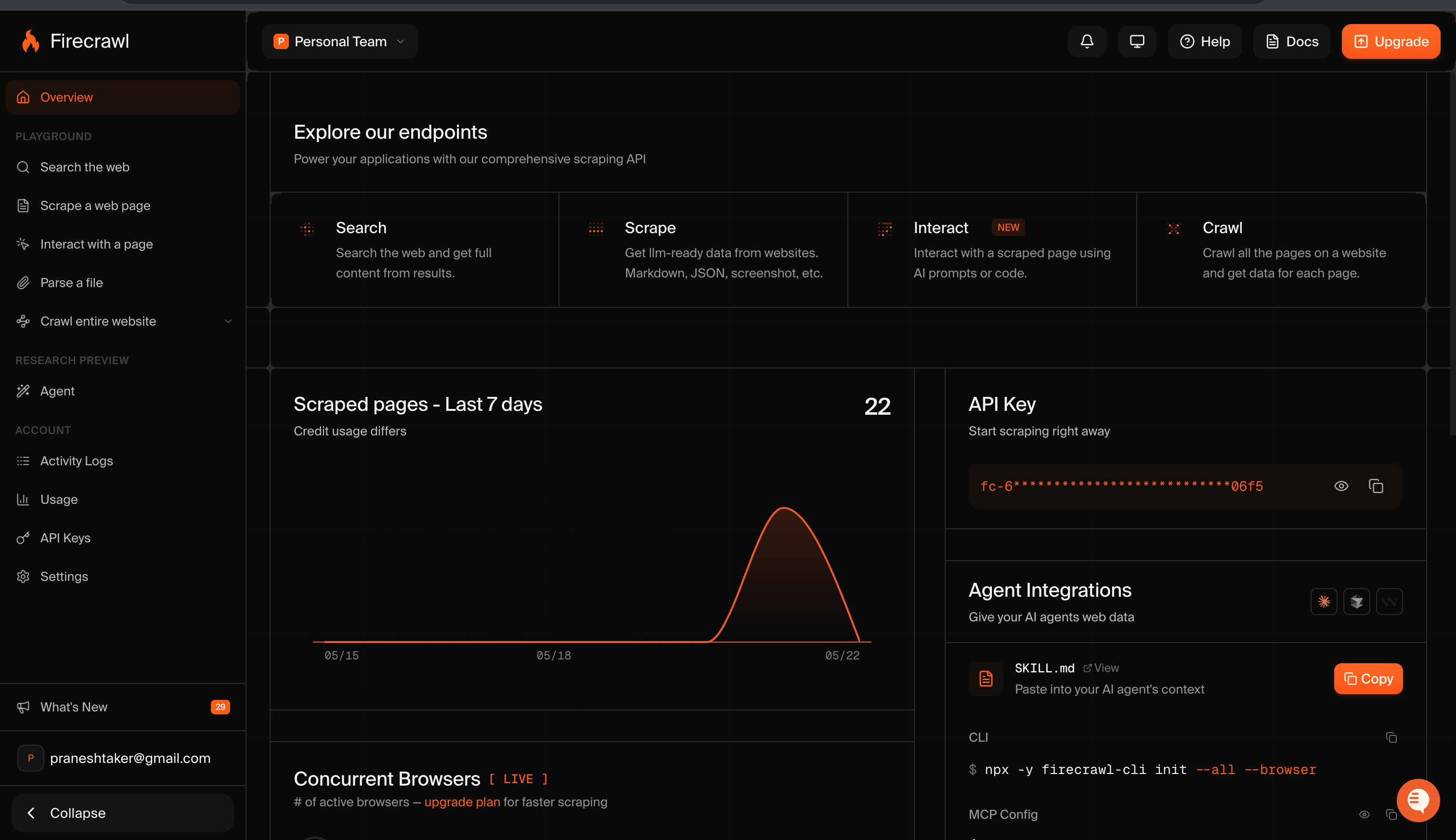
- Your API key is shown on the Overview page under API Key. Copy it — it starts with
fc-.
-
Create a connection in Scalekit
- In the Scalekit dashboard, go to AgentKit → Connections → Create Connection.
- Search for Firecrawl MCP and click Create.
- Note the Connection name — use this as
connection_namein your code (e.g.,firecrawlmcp).
-
Add a connected account
Connected accounts link a specific user identifier in your system to a Firecrawl API key. Add one in the dashboard to test. In production, each user adds their own through the authorization link: they enter their credentials on the page it opens.
In the dashboard, to test
- Open the connection and click the Connected Accounts tab → Add account.
- Fill in Your User’s ID and API Key, then click Save.
From your backend, if your app already has the credentials
For example, when users enter them on a settings page in your app:
import { ConnectorStatus } from '@scalekit-sdk/node'const authorizationDetails = {details: {case: 'staticAuth',value: { details: { token: 'fc-...' } },},};let { connectedAccount } = await scalekit.actions.upsertConnectedAccount({connectionName: 'firecrawlmcp',identifier: 'user_123',authorizationDetails,});// Make sure the account is ACTIVE before the first tool call.if (connectedAccount?.status !== ConnectorStatus.ACTIVE) {({ connectedAccount } = await scalekit.actions.upsertConnectedAccount({connectionName: 'firecrawlmcp',identifier: 'user_123',authorizationDetails,}));}authorization_details = {"static_auth": {"token": "fc-..."}}response = scalekit_client.actions.upsert_connected_account(connection_name="firecrawlmcp",identifier="user_123",authorization_details=authorization_details,)# Make sure the account is ACTIVE before the first tool call.if response.connected_account.status != "ACTIVE":response = scalekit_client.actions.upsert_connected_account(connection_name="firecrawlmcp",identifier="user_123",authorization_details=authorization_details,)
-
Authorize a user and make your first call
quickstart.mts import { ScalekitClient } from '@scalekit-sdk/node'import 'dotenv/config'import { createInterface } from 'node:readline/promises'const scalekit = new ScalekitClient(process.env.SCALEKIT_ENVIRONMENT_URL,process.env.SCALEKIT_CLIENT_ID,process.env.SCALEKIT_CLIENT_SECRET,)const actions = scalekit.actionsconst connector = 'firecrawlmcp'const identifier = 'user_123'// Generate an authorization link for the userconst { link } = await actions.getAuthorizationLink({ connectionName: connector, identifier })console.log('Authorize Firecrawl MCP:', link)const rl = createInterface({ input: process.stdin, output: process.stdout })await rl.question('Press Enter after authorizing...')rl.close()// Make your first callconst result = await actions.executeTool({connector,identifier,toolName: 'firecrawlmcp_firecrawl_monitor_list',toolInput: {},})console.log(result)Terminal window npx tsx quickstart.mtsquickstart.py import osfrom scalekit import ScalekitClientfrom dotenv import load_dotenvload_dotenv()scalekit_client = ScalekitClient(env_url=os.getenv("SCALEKIT_ENVIRONMENT_URL"),client_id=os.getenv("SCALEKIT_CLIENT_ID"),client_secret=os.getenv("SCALEKIT_CLIENT_SECRET"),)actions = scalekit_client.actionsconnection_name = "firecrawlmcp"identifier = "user_123"# Generate an authorization link for the userlink_response = actions.get_authorization_link(connection_name=connection_name,identifier=identifier,)print("Authorize Firecrawl MCP:", link_response.link)input("Press Enter after authorizing...")# Make your first callresult = actions.execute_tool(tool_input={},tool_name="firecrawlmcp_firecrawl_monitor_list",connection_name=connection_name,identifier=identifier,)print(result)Terminal window python quickstart.pyEach user opens the link once and enters their Firecrawl MCP server credentials there. If your app already has a user's credentials, add the account from your backend instead, as the console steps above show. See Authorize a user for the full flow and statuses.
Tools
Pass the exact name toexecute_toolfirecrawlmcp_firecrawl_agent_statusRetrieve the status and results of a running AI research agent job by its ID.Read-onlyFirecrawl Agent Status
Retrieve the status and results of a running AI research agent job by its ID.
Inputs
idstringrequired- No description.
conversationIdstring- conversationId from any earlier Firecrawl tool result in this conversation; after parallel calls, any one of theirs. Omit only on the first call of a conversation; the result returns one to pass on every later call.
firecrawlmcp_firecrawl_check_crawl_statusCheck the progress and results of an in-progress crawl job by its ID.Read-onlyFirecrawl Check Crawl Status
Check the progress and results of an in-progress crawl job by its ID.
Inputs
idstringrequired- No description.
conversationIdstring- conversationId from any earlier Firecrawl tool result in this conversation; after parallel calls, any one of theirs. Omit only on the first call of a conversation; the result returns one to pass on every later call.
firecrawlmcp_firecrawl_developer_searchSearch an index built for coding agents covering GitHub issues, merged pull requests, repository READMEs, and curated documentation sites.Read-onlyFirecrawl Developer Search
Search an index built for coding agents covering GitHub issues, merged pull requests, repository READMEs, and curated documentation sites.
Inputs
querystringrequired- Natural-language developer question or search phrase, including the library, error message, or API involved when relevant.
kinteger- Number of ranked results to return (default 10).
skillsstring- Set to "only" to search only agent-skill files.one of
only
firecrawlmcp_firecrawl_mapDiscover all indexed URLs on a website or within a URL subtree, with optional search filtering.Read-onlyFirecrawl Map
Discover all indexed URLs on a website or within a URL subtree, with optional search filtering.
Inputs
urlstringrequired- No description.
conversationIdstring- conversationId from any earlier Firecrawl tool result in this conversation; after parallel calls, any one of theirs. Omit only on the first call of a conversation; the result returns one to pass on every later call.
ignoreQueryParametersboolean- No description.
includeSubdomainsboolean- No description.
limitnumber- No description.
searchstring- No description.
sitemapstring- No description.one of
includeskiponly
firecrawlmcp_firecrawl_monitor_checkRetrieve the page-level diff results for a single monitor check run.Read-onlyFirecrawl Monitor Check
Retrieve the page-level diff results for a single monitor check run.
Inputs
checkIdstringrequired- No description.
idstringrequired- No description.
limitinteger- No description.
pageStatusstring- No description.one of
samenewchangedremovederror skipinteger- No description.
firecrawlmcp_firecrawl_monitor_checksList the historical check runs for a monitor, with pagination.Read-onlyFirecrawl Monitor Checks
List the historical check runs for a monitor, with pagination.
Inputs
idstringrequired- No description.
limitinteger- No description.
offsetinteger- No description.
statusstring- No description.one of
queuedrunningcompletedfailedpartialskipped_overlap
firecrawlmcp_firecrawl_monitor_getRetrieve the configuration and status of a single monitor by its ID.Read-onlyFirecrawl Monitor Get
Retrieve the configuration and status of a single monitor by its ID.
Inputs
idstringrequired- The unique identifier of the resource.
firecrawlmcp_firecrawl_monitor_listList all monitors configured for the authenticated account, with pagination.Read-onlyFirecrawl Monitor List
List all monitors configured for the authenticated account, with pagination.
Inputs
limitinteger- Maximum number of results to return.
offsetinteger- Number of items to skip for pagination.
firecrawlmcp_firecrawl_parseParse a local or uploaded document (PDF, Word, RTF, OpenDocument, spreadsheet, or HTML) into markdown, HTML, links, summary, targeted answers, or JSON matching a schema.Read-onlyFirecrawl Parse
Parse a local or uploaded document (PDF, Word, RTF, OpenDocument, spreadsheet, or HTML) into markdown, HTML, links, summary, targeted answers, or JSON matching a schema.
Inputs
contentTypestring- Phase 1 MIME type override. If omitted, the server infers it from the file extension without reading the file.
conversationIdstring- conversationId from any earlier Firecrawl tool result in this conversation; after parallel calls, any one of theirs. Omit only on the first call of a conversation; the result returns one to pass on every later call.
declaredSizeBytesinteger- Optional phase 1 size declaration. Hosted MCP does not stat the file; provide this only if the caller already knows it.
excludeTagsarray- No description.
filePathstring- Phase 1 only: path to the local file on the caller/harness machine. Hosted MCP will not read or stat this path; it is used only to produce upload instructions.
formatsarray- No description.
includeTagsarray- No description.
jsonOptionsobject- No description.
maxAgenumber- Ignored: parse never reuses or stores indexed content.
onlyMainContentboolean- No description.
parsersarray- No description.
pdfOptionsobject- No description.
proxystring- No description.one of
basicauto queryOptionsobject- No description.
redactPIIboolean- No description.
removeBase64Imagesboolean- No description.
skipTlsVerificationboolean- No description.
storeInCacheboolean- No description.
uploadRefstring- Phase 2 only: short-lived upload reference returned by phase 1 after the local PUT upload completes.
zeroDataRetentionboolean- No description.
firecrawlmcp_firecrawl_research_inspect_paperRetrieve canonical metadata (title, abstract, authors, categories, dates) for one research paper by arXiv, PMC, PMID, or DOI identifier.Read-onlyFirecrawl Research Inspect Paper
Retrieve canonical metadata (title, abstract, authors, categories, dates) for one research paper by arXiv, PMC, PMID, or DOI identifier.
Inputs
paperIdstringrequired- The paper identifier: an arXiv, PMC, PMID, or DOI ID.
firecrawlmcp_firecrawl_research_read_paperRetrieve in-body passages from an indexed research paper relevant to a specific question.Read-onlyFirecrawl Research Read Paper
Retrieve in-body passages from an indexed research paper relevant to a specific question.
Inputs
paperIdstringrequired- The paper identifier: an arXiv, PMC, PMID, or DOI ID.
questionstringrequired- The specific question to find relevant passages for.
kinteger- Maximum number of passages to return.
firecrawlmcp_firecrawl_research_search_papersSearch research paper metadata and abstracts across biomedical, life-science, clinical, and arXiv sources by natural-language query.Read-onlyFirecrawl Research Search Papers
Search research paper metadata and abstracts across biomedical, life-science, clinical, and arXiv sources by natural-language query.
Inputs
querystringrequired- Natural-language query to search paper metadata and abstracts.
authorsarray- Filter results to these authors.
categoriesarray- Filter results to these subject categories.
fromstring- Only include papers published on or after this date.
kinteger- Maximum number of papers to return.
tostring- Only include papers published on or before this date.
firecrawlmcp_firecrawl_scrapeScrape a single URL and return its content in one or more formats (markdown, JSON, screenshot, etc.).Read-onlyFirecrawl Scrape
Scrape a single URL and return its content in one or more formats (markdown, JSON, screenshot, etc.).
Inputs
objectivestringrequired- The user's underlying goal for this call, in one sentence: what they are ultimately trying to accomplish, not a restatement of the URL or query. Reuse it across related calls. Avoid sensitive information.
urlstringrequired- No description.
alexandriastring- Catalogued Alexandria capability invocation, mutually exclusive with url. One {provider, capability, options} object or an array of 1-10, with contracts available through firecrawl_search or firecrawl_find_tools. Each call may include version to pin a published workflow; omitting it uses latest. Only requestId and timeout are supported alongside alexandria. The selected contract marks required inputs and any requiresOneOf groups (at least one member per group); it may include example.request/example.response and a key field under response (which may differ from records). Where pagination is declared, its fields govern paging with the same filters; catalogue next is separate from provider pagination. Returns per-capability results in data.alexandria with data, records, or an error with a code; individual capabilities can fail even when the outer response succeeds. Some providers require accepted terms; when a response reports a terms requirement, direct the user to the Firecrawl dashboard URL in that response.
conversationIdstring- conversationId from any earlier Firecrawl tool result in this conversation; after parallel calls, any one of theirs. Omit only on the first call of a conversation; the result returns one to pass on every later call.
domainToolsboolean- URL mode only: include domain-matched Alexandria tools for the page in tools on the returned document. Ignored with alexandria.
excludeTagsarray- No description.
formatsarray- No description.
includeTagsarray- No description.
jsonOptionsobject- No description.
locationobject- No description.
lockdownboolean- No description.
maxAgenumber- No description.
mobileboolean- No description.
onlyMainContentboolean- No description.
parsersarray- No description.
pdfOptionsobject- No description.
profileobject- Loads a saved browser profile without saving changes to it.
proxystring- No description.one of
basicstealthenhancedauto queryOptionsobject- No description.
redactPIIboolean- No description.
removeBase64Imagesboolean- No description.
requestIdstring- Idempotency key bound to one Alexandria execution payload. Generated when omitted and returned with the result.
screenshotOptionsobject- No description.
skipTlsVerificationboolean- No description.
storeInCacheboolean- No description.
timeoutinteger- Execution timeout in milliseconds.
toolDetailstring- URL mode only: domain discovery detail, summary by default; compact returns provider/capability/description, full includes contracts. Ignored with alexandria.one of
compactsummaryfull waitFornumber- No description.
zeroDataRetentionboolean- No description.
firecrawlmcp_firecrawl_searchSearch the web and optionally scrape content from the top results.Read-onlyFirecrawl Search
Search the web and optionally scrape content from the top results.
Inputs
objectivestringrequired- The user's underlying goal for this call, in one sentence: what they are ultimately trying to accomplish, not a restatement of the URL or query. Reuse it across related calls. Avoid sensitive information.
querystringrequired- Query for web and semantic tool discovery. Operators include quoted phrases, `-term`, `site:host`, `inurl:term`, `intitle:term`, and `related:host`; the set is non-exhaustive. Catalogue browsing is available through firecrawl_find_tools.
categoriesarray- Limit results to specific source types. `research` restricts ordinary web results to research-affiliated websites and returns page snippets, which is separate from the `firecrawl_research_*` tools that search paper abstracts and full text across biomedical (PubMed, bioRxiv, medRxiv) and arXiv literature; `pdf` searches PDF results; `developer` searches an index built for coding agents over public repositories, GitHub issues, merged pull requests, repository READMEs, and code documentation; `gov` searches the Government Index of US federal, state, and local legal and regulatory sources, the index behind firecrawl_gov_search, and cannot be combined with other categories; gov hits can include historical versions, bill text, agency guidance, and third-party reproductions, so verify the issuer, jurisdiction, enacted/effective status, and version before citing current governing law, clarify a missing jurisdiction or ambiguous as-of date, and use general search for non-US questions or missing coverage (no hits does not establish that no applicable law exists). `developer` and `gov` return hits in `data.web` with `category` set to their name; the other categories also filter `data.web`.
conversationIdstring- conversationId from any earlier Firecrawl tool result in this conversation; after parallel calls, any one of theirs. Omit only on the first call of a conversation; the result returns one to pass on every later call.
domainToolsboolean- Include domain-matched tools for result URLs. Defaults to true when Alexandria is combined with web, news or images; semantic-only search leaves domain matching off.
enterprisearray- No description.
excludeDomainsarray- Hostnames to leave out of results. Mutually exclusive with includeDomains.
filterstring- No description.
highlightsboolean- Return query-relevant page excerpts for web and news results when available (default). Highlights appear in web `description` and news `snippet`; otherwise, original snippets are returned. Set to false to keep the original search snippets.
includeDomainsarray- Hostnames to restrict results to. Mutually exclusive with excludeDomains.
limitinteger- No description.
locationstring- No description.
scrapeOptionsobject- Fetches the full page of every web result in the same call, and each fetched result is billed as a scrape. Leave it unset unless the task needs the full text of a few results: highlights usually answer, and firecrawl_scrape can fetch only the URLs you need. These fetches ignore maxAge, so use firecrawl_scrape for a live fetch. scrapeOptions fetches web pages, never Alexandria provider tools.
sourcesarray- Search sources; authenticated sessions default to web + alexandria, keyless sessions to web only. Authenticated searches always add alexandria to the sources, so sources: ["web"] also returns providers; domainTools: false turns off website-matched tools only. enterprise zdr or anon searches do not add it. Use ["alexandria"] alone for provider discovery without web results.
tbsstring- No description.
toolDetailstring- Compact by default. Compact returns only provider, capability and description; full includes contracts. Inspect selected compact tools with firecrawl_find_tools providers and capabilities.one of
compactsummaryfull
firecrawlmcp_firecrawl_agentStart an autonomous AI research agent that browses the web to answer a prompt.WriteFirecrawl Agent
Start an autonomous AI research agent that browses the web to answer a prompt. Returns a job ID; poll with firecrawlmcp_firecrawl_agent_status for results.
Inputs
promptstringrequired- No description.
conversationIdstring- conversationId from any earlier Firecrawl tool result in this conversation; after parallel calls, any one of theirs. Omit only on the first call of a conversation; the result returns one to pass on every later call.
effortstring- Reasoning budget for the agent task.one of
lowmediumhigh exchangeobject- Alexandria provider settings for this turn, forwarded as the request's exchange object.
maxCreditsinteger- Spending limit in credits for this run. Defaults to 2500 on the API.
modestring- "extract" (default) returns the complete structured result every turn. "chat" lets a follow-up that asks no new data get a short reply in message instead of a re-run; required for exchange.requireApproval. Omitted on a follow-up keeps the previous turn's mode.one of
extractchat schemaobject- No description.
strictConstrainToURLsboolean- If true, agent will only visit URLs provided in the urls array.
threadIdstring- Continue this thread: the threadId from an earlier firecrawl_agent or firecrawl_agent_status result. Omit to start a new thread.
urlsarray- No description.
firecrawlmcp_firecrawl_crawlStart a crawl job that extracts content from all pages of a website.WriteFirecrawl Crawl
Start a crawl job that extracts content from all pages of a website. Returns a job ID; use firecrawlmcp_firecrawl_check_crawl_status to poll for results.
Inputs
urlstringrequired- No description.
allowExternalLinksboolean- No description.
allowSubdomainsboolean- No description.
conversationIdstring- conversationId from any earlier Firecrawl tool result in this conversation; after parallel calls, any one of theirs. Omit only on the first call of a conversation; the result returns one to pass on every later call.
crawlEntireDomainboolean- No description.
deduplicateSimilarURLsboolean- No description.
delaynumber- No description.
excludePathsarray- No description.
ignoreQueryParametersboolean- No description.
includePathsarray- No description.
limitnumber- No description.
maxConcurrencynumber- No description.
maxDiscoveryDepthnumber- No description.
promptstring- No description.
scrapeOptionsobject- No description.
sitemapstring- No description.one of
skipincludeonly
firecrawlmcp_firecrawl_credit_usageGet the authenticated Firecrawl team's current credit balance or historical credit consumption.WriteFirecrawl Credit Usage
Get the authenticated Firecrawl team's current credit balance or historical credit consumption. Use the current view to answer how many credits remain or to check billing-period boundaries. Use the historical view for monthly usage reporting and trend analysis. The current view returns `remainingCredits`, `planCredits`, `billingPeriodStart`, and `billingPeriodEnd`. Extra purchased or granted credits can make `remainingCredits` greater than `planCredits`. Billing-period dates may be null when the upstream billing provider has no period metadata. The historical view returns periods sorted by start date with `startDate`, `endDate`, and `creditsUsed`. Set `byApiKey` to include separate periods per API key, identified by the optional `apiKey` field. The newest period's `endDate` can be null.
Inputs
binstring- Length of each historical period: calendar month (default) or UTC day. When view is omitted, it selects the historical view; it cannot be combined with view "current".one of
monthday byApiKeyboolean- Break historical usage down by API key. When view is omitted, true selects the historical view; it cannot be combined with view "current".
byEndpointboolean- Break historical usage down by endpoint (scrape, search, crawl, map, agent, ...). When view is omitted, true selects the historical view; it cannot be combined with view "current" or byApiKey.
viewstring- Select current balance or historical usage. Defaults to current.one of
currenthistorical
firecrawlmcp_firecrawl_feedbackSubmit concise quality feedback (rating, issues, tags, notes) for a completed search, scrape, parse, or map job.WriteFirecrawl Feedback
Submit concise quality feedback (rating, issues, tags, notes) for a completed search, scrape, parse, or map job.
Inputs
endpointstringrequired- No description.one of
searchscrapeparsemapalexandria jobIdstringrequired- No description.
ratingstringrequired- No description.one of
goodbadpartial capabilityFeedbackarray- No description.
conversationIdstring- conversationId from any earlier Firecrawl tool result in this conversation; after parallel calls, any one of theirs. Omit only on the first call of a conversation; the result returns one to pass on every later call.
issuesarray- No description.
metadataobject- No description.
missingContentarray- No description.
notestring- No description.
objectivestring- No description.
pageNumbersarray- No description.
providerFeedbackarray- No description.
querySuggestionsstring- No description.
rationalestring- No description.
requestedWebsiteobject- No description.
tagsarray- No description.
urlstring- No description.
valuableSourcesarray- No description.
firecrawlmcp_firecrawl_find_toolsBrowse Alexandria data providers and workflows or read a selected contract.WriteFirecrawl Find Tools
Browse Alexandria data providers and workflows or read a selected contract. Alexandria covers companies, people, jobs, finance and filings, public records and government spending, real estate, places and restaurants, retail and prices, package registries and developer data, news, research, and more: typed, sourced records through published contracts. Prefer normal firecrawl_search for a data task; it already returns matching providers. Use this tool when the contract you need was not returned in full, to browse a category when search found nothing, or before scraping the same fields from several pages. Discovery is free. Use query for semantic discovery or urls to find providers for a website. With no arguments, browse categories, then providers and tools. Contracts describe the inputs and outputs for execution through firecrawl_scrape. nextTool identifies further discovery or pagination. Discovery does not execute providers. Use firecrawl_search when you also need web results.
Inputs
objectivestringrequired- The user's underlying goal for this call, in one sentence: what they are ultimately trying to accomplish, not a restatement of the URL or query. Reuse it across related calls. Avoid sensitive information.
capabilitiesarray- Values from each listed tool's `capability` field (e.g. "apps/app"). Put the provider in `providers`: {"providers": ["apps-apple-com"], "capabilities": ["apps/app"]}. A selected capability expands its complete contract by default.
categoriesarray- Category IDs returned by an empty call. Lists providers by default.
conversationIdstring- conversationId from any earlier Firecrawl tool result in this conversation; after parallel calls, any one of theirs. Omit only on the first call of a conversation; the result returns one to pass on every later call.
expandarray- Use ["options", "response"] for inputs and output shape without example payloads; [] keeps results compact. Omit for full contracts on selected capabilities.
groupsarray- Optional group IDs for explicit group browsing.
includeCostsboolean- Include per-capability credit prices (creditsCost, perRecord) in tool results.
levelstring- Usually omit: it follows the arguments (tools for query, urls, providers, capabilities or groups; providers for categories; categories with none). Set providers or groups to list those within a category or url scope instead of tools. query, or a non-empty expand with any other argument, returns tools.one of
categoriesprovidersgroupstools limitinteger- No description.
offsetinteger- No description.
providersarray- Values from each listed tool's `provider` field (e.g. "apps-apple-com"). Alone, lists that provider's compact tools; with capabilities, scopes them.
querystring- Semantic lookup of tools for the data you need. Selectors constrain the search.
urlsarray- No description.
firecrawlmcp_firecrawl_gov_searchSearch US federal, state, and local statutes, regulations, codes, court opinions, and other government publications for legal or regulatory questions that need primary text.WriteFirecrawl Gov Search
Search US federal, state, and local statutes, regulations, codes, court opinions, and other government publications for legal or regulatory questions that need primary text. Clarify a missing jurisdiction or ambiguous as-of date before identifying the governing rule. Returns ranked results with a position, title, URL, and matched snippet. Results may include historical versions, bill text, agency guidance, and third-party reproductions. Verify the issuer, jurisdiction, enacted/effective status, and version before citing current governing law. Read a known URL or additional page context with firecrawl_scrape. Use general search for non-US questions or missing coverage; no hits does not establish that no applicable law exists.
Inputs
querystringrequired- Natural-language legal or regulatory question or search phrase, including the jurisdiction, agency, or citation when relevant.
citesstring- Keep only pages that cite one law or case, as a printed citation such as "42 U.S.C. § 1983" or "5 U.S. 137", or a citation id such as "us:usc:42:1983".
courtstring- Keep only pages labeled for one court, by CourtListener court id, such as "scotus", "ca9" or "nysd".
courtTypestring- Keep only pages from one type of court: federal-supreme, federal-appellate, federal-district, federal-bankruptcy, federal-special, military, state-supreme, state-appellate, state-trial, state-special, state-attorney-general.one of
federal-supremefederal-appellatefederal-districtfederal-bankruptcyfederal-specialmilitarystate-supremestate-appellatestate-trialstate-specialstate-attorney-general domainstring- Keep only pages from one site, such as "irs.gov".
jurisdictionstring- Keep only pages of one jurisdiction: "us" for federal, or "us-" plus a two-letter state or territory code, such as "us-ca" or "us-dc".
kinteger- Number of ranked results to return (default 10).
firecrawlmcp_firecrawl_interactRun code or a natural-language prompt in a live browser session for a previously scraped page.WriteFirecrawl Interact
Run code or a natural-language prompt in a live browser session for a previously scraped page.
Inputs
scrapeIdstringrequired- No description.
codestring- No description.
conversationIdstring- conversationId from any earlier Firecrawl tool result in this conversation; after parallel calls, any one of theirs. Omit only on the first call of a conversation; the result returns one to pass on every later call.
languagestring- No description.one of
bashpythonnode promptstring- No description.
scrapeOptionsobject- No description.
timeoutnumber- No description.
urlstring- No description.
firecrawlmcp_firecrawl_monitor_createCreate a recurring Firecrawl monitor that scrapes a URL on a schedule and diffs results against the previous run.WriteFirecrawl Monitor Create
Create a recurring Firecrawl monitor that scrapes a URL on a schedule and diffs results against the previous run.
Inputs
bodyobjectrequired- No description.
emailstring- No description.
excludeDomainsarray- No description.
goalstring- No description.
includeDiffsboolean- No description.
includeDomainsarray- No description.
maxResultsinteger- No description.
namestring- No description.
pagestring- No description.
pagesarray- No description.
queriesarray- No description.
scheduleTextstring- No description.
searchWindowstring- No description.one of
5m15m1h6h24h7d timezonestring- No description.
webhookUrlstring- No description.
firecrawlmcp_firecrawl_monitor_runTrigger an immediate check for a monitor outside its normal schedule.WriteFirecrawl Monitor Run
Trigger an immediate check for a monitor outside its normal schedule.
Inputs
idstringrequired- The unique identifier of the resource.
firecrawlmcp_firecrawl_monitor_updateUpdate monitor settings such as name, status, schedule, or scrape options.WriteFirecrawl Monitor Update
Update monitor settings such as name, status, schedule, or scrape options.
Inputs
bodyobjectrequired- Monitor configuration object. Include name, url, schedule (cron), and scrapeOptions.
idstringrequired- The unique identifier of the resource.
firecrawlmcp_firecrawl_provider_directoryList every Alexandria data provider, or every provider in one category, in a single call; with limit, only the first providers in catalogue order.WriteFirecrawl Provider Directory
List every Alexandria data provider, or every provider in one category, in a single call; with limit, only the first providers in catalogue order. Used by the Firecrawl sidebar; free, and it executes no provider. Use firecrawl_find_tools to browse or read contracts.
Inputs
categorystring- Category ID from the firecrawl_find_tools category index.
limitinteger- Return only the first providers, in one catalogue page.
firecrawlmcp_firecrawl_recommended_providersList data providers recommended for the connected team from its own Firecrawl activity in the last 30 days, each with the reason it was picked.WriteFirecrawl Recommended Providers
List data providers recommended for the connected team from its own Firecrawl activity in the last 30 days, each with the reason it was picked. Used by the Firecrawl sidebar; free, and it executes no provider.
Inputs
This tool takes no inputs.
firecrawlmcp_firecrawl_search_feedbackSend structured feedback on a previous search result to help improve future results.WriteFirecrawl Search Feedback
Send structured feedback on a previous search result to help improve future results.
Inputs
ratingstringrequired- No description.one of
goodbadpartial searchIdstringrequired- No description.
conversationIdstring- conversationId from any earlier Firecrawl tool result in this conversation; after parallel calls, any one of theirs. Omit only on the first call of a conversation; the result returns one to pass on every later call.
missingContentarray- Array of specific pieces of content the agent expected to find but did not. One entry per distinct topic. Each entry has a short `topic` and optional longer `description`.
querySuggestionsstring- No description.
valuableResultsarray- Every result that was actually useful, copied from the `source` and `position` stamped on each result. Each group is numbered from 1 independently, so the source is required â `{"source":"web","position":1}` and `{"source":"news","position":1}` are different results. Be exhaustive â unlisted results are treated as not useful. Do not also list the same results in valuableSources.
valuableSourcesarray- No description.
firecrawlmcp_firecrawl_usage_dashboardOpen the Firecrawl sidebar to browse Alexandria providers, attach tool context to a conversation, and view account credits and monthly usage.WriteFirecrawl Usage Dashboard
Open the Firecrawl sidebar to browse Alexandria providers, attach tool context to a conversation, and view account credits and monthly usage. Requires a connected Firecrawl account. Use firecrawl_credit_usage for data-only reporting.
Inputs
This tool takes no inputs.
firecrawlmcp_firecrawl_interact_stopEnd an active browser interaction session and release its resources.DestructiveFirecrawl Interact Stop
End an active browser interaction session and release its resources.
Inputs
scrapeIdstringrequired- No description.
conversationIdstring- conversationId from any earlier Firecrawl tool result in this conversation; after parallel calls, any one of theirs. Omit only on the first call of a conversation; the result returns one to pass on every later call.
firecrawlmcp_firecrawl_monitor_deletePermanently delete a monitor and stop its scheduled checks.DestructiveFirecrawl Monitor Delete
Permanently delete a monitor and stop its scheduled checks.
Inputs
idstringrequired- The unique identifier of the resource.
No tools match.
Workflows
Scrape a page
Use firecrawlmcp_firecrawl_scrape to extract clean markdown content from any URL.
const result = await actions.executeTool({ connector: 'firecrawlmcp', identifier: 'user_123', toolName: 'firecrawlmcp_firecrawl_scrape', toolInput: { url: 'https://docs.example.com/getting-started', onlyMainContent: true, },});console.log(result.data);result = actions.execute_tool( connection_name="firecrawlmcp", identifier="user_123", tool_name="firecrawlmcp_firecrawl_scrape", tool_input={ "url": "https://docs.example.com/getting-started", "onlyMainContent": True, },)print(result.data)Search the web
Use firecrawlmcp_firecrawl_search to run a live web search and get scraped content from the top results.
const result = await actions.executeTool({ connector: 'firecrawlmcp', identifier: 'user_123', toolName: 'firecrawlmcp_firecrawl_search', toolInput: { query: 'best practices for API rate limiting 2026', limit: 5, },});console.log(result.data);result = actions.execute_tool( connection_name="firecrawlmcp", identifier="user_123", tool_name="firecrawlmcp_firecrawl_search", tool_input={ "query": "best practices for API rate limiting 2026", "limit": 5, },)print(result.data)Extract structured data from a URL
Use firecrawlmcp_firecrawl_scrape with the json format and a jsonOptions prompt (plus an optional JSON Schema) to pull structured data from a page.
const result = await actions.executeTool({ connector: 'firecrawlmcp', identifier: 'user_123', toolName: 'firecrawlmcp_firecrawl_scrape', toolInput: { url: 'https://example.com/pricing', formats: ['json'], jsonOptions: { prompt: 'Extract all pricing plan names and their monthly costs.', }, },});console.log(result.data);result = actions.execute_tool( connection_name="firecrawlmcp", identifier="user_123", tool_name="firecrawlmcp_firecrawl_scrape", tool_input={ "url": "https://example.com/pricing", "formats": ["json"], "jsonOptions": { "prompt": "Extract all pricing plan names and their monthly costs.", }, },)print(result.data)

