
Vimeo
Connect to Vimeo API v3.4. Upload and manage videos, organize content into showcases and folders, manage channels, handle comments, likes, and webhooks.
Connect to Vimeo API v3.4. Upload and manage videos, organize content into showcases and folders, manage channels, handle comments, likes, and webhooks.

Supports authentication: OAuth 2.0
Set up the agent connector
Section titled “Set up the agent connector”Register your Vimeo app credentials with Scalekit so it can manage the OAuth 2.0 authentication flow and token lifecycle on your behalf. You’ll need a Client Identifier and Client Secret from the Vimeo Developer Portal.
-
Create a Vimeo app
-
Go to the Vimeo Developer Portal and click Create an app in the top-right corner.
-
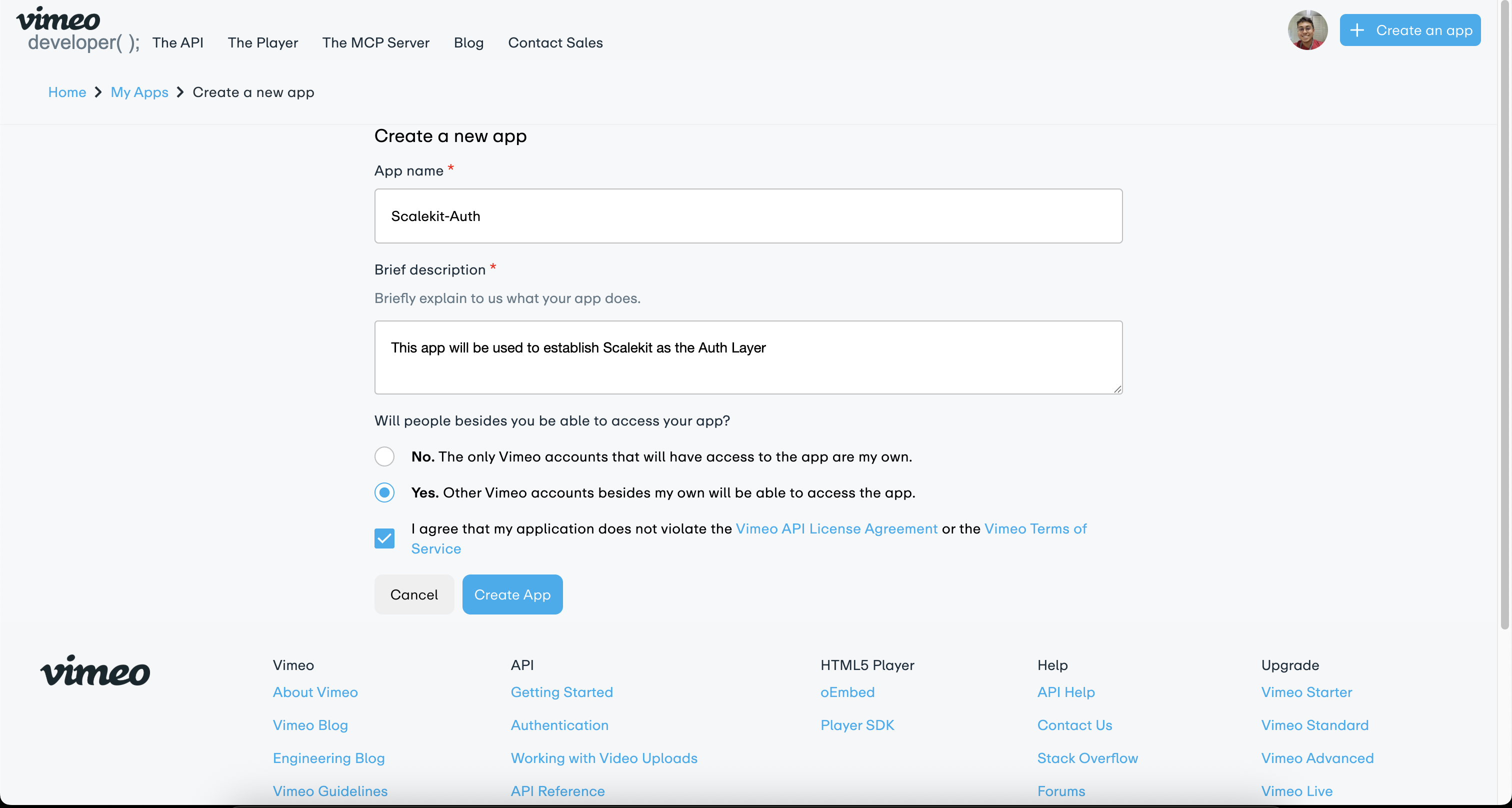
Fill in the required fields:
- App name — enter a name for your app (e.g.,
Scalekit-Auth) - Brief description — describe what the app does
- Select Yes under “Will people besides you be able to access your app?” to allow other Vimeo accounts to authenticate
- Check the box to agree to the Vimeo API License Agreement and Terms of Service
- App name — enter a name for your app (e.g.,
-
Click Create App.
-
-
Copy your Client Identifier
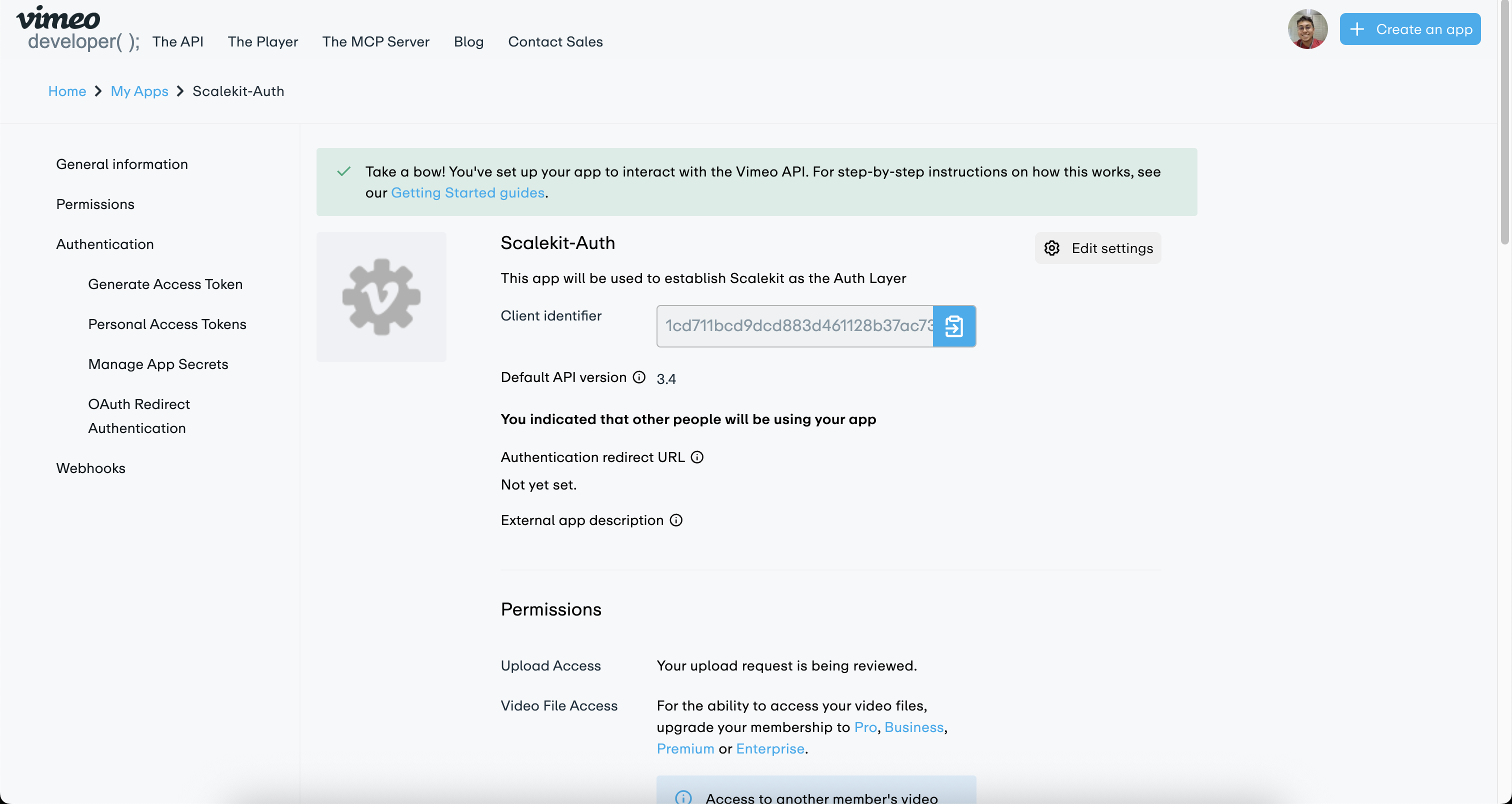
After creating the app, you are taken to the app’s settings page. Copy the Client identifier — you’ll need it in a later step.
-
Create a connection in Scalekit
-
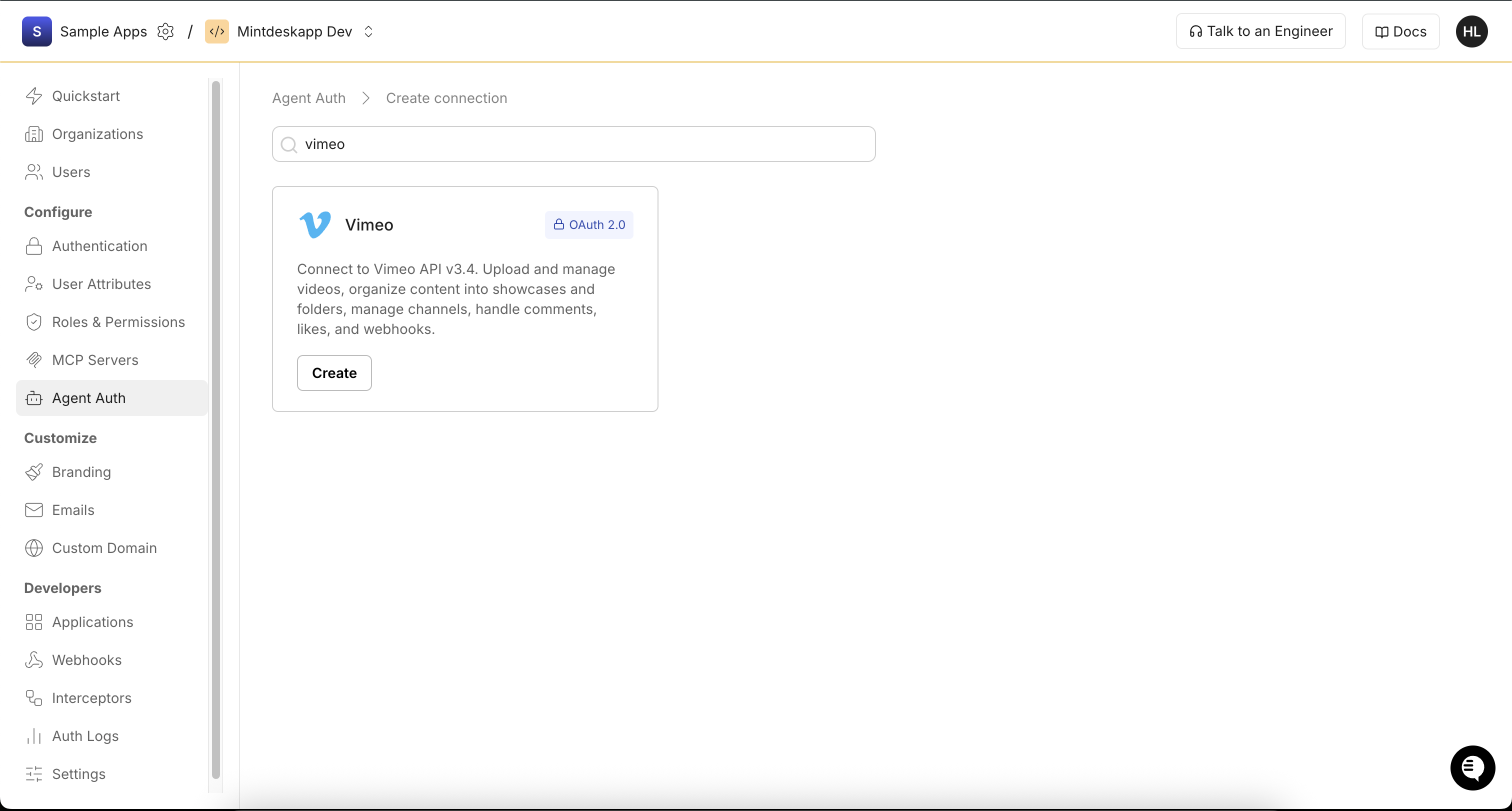
In Scalekit dashboard, go to Agent Auth → Create Connection. Search for Vimeo and click Create.
-
Copy the Redirect URI from the connection configuration panel. It looks like
https://<SCALEKIT_ENVIRONMENT_URL>/sso/v1/oauth/<CONNECTION_ID>/callback.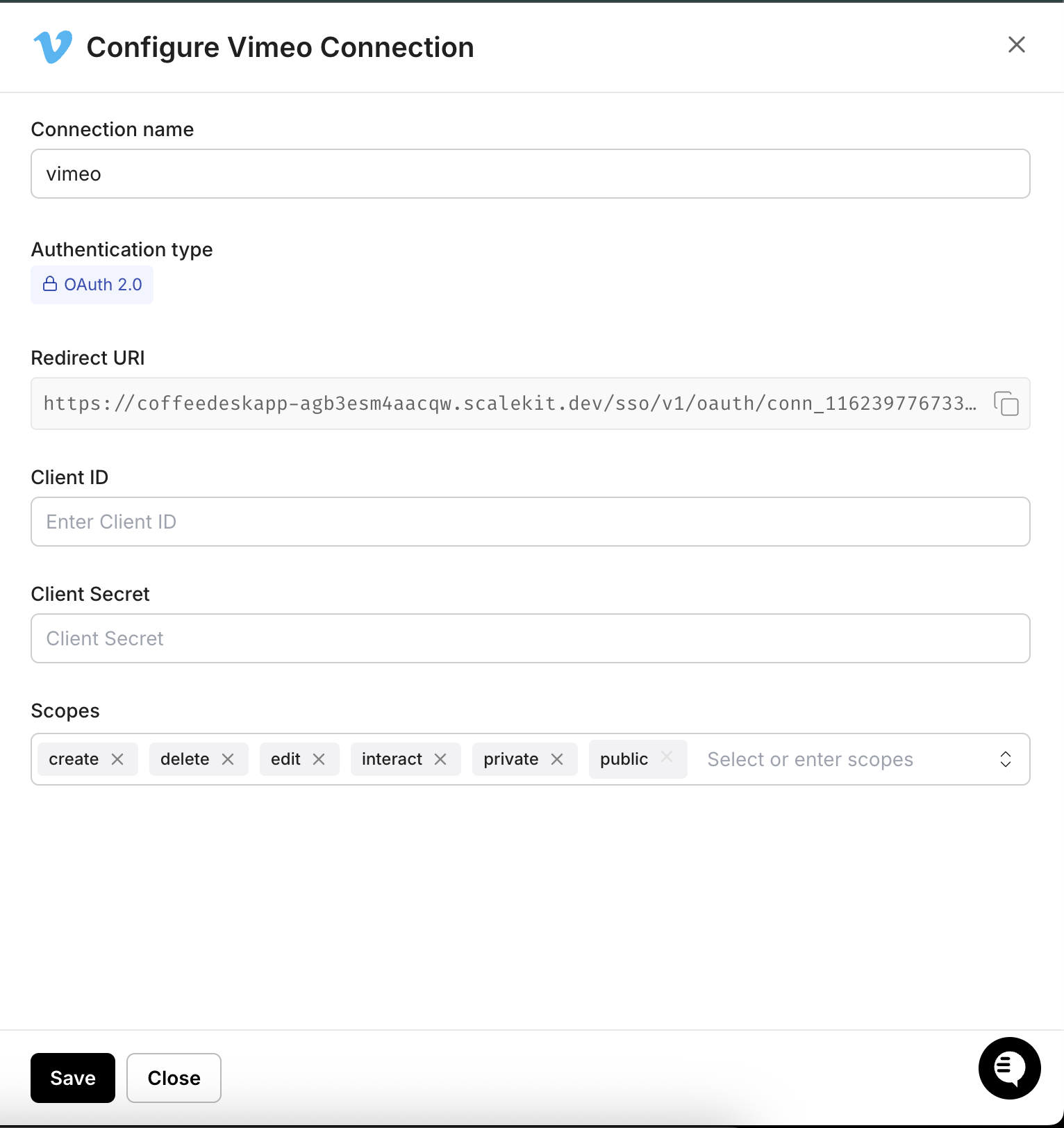
-
-
Configure the callback URL in Vimeo
-
Back in the Vimeo Developer Portal, open your app and click Edit settings.
-
Paste the Scalekit Redirect URI into the App URL field and the Your callback URLs field.
-
Click Add secret under Client secrets to generate a new client secret. Copy the secret value.
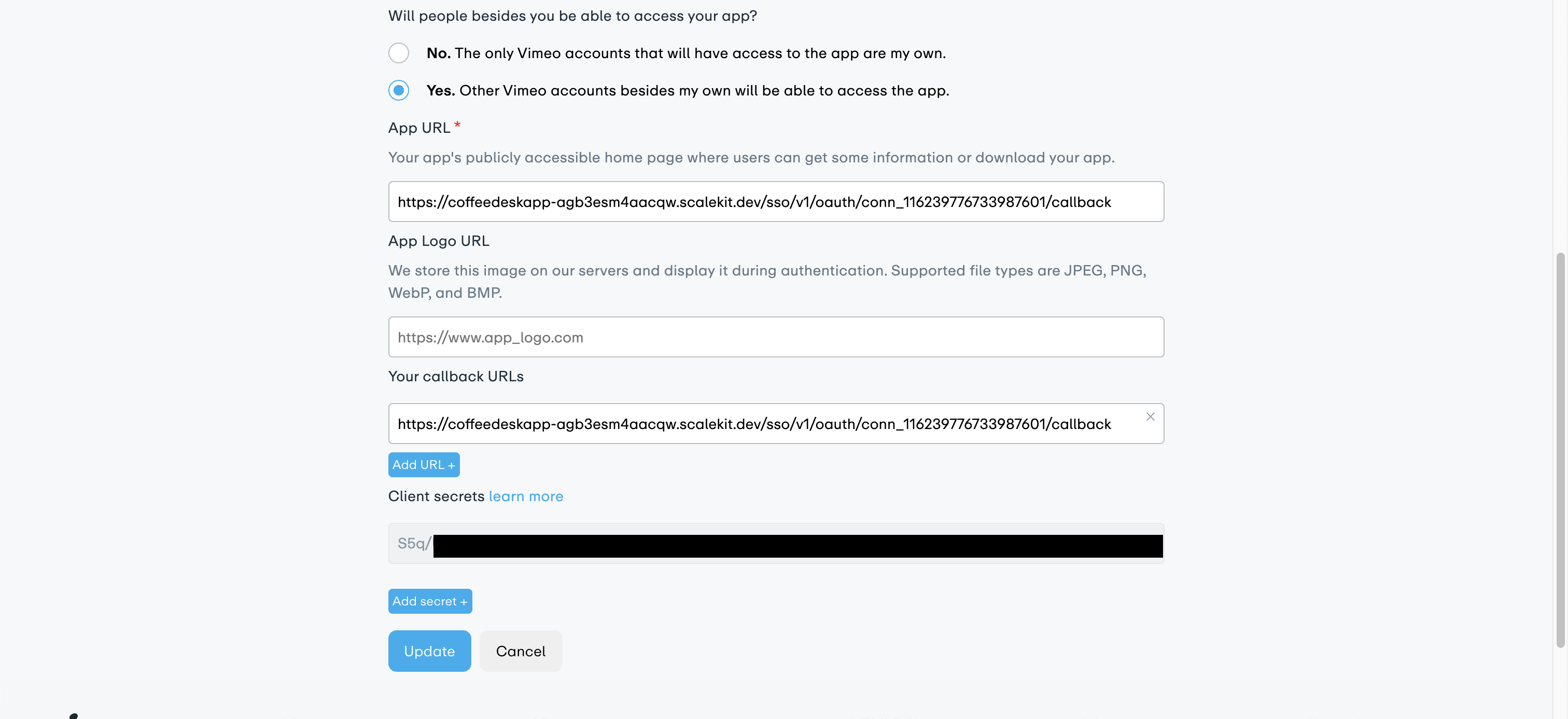
-
Click Update to save.
-
-
Add credentials in Scalekit
-
In Scalekit dashboard, go to Agent Auth → Connections and open the Vimeo connection you created.
-
Enter your credentials:
- Client ID — the Client Identifier from your Vimeo app
- Client Secret — the secret you generated in step 4
- Scopes — select the scopes your app needs (e.g.,
create,delete,edit,interact,private,public)
-
Click Save.
-
Tool list
Section titled “Tool list”vimeo_categories_list
Section titled “vimeo_categories_list”Retrieve all top-level Vimeo content categories (e.g., Animation, Documentary, Music). Requires public scope.
| Name | Type | Required | Description |
|---|---|---|---|
direction | string | No | Sort direction |
page | integer | No | Page number of results |
per_page | integer | No | Number of categories per page |
sort | string | No | Sort order for categories |
vimeo_channel_videos_list
Section titled “vimeo_channel_videos_list”Retrieve all videos in a specific Vimeo channel. Requires public scope.
| Name | Type | Required | Description |
|---|---|---|---|
channel_id | string | Yes | Vimeo channel ID or slug |
direction | string | No | Sort direction |
filter | string | No | Filter videos by type |
page | integer | No | Page number of results |
per_page | integer | No | Number of videos per page |
query | string | No | Search query to filter channel videos |
sort | string | No | Sort order for videos |
vimeo_channels_list
Section titled “vimeo_channels_list”Retrieve a list of Vimeo channels. Can list all public channels or channels the authenticated user follows/manages. Requires public scope.
| Name | Type | Required | Description |
|---|---|---|---|
direction | string | No | Sort direction |
filter | string | No | Filter channels by type |
page | integer | No | Page number of results |
per_page | integer | No | Number of channels per page |
query | string | No | Search query to filter channels by name |
sort | string | No | Sort order for channels |
vimeo_folder_create
Section titled “vimeo_folder_create”Create a new folder (project) in the authenticated user’s Vimeo account for organizing private video content. Requires create scope.
| Name | Type | Required | Description |
|---|---|---|---|
name | string | Yes | Name of the new folder |
parent_folder_uri | string | No | URI of the parent folder to nest this folder inside |
vimeo_folder_video_add
Section titled “vimeo_folder_video_add”Move or add a video into a Vimeo folder (project). Requires edit scope.
| Name | Type | Required | Description |
|---|---|---|---|
folder_id | string | Yes | Folder (project) ID to add the video to |
video_id | string | Yes | Video ID to add to the folder |
vimeo_folder_videos_list
Section titled “vimeo_folder_videos_list”Retrieve all videos inside a specific Vimeo folder (project). Requires private scope.
| Name | Type | Required | Description |
|---|---|---|---|
direction | string | No | Sort direction |
filter | string | No | Filter videos by type |
folder_id | string | Yes | Folder (project) ID to list videos from |
page | integer | No | Page number of results |
per_page | integer | No | Number of videos per page |
query | string | No | Search query to filter videos by name |
sort | string | No | Sort order for videos |
vimeo_folders_list
Section titled “vimeo_folders_list”Retrieve all folders (projects) owned by the authenticated Vimeo user for organizing private video libraries. Requires private scope.
| Name | Type | Required | Description |
|---|---|---|---|
direction | string | No | Sort direction |
page | integer | No | Page number of results |
per_page | integer | No | Number of folders per page |
query | string | No | Search query to filter folders by name |
sort | string | No | Sort order for folders |
vimeo_following_list
Section titled “vimeo_following_list”Retrieve a list of Vimeo users that the authenticated user is following. Requires private scope.
| Name | Type | Required | Description |
|---|---|---|---|
direction | string | No | Sort direction |
filter | string | No | Filter following list by type |
page | integer | No | Page number of results |
per_page | integer | No | Number of users per page |
query | string | No | Search query to filter following list by name |
sort | string | No | Sort order |
vimeo_liked_videos_list
Section titled “vimeo_liked_videos_list”Retrieve all videos liked by the authenticated Vimeo user. Requires private scope.
| Name | Type | Required | Description |
|---|---|---|---|
direction | string | No | Sort direction |
filter | string | No | Filter liked videos by type |
page | integer | No | Page number of results |
per_page | integer | No | Number of videos per page |
sort | string | No | Sort order for liked videos |
vimeo_me_get
Section titled “vimeo_me_get”Retrieve the authenticated Vimeo user’s profile including account type, bio, location, stats, and links. Requires a valid Vimeo OAuth2 connection.
vimeo_my_videos_list
Section titled “vimeo_my_videos_list”Retrieve all videos uploaded by the authenticated Vimeo user. Supports filtering, sorting, and pagination. Requires private scope.
| Name | Type | Required | Description |
|---|---|---|---|
containing_uri | string | No | Filter videos that contain a specific URI |
direction | string | No | Sort direction |
filter | string | No | Filter videos by type |
page | integer | No | Page number of results |
per_page | integer | No | Number of videos per page |
query | string | No | Search query to filter videos by title or description |
sort | string | No | Sort order for video results |
vimeo_showcase_create
Section titled “vimeo_showcase_create”Create a new showcase (album) on Vimeo for organizing videos. Supports privacy, password protection, branding, and embed settings. Requires create scope.
| Name | Type | Required | Description |
|---|---|---|---|
brand_color | string | No | Hex color code for showcase branding |
description | string | No | Description of the showcase |
hide_nav | boolean | No | Whether to hide Vimeo navigation in the showcase |
hide_upcoming | boolean | No | Whether to hide upcoming live events in the showcase |
name | string | Yes | Name/title of the showcase |
password | string | No | Password for the showcase when privacy is set to ‘password’ |
privacy | string | No | Privacy setting for the showcase |
review_mode | boolean | No | Enable review mode for the showcase |
sort | string | No | Default sort for videos in the showcase |
vimeo_showcase_video_add
Section titled “vimeo_showcase_video_add”Add a video to a Vimeo showcase. Requires edit scope and ownership of both the showcase and the video.
| Name | Type | Required | Description |
|---|---|---|---|
album_id | string | Yes | Showcase (album) ID to add the video to |
video_id | string | Yes | Video ID to add to the showcase |
vimeo_showcase_videos_list
Section titled “vimeo_showcase_videos_list”Retrieve all videos in a specific Vimeo showcase. Requires private scope.
| Name | Type | Required | Description |
|---|---|---|---|
album_id | string | Yes | Showcase (album) ID |
direction | string | No | Sort direction |
page | integer | No | Page number of results |
per_page | integer | No | Number of videos per page |
sort | string | No | Sort order for videos |
vimeo_showcases_list
Section titled “vimeo_showcases_list”Retrieve all showcases (formerly albums) owned by the authenticated Vimeo user. Requires private scope.
| Name | Type | Required | Description |
|---|---|---|---|
direction | string | No | Sort direction |
page | integer | No | Page number of results |
per_page | integer | No | Number of showcases per page |
query | string | No | Search query to filter showcases by name |
sort | string | No | Sort order for showcases |
vimeo_user_follow
Section titled “vimeo_user_follow”Follow a Vimeo user on behalf of the authenticated user. Requires interact scope.
| Name | Type | Required | Description |
|---|---|---|---|
follow_user_id | string | Yes | Vimeo user ID to follow |
vimeo_user_get
Section titled “vimeo_user_get”Retrieve public profile information for any Vimeo user by their user ID or username. Requires public scope.
| Name | Type | Required | Description |
|---|---|---|---|
user_id | string | Yes | Vimeo user ID or username |
vimeo_user_videos_list
Section titled “vimeo_user_videos_list”Retrieve all public videos uploaded by a specific Vimeo user. Supports filtering and pagination. Requires public scope.
| Name | Type | Required | Description |
|---|---|---|---|
direction | string | No | Sort direction |
filter | string | No | Filter results by video type |
page | integer | No | Page number of results |
per_page | integer | No | Number of videos per page |
query | string | No | Search query to filter videos |
sort | string | No | Sort order for video results |
user_id | string | Yes | Vimeo user ID or username |
vimeo_video_comment_add
Section titled “vimeo_video_comment_add”Post a comment on a Vimeo video on behalf of the authenticated user. Requires interact scope.
| Name | Type | Required | Description |
|---|---|---|---|
text | string | Yes | Comment text to post |
video_id | string | Yes | Vimeo video ID to comment on |
vimeo_video_comments_list
Section titled “vimeo_video_comments_list”Retrieve all comments posted on a specific Vimeo video. Requires public scope.
| Name | Type | Required | Description |
|---|---|---|---|
direction | string | No | Sort direction |
page | integer | No | Page number of results |
per_page | integer | No | Number of comments per page |
video_id | string | Yes | Vimeo video ID to list comments from |
vimeo_video_delete
Section titled “vimeo_video_delete”Permanently delete a Vimeo video. This action is irreversible. Requires delete scope and ownership of the video.
| Name | Type | Required | Description |
|---|---|---|---|
video_id | string | Yes | Vimeo video ID to delete |
vimeo_video_edit
Section titled “vimeo_video_edit”Update the metadata of an existing Vimeo video including title, description, privacy settings, tags, and content rating. Requires edit scope.
| Name | Type | Required | Description |
|---|---|---|---|
content_rating | string | No | Content rating of the video |
description | string | No | New description for the video |
license | string | No | Creative Commons license to apply |
name | string | No | New title for the video |
password | string | No | Password for the video when privacy view is set to ‘password’ |
privacy_add | boolean | No | Whether users can add the video to their showcases or channels |
privacy_comments | string | No | Who can comment on the video |
privacy_download | boolean | No | Whether users can download the video |
privacy_embed | string | No | Who can embed the video |
privacy_view | string | No | Who can view the video |
video_id | string | Yes | Vimeo video ID to edit |
vimeo_video_get
Section titled “vimeo_video_get”Retrieve detailed information about a specific Vimeo video including metadata, privacy settings, stats, and embed details. Requires a valid Vimeo OAuth2 connection.
| Name | Type | Required | Description |
|---|---|---|---|
video_id | string | Yes | Vimeo video ID |
vimeo_video_like
Section titled “vimeo_video_like”Like a Vimeo video on behalf of the authenticated user. Use PUT /me/likes/{video_id} to like. Requires interact scope.
| Name | Type | Required | Description |
|---|---|---|---|
video_id | string | Yes | Vimeo video ID to like |
vimeo_video_tags_list
Section titled “vimeo_video_tags_list”Retrieve all tags applied to a specific Vimeo video. Requires public scope.
| Name | Type | Required | Description |
|---|---|---|---|
video_id | string | Yes | Vimeo video ID to list tags from |
vimeo_videos_search
Section titled “vimeo_videos_search”Search for public videos on Vimeo using keywords and filters. Returns paginated video results with metadata. Requires a valid Vimeo OAuth2 connection with public scope.
| Name | Type | Required | Description |
|---|---|---|---|
direction | string | No | Sort direction for results |
filter | string | No | Filter results by video type |
page | integer | No | Page number of results to return |
per_page | integer | No | Number of results to return per page |
query | string | Yes | Search query keywords |
sort | string | No | Sort order for search results |
vimeo_watchlater_add
Section titled “vimeo_watchlater_add”Add a video to the authenticated user’s Vimeo Watch Later queue. Requires interact scope.
| Name | Type | Required | Description |
|---|---|---|---|
video_id | string | Yes | Vimeo video ID to add to Watch Later |
vimeo_watchlater_list
Section titled “vimeo_watchlater_list”Retrieve all videos in the authenticated user’s Vimeo Watch Later queue. Requires private scope.
| Name | Type | Required | Description |
|---|---|---|---|
direction | string | No | Sort direction |
filter | string | No | Filter by video type |
page | integer | No | Page number of results |
per_page | integer | No | Number of videos per page |
sort | string | No | Sort order for watch later videos |
vimeo_webhook_create
Section titled “vimeo_webhook_create”Register a new webhook endpoint to receive real-time Vimeo event notifications. Supports events for video uploads, transcoding, privacy changes, and comments. Requires private scope.
| Name | Type | Required | Description |
|---|---|---|---|
event_types | array<string> | Yes | List of event types that will trigger this webhook |
url | string | Yes | HTTPS URL that Vimeo will send webhook POST requests to |
vimeo_webhook_delete
Section titled “vimeo_webhook_delete”Delete a registered Vimeo webhook endpoint so it no longer receives event notifications. Requires private scope.
| Name | Type | Required | Description |
|---|---|---|---|
webhook_id | string | Yes | Webhook ID to delete |
vimeo_webhooks_list
Section titled “vimeo_webhooks_list”Retrieve all webhooks registered for the authenticated Vimeo application. Requires private scope.
| Name | Type | Required | Description |
|---|---|---|---|
page | integer | No | Page number of results |
per_page | integer | No | Number of webhooks per page |